January’s Ophelia Codes brings new puzzles, partner reveals with BlackViiper, and a reworked reward redemption system-offering sharp players a chance to claim exclusive prizes before they vanish.
To help you on your investigation, we have listed all the latest Ophelia codes, which will provide you with free cash, revives, and other rewards.
All New Ophelia Codes
All new Ophelia Codes for January 2026 bring refreshed ways to earn rewards and boost progress in the game. Players can redeem these updated codes provided by BlackViiper to gain exclusive bonuses and rare in-game items. Each code offers different benefits, so check the full list often to stay current and make the most of upcoming events and seasonal rewards.
- SORRYEVERYONE2k: Cash (NEW)
- FREEREVIVE: 1 Revive (NEW)
- BARRYLOOKINGATYOU: 250 Cash
- WELCOMEOPHELIA: 1 Revive
Expired Ophelia Codes
There are no expired codes yet in this Roblox experience. Make sure to redeem the active codes before developers make them inactive.
If you like horror games, then check out 99 Nights in the Forest and Doors. Grab The Forge codes and Blox Fruits codes and go on a meaningful adventure. For a more chill experience, try Escape Tsunami for Brainrots and My Fishing Brainrot, or directly look for your favorites in our Roblox game codes master list.
How to Redeem Ophelia Codes
Open the Ophelia app or visit the official redemption page at ophelia.gg/redeem. Log in with your account credentials. Locate the code input field, usually labeled “Enter Code” near the top menu. Paste or type the active January 2026 code exactly as provided, without spaces. Click the “Redeem” button. Check your in-game mail or inventory for the reward confirmation, which arrives within seconds if the code works.
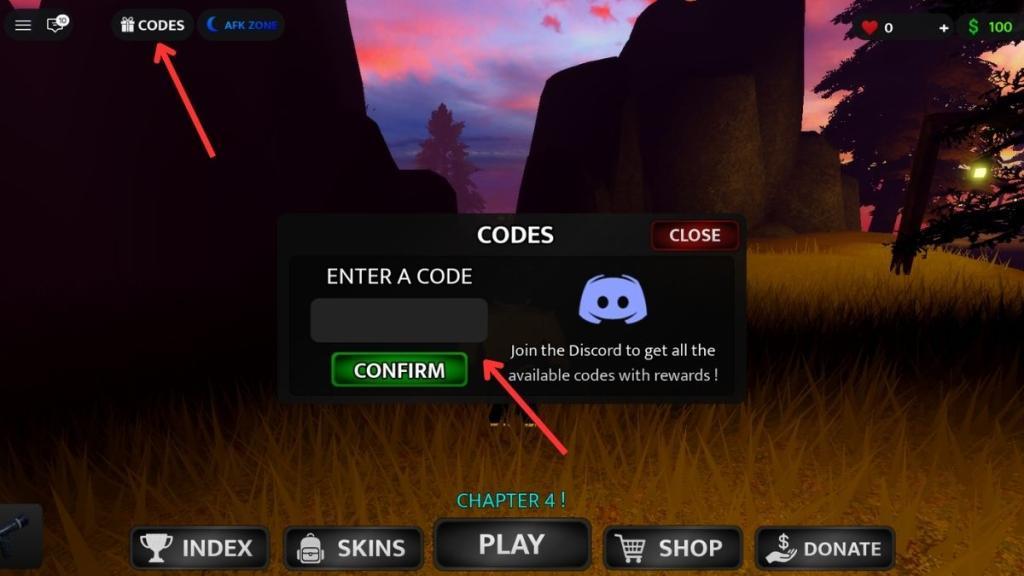
Redeeming codes for Ophelia is simple. Here is how you can do it and claim the free rewards:
- Launch Ophelia on Roblox.
- Click on the Codes option at the top left corner
- Enter a working code in the ‘Enter a Code’ area.
- Hit Confirm to get the rewards.
Where to Get More Ophelia Codes
You can often find new Ophelia codes shared on the game’s official social media pages, including X, Discord, and YouTube, where developers post updates and community events. Fans also share codes on gaming forums, Reddit threads, and creator channels such as BlackViiper’s page. To avoid missing any rewards, check these sources regularly and follow trusted channels that post verified codes as they appear.
The best place to learn about new codes for Ophelia is right here. We are always on the lookout for new codes, constantly checking whether the developers have finally added a code system in the game or not. So, you don’t have to burden yourself with this task and can rely on us instead. We can assure you that the moment a code is released for this game, you will find it first on our list above.
But if you would much rather look for codes yourself, then join the BlackViiper Games Discord server. This is the best place to await the announcement of new codes while you have fun discussions with other players in the community. Other than that, you can check @BlackViiper YouTube channel for more information.
Why Are My Ophelia Codes Not Working?
If your Ophelia codes are not working, check first that you entered them exactly as shown, including punctuation and capitalization. Expired or region-locked codes will also fail, so verify the expiration date and confirm the reward event is active for your account location. Sometimes the servers experience delays or maintenance, which can cause temporary redemption errors. If everything seems correct and the issue continues, try restarting the game or contacting Ophelia or BlackViiper support for assistance.
When new Ophelia codes arrive, the game usually pushes a fresh client update, so give the servers a moment to reset before you try anything. If you see an error while redeeming, look for small typing mistakes. The safest option is to copy the code directly from our list. Some codes run on strict timers, so if one stops working, it likely means it has already expired. Visit our page again and see if it has been moved to the expired section.
How to redeem Ophelia codes step by step
Here is a simple step-by-step way to redeem Ophelia codes in Roblox:
-
Launch Roblox and start the game Ophelia from your experiences list.
-
Once you are in the game lobby, look at the top-left corner of your screen and click the Codes button.
-
A small code window or dialog box will appear with a text field labeled something like “Enter a Code.”
-
Carefully type or paste an active Ophelia code into this textbox (codes are usually in all caps and must be exact).
-
Click the green Confirm button next to or under the textbox to submit the code.
-
If the code is valid and not expired, your free reward (Cash or Revive) will be added to your account immediately.
-
If you get an error, double-check spelling, try a different server (leave and rejoin the game), or use another code in case that one has expired.
What are all active Ophelia codes in February 2026
The latest available lists (from late January 2026) show these codes as the only active Ophelia codes, and none were marked expired yet, so they should still work in early February 2026:
-
SORRYEVERYONE – 2,000 Cash.
-
SORRYEVERONE2K – 2,000 Cash (listed as a variant on some sites; try this too if the first one says invalid).
-
FREEREVIVE – 1 Revive.
-
BARRYLOOKINGATYOU – 250 Cash.
-
WELCOMEOPHELIA – 1 Revive.
No expired Ophelia codes were reported as of the end of January 2026, but event codes can turn off at any time, so a code might quietly stop working without notice. If any of these show as invalid, it usually means the devs have just disabled them on the backend, even if some sites still list them.
