New Strafe codes for January 2026 are here, bringing fresh rewards to boost your Roblox experience – from exclusive gear to in-game bonuses that give you an edge.
All New Strafe Codes
The latest Strafe codes for January 2026 offer fresh rewards that players can redeem for exclusive in-game items and bonuses. These codes are a quick way to boost your progress, giving you extra boosts, skins, or special cosmetics to enhance your gameplay. Be sure to redeem them soon, as some may expire within days of release. Keep checking for updates to make the most of these limited-time rewards.
- OVERGROWTH: EXP and Krone (NEW)
- E-TWIN-SR: EXP and Krone
- E-TWIN-JR: EXP and Krone
- W4TORM3LON: EXP and Krone
- READY4RUINS: EXP and Krone
- RUNNERCENTRAL: EXP and Krone
- TAKEFIVE: EXP and Krone
- SILVERSSECRET: EXP and Krone
- STERLINGSILVER: EXP and Krone
- SMELL-O-VISION: EXP and Krone
- THEGIVINGTREE: EXP and Krone
- CONNORWHO?: EXP and Krone
- FREETRUESQUIMBLER: EXP and Krone
- SNEAKYSNEAKY: EXP and Krone
- MAGPIEBESTDEV: EXP and Krone
- ZIPISAWESOME: EXP and Krone
- STRAFE2025: EXP and Krone
- CHARITY: Krone
Expired Strafe Codes
There are no expired codes yet in this Roblox game. Make sure to redeem the active codes promptly before they expire.
If you are tired of all the parkour in Strafe, consider trying out a relaxing experience like Grow a Garden, Fisch, and Prospecting. You can even try out some other games like The Forge or 99 Nights in the Forest. For a Apart from chill games, you can try out other cool games on this platform by looking at our Roblox game codes master list.
How to Redeem Strafe Codes
To redeem Strafe codes in Roblox, open the game and select the “Codes” option from the main menu. Type or paste a valid code into the text box and press “Redeem” to claim your reward. Make sure the code is entered exactly as shown, including capitalization. If the code is active, your bonus items or currency will appear in your account immediately.
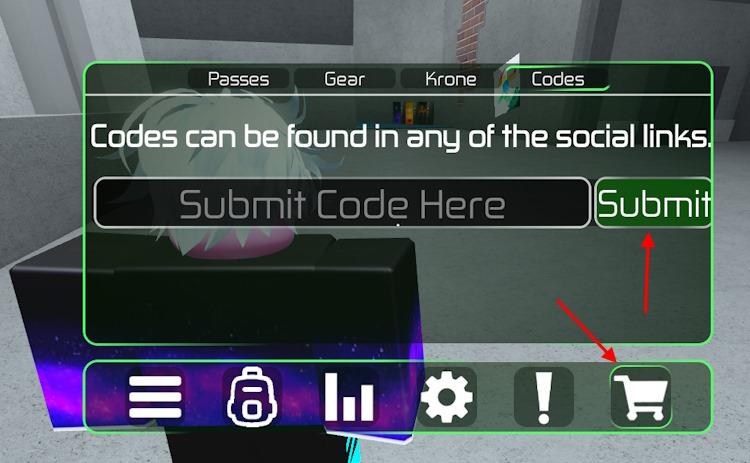
Redeeming codes for Strafe is simple. Here is how you can do it and claim the free rewards:
- Launch Strafe on Roblox.
- Click the M button and go to the Shop tab.
- Select the Codes tab.
- Enter a working code in the ‘Submit Code here’ area.
- Hit Submit to get the rewards.
Where to Get More Strafe Codes
New Strafe codes are usually shared through the game’s official social media pages, including X (Twitter), Discord, and the Roblox group. Checking these sources regularly ensures you don’t miss any new rewards or limited-time promotions. Players can also follow community pages or fan servers where new codes are often reposted shortly after release.
The best place to learn about new codes for Strafe is right here. We are always on the lookout for new codes, constantly checking whether the developers have finally added a code system in the game or not. So, you don’t have to burden yourself with this task and can rely on us instead. We can assure you that the moment a code is released for this game, you will find it first on our list above.
But if you would much rather look for codes yourself, then join the Strafe Official Discord server. This is the best place to await the announcement of new codes while you have fun discussions with other players in the community.
Why Are Strafe Codes Not Working?
Strafe codes usually fail because they are typed incorrectly, include extra spaces, or use the wrong capitalization. Some codes also expire after a short time, so ones you saw on social media or older guides may already be invalid. If a code still will not work after you copy it exactly, the servers might need a restart or the developer may have silently disabled that specific reward.
When new Strafe codes arrive, the game usually pushes a fresh client update, so give the servers a moment to reset before you try anything. If you see an error while redeeming, look for small typing mistakes. The safest option is to copy the code directly from our list. Some codes run on strict timers, so if one stops working, it likely means it has already expired. Visit our page again and see if it has been moved to the expired section.
How to redeem Strafe codes step by step
Here is a simple step-by-step guide to redeem Strafe codes in Roblox:
-
Open Strafe on Roblox
Launch Roblox, find Strafe, and join a server. -
Open the main menu
Once you load in, press the Menu button in the top-left of the screen, or press the Tab/M key depending on your platform to bring up the main menu. -
Go to the Shop
In the menu, click the Shop button (shopping cart icon), usually at the bottom-left of the menu. -
Open the Codes tab
In the Shop window, click the Codes tab at the top to open the code-redeeming section. -
Enter your code
Click the text box, type or paste a valid Strafe code exactly as shown (they are case-sensitive). -
Submit and collect rewards
Press the Submit/Redeem button; if the code is active and typed correctly, you’ll instantly get your EXP, Krone, or other rewards. If it says invalid, check spelling or try another code.
How to redeem Strafe codes step by step
Here is the step-by-step way to redeem Strafe codes:
-
Launch Strafe in Roblox
Open Roblox, find Strafe, and join a game session. -
Open the main menu
Once you load in, press the Menu button in the top-left of the screen, or use the Tab/M key (depending on your platform) to bring up the main menu. -
Go to the Shop
In the menu, click the Shop button (shopping cart icon), usually near the bottom-left of the menu. -
Open the Codes tab
Inside the Shop screen, select the Codes tab at the top. -
Enter your code
Click the text box that says something like “Submit Code Here,” then type or paste your Strafe code exactly as shown (codes are case-sensitive). -
Submit and claim rewards
Press the Submit/Redeem button. If the code is valid and not expired, your EXP, Krone, or other rewards will be added to your account immediately. If you get an error, check for typos or try a different active code.
