Grab the newest Brainrot codes from December 2025 and boost your Roblox game with fresh rewards, rare items, and XP that keep you climbing the ranks faster than anyone else.
All New Become the Biggest Brainrot Codes
The latest Become the Biggest Brainrot codes bring new rewards that can boost your progress and make gameplay more exciting. These codes often include free boosts, in-game currency, and exclusive items that help you rise faster through the ranks. Make sure to redeem them while they’re active, as many expire quickly with each new update or event.
- Update4 (NEW)
- 5MVisits (NEW)
- Speed (NEW)
- Update3
Expired Become the Biggest Brainrot Codes
- 1MVisits
If you have become tired of brainrot games, then you are not alone. Roblox has so many amazing games you can try out. Take a look at our Roblox game codes list to find many such amazing games. I will recommend you try out Grow a Garden, Blue Lock Rivals, and The Forge.
How to Redeem Become the Biggest Brainrot Codes
To redeem Become the Biggest Brainrot codes, open the game on Roblox and find the Twitter or Codes button on the main menu screen. Click it to open the redemption window, then enter an active code exactly as shown, paying attention to capitalization and spacing. Press the confirm or redeem button to claim your free rewards instantly. If a code doesn’t work, try retyping it or check if it has expired or been replaced with a new one.
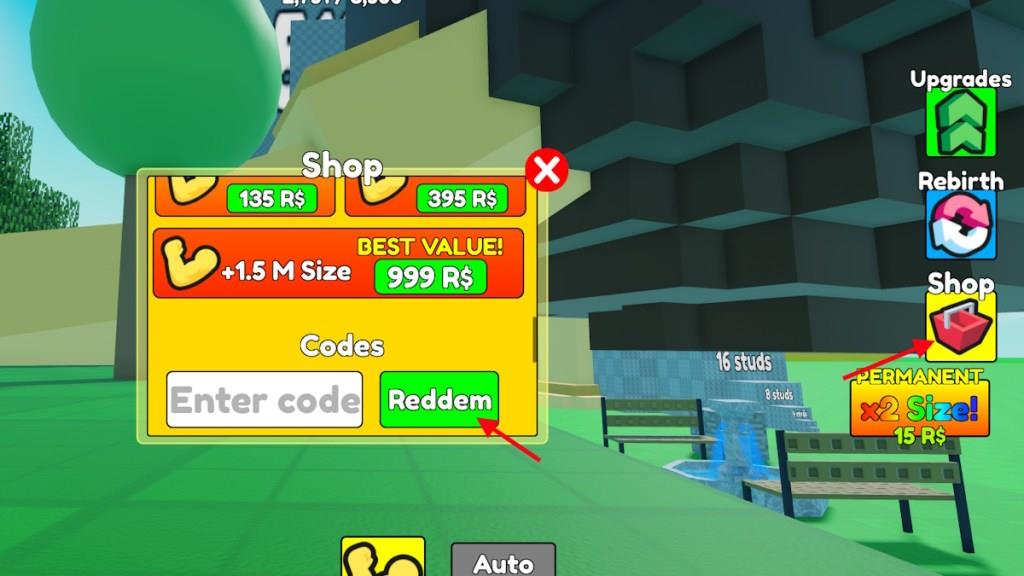
Once you have the codes for Become the Biggest Brainrot, you will need to redeem them. Here is how you can do it:
- Launch Become the Biggest Brainrot on Roblox.
- Click on the Shop option on the right side of the screen.
- Scroll down to the codes section.
- Type the active code in the ‘Enter code’ box.
- Click Redeem to redeem the rewards.
How to Get More Become the Biggest Brainrot Codes
Navigate the most effective methods to maximize your Brainrot code drops by prioritizing events, trading with trusted players, and tracking daily rotations to seize limited-time offers.
If you want to get bigger much faster, then I am sure you want to use as many codes as possible. However, to find more codes for Become the Biggest Brainrot, you will have to wait for them to be released first. But, how will you know when they release? Simply bookmark our page here and visit regularly to find the latest codes.
But, if you want to find the codes yourself, we will help you with that aswell. Join the Biggest Brainrot Roblox community and find the newly added codes in the announcement section.
Why Are My Become the Biggest Brainrot Codes Not Working?
If your Become the Biggest Brainrot codes aren’t working, it’s likely that they have expired or were entered incorrectly. Roblox codes are usually time-limited and case-sensitive, so make sure to type them exactly as shown, including any numbers or punctuation. Another issue could be a temporary bug or server delay-try restarting the game or checking the developer’s official channels for updates or new codes.
If the Become the Biggest Brainrot codes are not working, then it is either expired or you have entered it incorrectly. The most probable cause would be that it has expired, which would show the Invalid error. But if the code was announced recently, then make sure you have copied it correctly from our list here. If rare cases, you may have to wait for a couple of hours before redeeming a code if it arrives with a new update.
How to redeem Update4 code
To redeem the Update4 code in a Roblox game that uses in-game code redemption (like Become the Biggest Brainrot or King Legacy), follow these general steps.
Step-by-step redemption
-
Join the game
-
Open Roblox and start the specific game where the Update4 code is valid (for example, King Legacy or Become the Biggest Brainrot, depending on where you got the code from).
-
Wait until your character fully loads into the main world.
-
-
Open the menu/shop
-
Look for a Menu, Settings, or Shop button on the game screen; in many Roblox games this is at the side or top of the HUD.
-
Click it to open the panel that includes the code redemption section.
-
-
Find the code box
-
Scroll or switch tabs in that panel until you see a text field labeled something like “Enter Code” or “Code”.
-
Click inside that text box so you can type.
-
-
Enter and redeem “Update4”
-
Type Update4 exactly as shown (matching capitals), or paste it if you copied it from a guide.
-
Press the Redeem, OK, or Confirm button next to the box to submit the code.
-
-
Check your reward
-
If the code is active, you should see a success message and receive the reward immediately (for example, gems, boosts, or size/rebirth benefits, depending on the game).
-
If you get an error, the code may be expired, already used on your account, or not valid for that particular game.
-
If you tell which exact Roblox game you are trying to use Update4 in, more precise button locations and reward details can be given.
What does UPDATE4 code give in King Legacy
In King Legacy, the UPDATE4 code gives 5 Gems when redeemed.
Details
-
Code name: UPDATE4
-
Reward: 5 Gems added to your account after successful redemption.
-
Note: This code is from the Update 4 period and may now be expired if you try to use it in 2026.
