Players of Grow a Garden on Roblox now have an official hub to coordinate, share tips, and track progress. Here’s where to find the verified Discord and Trello links every gardener needs to stay ahead in the game’s bustling community.
So, you might be searching for a central resource to stay updated on all the information. In this guide, we have mentioned Grow a Garden Discord and Trello links, and how you can join them.
Official Grow a Garden Discord Link
Join the official Grow a Garden Discord server for real-time tips, player discussions, and community events. This link connects you directly to fellow gardeners sharing strategies on rare plants, crop boosts, and game updates. Access it here: Official Discord Link. Stay linked with the active hub for all your Roblox gardening needs.
You can find the official Grow a Garden Discord server link right here. The server is very active with more than 5.4 million members. Here, you’ll find all sorts of information. For example, there’s the ‘#announcements‘ channel if you’re looking for the latest news and new information about Next Grow a Garden update.
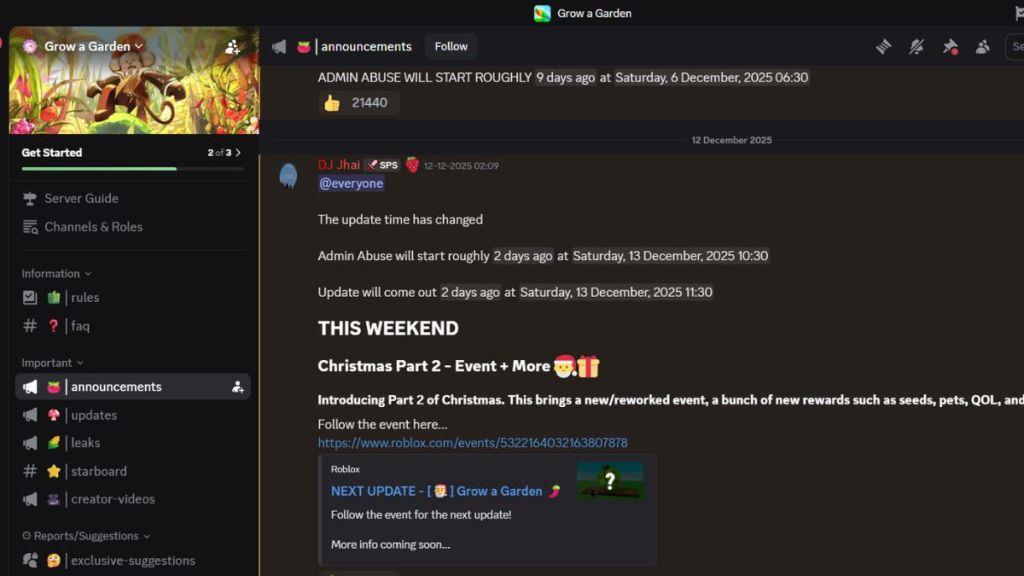
If you’re looking for new characters and content coming in the next update, there is the ‘#leaks’ channel. There are Grow a Garden codes too; you can find them in the ‘#updates’ channel along with bug fixes and changes.
Finally, you can have discussions with other players who enjoy this game in the general channel. If you like this experience, you’ll like playing Plants vs Brainrots and The Forge as well.
Official Grow a Garden Trello Board Link
Access the official Grow a Garden Trello board here: [Trello Link]. This board organizes guides, task lists, and updates for players. Use it to track progress, share tips, and stay current with game strategies on Roblox. Join via the direct link for seamless collaboration.
Unfortunately, there is no Grow a Garden Trello link where you can find information on every Grow a Garden seeds and the special events in the game. However, you can rely on our Grow a Garden guides for that. We have tested and reviewed everything about the game, including Pet Trading values, plant types, travelling merchant, pet mutation, and more.
The game was released in March 2025 and has since been visited by more than 34.1 billion players and counting. With an average of 140k players active daily, Grow a Garden is one of the most popular games on Roblox. So, it won’t be too long before an official Trello board is released. We’ll make sure to update this page right away when that happens.
How to join Grow a Garden Discord on mobile
Joining on Mobile via Discord App
Open the Discord app on your phone. Tap the plus icon (+) in the server list on the left side, then select “Join a Server” at the bottom. Type “GrowAGarden” (no spaces) into the invite link box and tap “Join.”
From Roblox App
Launch Roblox on mobile and search for Grow a Garden. Swipe up on the game page, scroll to social links, and tap the Discord icon. Accept the invite to launch Discord and complete the join process.
Completing Setup
After joining, select bonus channels or tap Skip. Read the rules, scroll down, and tap “Agree and Finish” to access announcements, chats, and updates.
How to join Grow a Garden Discord on PC
Joining on PC via Discord App
Launch the Discord desktop app or browser version. Scroll to the server list on the left sidebar and click the “+” (add a server) icon at the bottom.
Select “Join a Server,” then type “growagarden” (no spaces) into the search field. Click the server result and hit “Join Server.”
Completing Server Entry
Follow on-screen prompts: skip bonuses if desired, read rules by scrolling down, and click “Agree and Finish” to unlock channels like announcements and general chat.
Alternative from Roblox Website
Open Roblox in a browser, search for Grow a Garden, and click its page. Scroll to social links, click the Discord icon, and confirm the invite in the opened Discord app.