Fans of tycoon games have flocked to My Boba Stand for its quirky charm and business-building fun. Here are the latest December 2025 codes that can boost your earnings, speed up your progress, and keep your boba empire bubbling.
But playing such games takes a ton of effort and time, which is why you can use My Boba Stand codes to obtain free cash and speed up your progress
All New My Boba Stand Codes
These new My Boba Stand codes for December 2025 can help you collect extra cash, ingredients, and boosts to grow your bubble tea business faster. Redeem them easily in-game to enhance your stand, attract more customers, and experiment with new recipes while expanding your tycoon setup. Keep checking back for fresh codes before they expire to make sure you don’t miss any freebies.
- welcome: 200 Cash and Cash Potion II (NEW)
Expired My Boba Stand Codes
Currently, there are no expired codes for this Roblox experience. Once the above codes expire, they will be moved to this section.
If you like playing My Boba Stand, then you should also check out Grow a Business, Pizzeria Tycoon 2, or Grow a Garden. But none of these games are to your taste, then take a peek at our Roblox game codes list.
How to Redeem My Boba Stand Codes
Launch My Boba Stand on Roblox and check the main screen for the Codes button. Click it to open the redemption box. Enter a valid code from our December 2025 list exactly as shown, then hit Redeem. Rewards like cash or boosts appear right away if the code works. Codes expire fast, so use them soon.
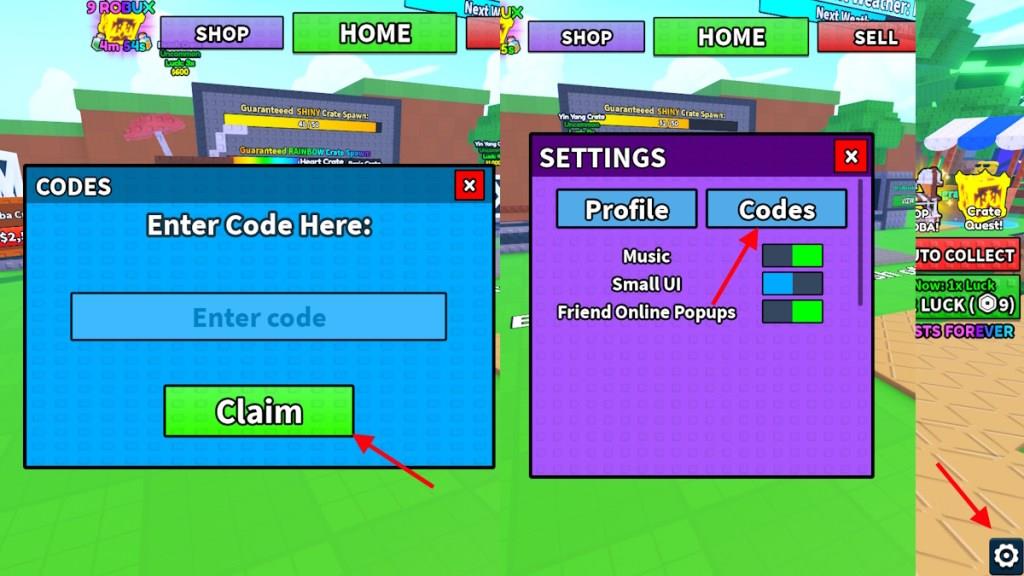
Redeeming the codes for My Boba Stand is extremely easy, unlike running a successful business. Here is how you can redeem the codes:
- Launch My Boba Stand on Roblox.
- Click on the Gear icon in the bottom right corner of the screen.
- Select the Codes option.
- Type the active code in the ‘Enter Code’ box.
- Click Claim to redeem the rewards.
How to Get More My Boba Stand Codes
New My Boba Stand codes are usually shared through the game’s official social media pages, such as X (Twitter), Discord, and Roblox group posts. Players can also find them in special events, developer announcements, or update notes. It’s helpful to follow Habit Games’ accounts and check the game page regularly to catch new codes before they expire. Some creators on YouTube or gaming forums also post them shortly after release.
Running a business can be hard, especially in Roblox. You may soon run into issues, and codes are a good way to get a quick bailout reward. But finding codes is not that easy. Codes for My Boba Stand are often released on their social accounts, and normal players can have a hard time tracking them all.
Instead of looking for codes yourself, simply bookmark our guide here. This way, you can simply visit us and find the latest codes without worrying. Other than that, do join the Habit Games Roblox Discord server to stay connected with the game’s community.
Why Are My Boba Stand Codes Not Working?
If your My Boba Stand codes aren’t working, they may have expired or been entered incorrectly. Double-check for typos, extra spaces, or differences between uppercase and lowercase letters. Some codes only work during special events or after certain game updates, so make sure you’re using the latest version. If the issue continues, try restarting the game or checking official Habit Games channels for active codes and announcements.
If your My Boba Stand codes are not working correctly, then here is what you need to do. First, make sure you have copied the exact code from our list here. Next, make sure that there is no extra space before or after the code. Other than that, sometimes codes released during an update only work on new servers. Finally, if the codes are still not working, then they may have expired.
How to redeem codes in My Boba Stand
Redeeming codes in My Boba Stand is straightforward and quick. Follow the steps below to claim your free rewards like cash and potions.
Redemption Steps
Launch My Boba Stand on Roblox. Click the gear icon or settings cog in the bottom-right corner of the screen. Select the “Codes” option, enter the code exactly as shown (case-sensitive), and press “Claim”.
Troubleshooting Tips
Copy-paste codes to avoid typos or extra spaces. Codes may fail if expired, already redeemed, or entered on an old server-try a new one. Check Discord or Roblox group for updates if issues persist.
How to redeem codes in My Boba Stand
Redeeming codes in My Boba Stand takes just a few seconds once you’re in-game. This process works across devices and grants free cash, potions, or crates instantly if the code is valid.
Step-by-Step Guide
Launch My Boba Stand on Roblox and join a server. Tap the gear icon (settings cog) in the bottom-right corner of the screen. Select the “Codes” tab or button, type or paste the code into the “Enter Code” field, and press “Claim” or the green Redeem button.
Common Fixes
Copy-paste codes to prevent typos, as they are case-sensitive with no extra spaces. If a code fails, ensure it’s active, hasn’t been redeemed before on your account, or try rejoining a fresh server. Success shows a reward notification right away.