Mysterious forges, hidden codes, and rare rewards await in Roblox The Forge. This November’s list holds fresh combinations that can turn your next match into a powerhouse of power-ups and exclusive gear.
Starting the game as a new player can get hard, and that is where The Forge codes come in with free rerolls and luck totems. Use these freebies properly to be the strongest champion in the game.
All New The Forge Codes
The latest The Forge codes for November 2025 offer players new rewards such as free resources, in-game currency, and exclusive boosters to enhance progress. These codes are updated regularly, so players should redeem them as soon as possible before they expire. Using these active codes can make crafting, upgrading, and competing much easier, giving an edge in building powerful items and advancing through the challenges faster.
- 20KLIKES: 2x Reroll (NEW)
- 15KLIKES: 2x Reroll (NEW)
- 10KLIKES: 1x Luck Totem, 2x Reroll (NEW)
- 5KLIKES: 1x Miner Totem, 2x Reroll (NEW)
- BETARELEASE!: 2x Reroll (NEW)
- POSTRELEASEQNA: 1x Reroll (NEW)
Expired The Forge Codes
- RELEASE
While you wait for additional codes, try the anime-inspired games like Anime Weapons or Uma Racing. You can also play the other top anime sports games on Roblox, like Volleyball Legends and Basketball Zero. Tired of the typical anime games? Check out our Roblox game codes master list to find your next adventure.
How to Redeem The Forge Codes
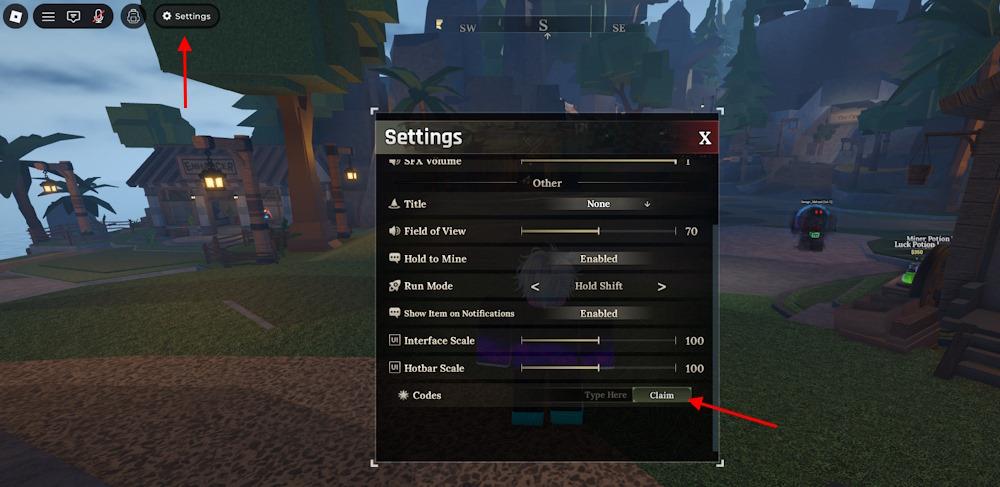
To redeem The Forge codes in Roblox, open the game and tap the “Codes” or “Gift” icon, usually found on the main screen or in the settings menu. Copy a valid code from the list and paste it into the redemption box, then press “Redeem” or “Submit.” If the code is active, you’ll instantly receive your in-game rewards, such as coins, boosts, or exclusive items. Make sure to enter the code exactly as shown, since capitalization and symbols matter.
Redeeming the codes for The Forge is simple on Roblox. Here is how you can do it:
- Launch The Forge on the Roblox app.
- Click the Gear button on the top left screen.
- Type a working code in the ‘Type Here’ area.
- Click the Claim button to claim rewards.
How to Get More The Forge Codes
Players can find new The Forge codes by following the game’s official social media pages, such as Twitter, Discord, or Roblox group updates, where developers often share the latest rewards. Checking community forums and fan pages can also help, as players regularly post newly released or active codes. Keeping notifications on for official announcements ensures you never miss time-limited code drops or special event giveaways.
Looking for the best way to get more codes for The Forge? Bookmarking this page is your best bet, as we are always on the lookout for new updates. So, when in doubt for new Roblox game codes, check back, and you’ll find them here.
If you want to take matters into your own hands, then you should join the official The Forgers Discord community for the latest news on the game. You will find the latest codes in the ‘codes’ channel. And who knows? You might even find extra rewards here in the future.
Why Are My The Forge Codes Not Working?
If your The Forge codes are not working, check for typing errors such as missing symbols, extra spaces, or incorrect capitalization. Codes are case-sensitive and must match exactly as provided. Some codes expire after a short time or become inactive once new ones are released, so make sure you’re using the latest list. Also, confirm that you’re entering them in the correct section of the game and that you have a stable internet connection while redeeming.
When The Forge codes arrive, the servers usually need a moment to refresh after the update rolls out, so give the client a short breather before trying anything. If a code refuses to work, look for simple mistakes because even a single wrong letter breaks it. The easiest method is to copy the codes straight from our list to avoid slips.
How to redeem The Forge codes
To redeem codes in Roblox’s The Forge, follow these straightforward in-game steps. No special requirements or Robux are needed, and codes are not case-sensitive.
Redemption Steps
-
Launch The Forge through the Roblox app or website.
-
Click the gear icon (Settings) in the top-left corner of the screen.
-
Scroll to the bottom of the Settings menu to find the code input area labeled “Type Here” or similar.
-
Enter the code exactly as listed and press Claim to receive rewards like rerolls or totems.
Troubleshooting
Codes may show “Code does not exist” if misspelled or expired-double-check spelling and try recent lists from guides. New codes often drop via developer milestones, so redeem promptly as they expire quickly.
What are the current active The Forge codes
The Forge Roblox codes from late 2025, like those tied to like milestones (e.g., 20KLIKES, 15KLIKES), often expire quickly after release, and no guides confirm active codes as of January 2026.
Potentially Active Codes
Recent December 2025 lists (now outdated) highlighted these, but test them in-game as they likely expired:
-
400K! – 8 Rerolls
-
PEAK! – 10 Rerolls (weekend-limited)
-
SORRYFORSHUTDOWN – 5 Rerolls
-
300K! – Luck Totem + 5 Rerolls
-
100KLIKES – 10 Rerolls
Earlier ones like 20KLIKES (2 Rerolls) and BETARELEASE! (2 Rerolls) were active in November but are probably expired by now.
Checking Status
Join the official The Forge Discord for real-time updates, as developers drop codes there first-check the announcements channel. In-game, invalid codes show “Code does not exist” or “expired,” so redeem via the gear icon promptly. New codes typically reward rerolls or totems for races and mining.