Mysterious crates, secret deliveries, and hidden loot await-November’s Deadly Delivery codes for Roblox drop fresh rewards that players won’t want to miss.
All New Deadly Delivery Codes
New Deadly Delivery codes bring players fresh ways to grab exclusive rewards and power-ups for their Roblox experience. These codes can grant bonus items, in-game currency, and special boosts to help you progress faster. Be sure to redeem them quickly, as many expire fast and aren’t reused in later updates. Keep an eye out for new code drops from developers through official social channels and game events.
- deadlydelivery2000: 1x Pumpking and 2x Syringe (NEW)
- deadlydelivery1000: 2000 Coins (NEW)
- DEADLYDELIVERY: 1x Baseball bat, 1x Syringe, and 1x Z-Ray gun (NEW)
Expired Deadly Delivery Codes
There are no such expired codes in this game, and therefore, you should get these rewards right now.
Now that you have checked out this game, go and try out Survive the Elevator, Wild Rails Tower Defense, and Dead Sails. But if these are worth your time, you can check our Roblox game codes master list to find the best ones to try on this platform.
How to Redeem Deadly Delivery Codes
To redeem Deadly Delivery codes, open Roblox and launch the game. Click the Twitter or Codes icon on the main menu, then enter a valid code exactly as shown in the list. Press the Redeem button to claim your item or reward. If the code doesn’t work, double-check for typos or see if it has expired, since some are only active for a short time.
All you need to do to get the latest rewards is follow the steps below and redeem the codes for Deadly Delivery:
- Launch Deadly Delivery on your Roblox app.
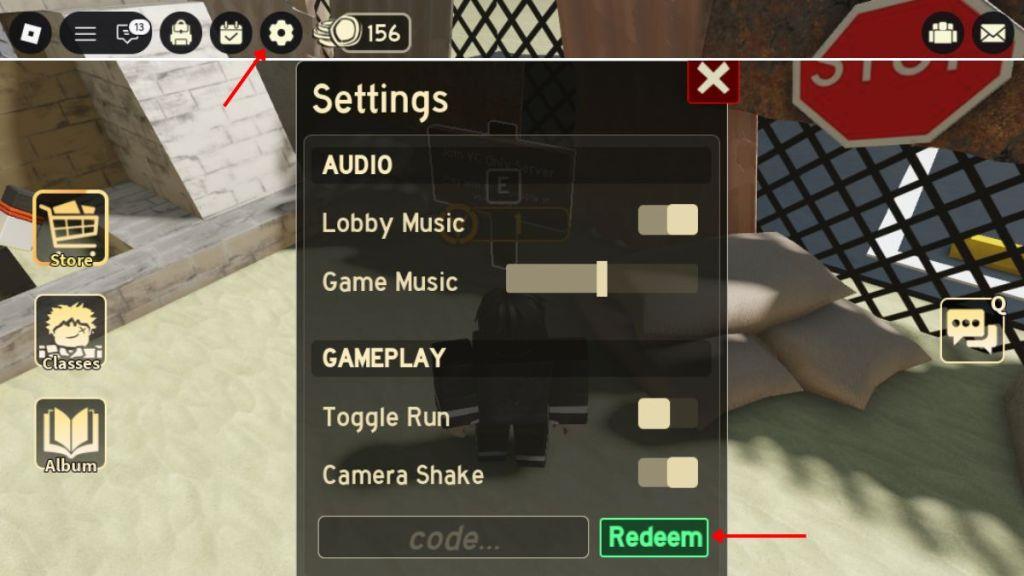
- Click on the Settings wheel button on the top-left side of the screen
- Enter a working code in the text box of the pop-up window.
- Click on the Redeem button to claim your rewards.
How to Get More Deadly Delivery Codes
Players can find new Deadly Delivery codes by checking the game’s official Roblox page, joining the developer’s Discord server, or following their social media accounts. These platforms often share fresh codes during events, updates, or special milestones. It’s also smart to keep an eye on community forums and fan pages where players frequently post recently released codes. Redeeming them quickly helps ensure you don’t miss any limited-time rewards or bonuses.
The first method of getting more codes for Deadly Delivery in this game is by bookmarking this page right now. You will not miss out on any new rewards since we keep updating this list frequently.
You can also join the official Deadly Delivery Discord server and check the ‘codes‘ channel to find the list of new codes. Lastly, go ahead and join the WTHHELL BRO community on the platform for some exclusive in-game rewards.
Why Are My Deadly Delivery Codes Not Working?
Deadly Delivery codes might not work for several reasons. They could have expired, as most Roblox promo codes are available only for a limited time. Another common issue is typing errors, such as extra spaces or incorrect capitalization. Some codes may also be region-restricted or limited to certain events. If a code still doesn’t work after double-checking, it’s best to look for new ones released by the game’s official channels or social media pages.
It may happen that the codes you’re entering in the game aren’t working. So, check your internet connection first, and then check if the spelling of the codes is written correctly. Rather than writing them yourself, you can copy the codes from our list and paste them directly into the game. If nothing works, consider restarting your Roblox player and check whether the codes you’re entering have expired or not.
How to redeem Deadly Delivery codes step by step
To redeem codes in Roblox’s Deadly Delivery, first launch the game and complete the tutorial if you’re new. Access the settings menu via the gear or cogwheel icon, typically in the top-right or top-left corner once on the surface or in the lobby, then enter the code in the provided text box at the bottom and hit Redeem.
Step-by-Step Guide
Follow these exact steps for successful redemption, as codes are case-sensitive and must match precisely:
-
Open Deadly Delivery on Roblox via PC, mobile, or the app.
-
Finish the introductory tutorial to unlock the full menu (takes just a few minutes).
-
Locate the settings cog/gear icon at the top of the screen (top-right or top-left depending on your view).
-
Click it to open the settings panel, then scroll to the code input box at the bottom.
-
Type or paste a valid code (no spaces, exact capitalization) and press the Redeem button.
-
Check for a green success message (red means invalid/expired); rewards like coins or revives appear in your inventory instantly.
Troubleshooting Tips
Codes may fail if already redeemed on your account, expired, or mistyped-restart the game and retry. Avoid third-party sites requiring logins, as official redemption happens only in-game. Rewards won’t apply if your inventory is full.
How to redeem Deadly Delivery codes step by step
Deadly Delivery codes redeem directly in-game on Roblox with a simple settings menu process. Complete the tutorial first to unlock full access, then follow precise steps for rewards like coins or revives.
Step-by-Step Redemption
-
Launch Deadly Delivery via Roblox on PC, mobile, or app.
-
Finish the tutorial if new-this enables the settings menu.
-
In the lobby or on the surface, click the gear/cog icon at the top (left or right corner).
-
Scroll to the “Enter Code” text box at the bottom of settings.
-
Copy-paste a valid code exactly (case-sensitive, no spaces) and press Redeem.
-
Success shows green text with instant rewards; red means invalid, expired, or already used.
Common Fixes
Restart the game for server glitches, verify spelling by copying codes, and ensure one use per account. Avoid pre-tutorial attempts or third-party redeemers.
