Sharpen your aim and grab free rewards with the newest Roblox Hypershot codes for November 2025-boost your shooter skills and stand out in every match.
All New Hypershot Codes
New Hypershot codes bring fresh rewards to players eager to sharpen their aim and upgrade their gear. These limited-time codes can grant free coins, exclusive skins, and special boosts that give an edge in matches. Make sure to redeem them quickly before they expire, as new ones are added regularly to celebrate updates and community milestones.
- THANKSGIVING: 30000 Coins and 3000 Gems (NEW)
Expired Hypershot Codes
There are no expired codes yet due to the redemption system being new to this Roblox game. So, grab the freebies before developers change their minds.
While Hypershot is undeniably the best shooter on Roblox, you can also give a shot to Arsenal and Rivals. If you are done with shooting heads, try checking out Blox Fruits and Type Soul. For a relaxing experience, try Grow a Garden, Fisch, and Prospecting. Apart from chill games, you can try out other cool games on this platform by looking at our Roblox game codes master list.
How to Redeem Hypershot Codes
To redeem Hypershot codes, open Roblox and launch Hypershot from your games list. Once loaded, find and click the “Codes” or “Gift” button on the main menu. A text box will appear-enter a valid code exactly as shown and press the “Redeem” button to claim your reward. If the code is active, your items or bonuses will be added to your account instantly.
Redeeming the codes for Hypershot is simple. Here is how you can do it and claim the free rewards:
- Launch Hypershot on Roblox.
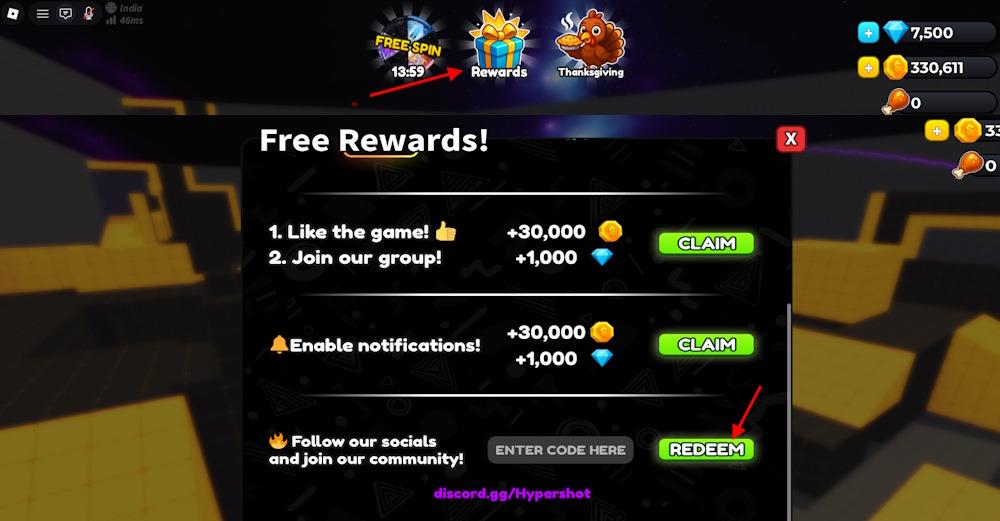
- Click the Rewards button from the top menu.
- Type a working code in the ‘Enter Code Here’ area.
- Click the Redeem button to claim the rewards.
How to Get More Hypershot Codes
Check the game’s official Roblox page and store description regularly, as new Hypershot codes are often shared there alongside update notes. Join the developer’s Roblox group and follow their social media profiles, especially X, Discord, and YouTube, where time-limited codes may appear during events, milestones, or patch releases. Keep an eye on in-game announcements and pop-up messages, since some codes are revealed during special challenges or seasonal events. You can also follow trusted Roblox promo communities and fan pages that track fresh codes and archive expired ones to save time.
If you do not feel like hunting for new codes every day, you can let us do the work. We update this page the moment fresh codes appear, and we move the expired ones aside so nothing gets mixed up. Add it to your bookmarks and keep your run smooth.
Even seasoned shooters need a little help at times. If you want updates straight from the source, join the official Hypershot Discord server. It is the only verified place where new codes are posted, and you will find them neatly listed in the ‘updates’ channel. Scouring through the announcement to get the codes for Hypershot can get tricky, so we suggest you stick to our list.
Why Are My Hypershot Codes Not Working?
Your Hypershot codes might not work for a few common reasons. They could have expired if they were part of a limited-time event or promotion. Typos also cause issues, so check that each character matches exactly, including capital letters and symbols. Sometimes, the game may not have updated properly after a new patch, so restarting Roblox or rejoining the server can help. If none of these fixes work, the developers might have temporarily disabled some codes during maintenance or content updates.
When new Hypershot codes arrive, the game usually pushes a fresh client update, so give the servers a moment to reset before you try anything. If you see an error while redeeming, look for small typing mistakes. The safest option is to copy the code directly from our list. Some codes run on strict timers, so if one stops working, it likely means it has already expired. Visit our page again and see if it has been moved to the expired section.
How to redeem Hypershot codes step by step
To redeem codes in Roblox Hypershot, follow these steps precisely to claim free Coins, Gems, or other rewards.
Step-by-Step Guide
-
Launch Hypershot through the Roblox platform and fully load into the game.
-
Complete your first match if you’re a new player, as this unlocks the Rewards menu.
-
Click the Rewards button (or Free Rewards! icon) located at the top of the main screen.
Entering Codes
Scroll down in the Rewards menu to find the Enter Code Here text box.
Type or paste the code exactly as listed (case-sensitive, no spaces), then press Redeem.
Rewards appear instantly if the code is valid and unexpired.
Codes may fail if already redeemed or outdated; verify via recent sources like Discord or code lists.
Show where to find new Hypershot codes regularly
New Hypershot codes appear sporadically around updates, holidays, or events in the Roblox shooter. Regular checks at key sources ensure you catch them before they expire.
Primary Sources
-
Official Discord server: Developers post codes first in the ‘updates’ channel-join via the game’s Roblox page.
-
Roblox game page: Scan the description, recent updates, or group wall for announcements.
-
Social media: Follow developer accounts on X (@PhoenixSignsRBX) and YouTube (@PhoenixSigns) for direct drops.
Reliable Trackers
Bookmark code list sites that update daily, such as Pocket Tactics, Pro Game Guides, Destructoid, or Beebom, which verify and list active codes like CHRISTMAS2025 or CONTRACTS. These aggregate from official channels and test validity.