Sharpen your edge in Anime Weapons this November 2025 with the newest Roblox codes-claim exclusive boosts, rare weapons, and in-game rewards before they vanish.
Anime Weapons lets you power up by clicking, but also throws in quests and variety, so it doesn’t feel the same old. It’s like an upgrade to your anime grind, with way more fun on the side. And to help you start your journey, we compiled a list of latest Anime Weapons codes below, which will give free rewards such as Emeralds, potions, reset tokens, and XP boost.
All New Anime Weapons Codes
All new Anime Weapons codes listed below can boost your progress with free gems, coins, and other useful items for upgrading your gear. Make sure you type each code exactly as shown, since even a small typo can make it invalid. Many codes are time-limited or tied to special events, so try to redeem them as soon as possible. If a code does not work, it has likely expired or been replaced by a newer one.
- PATCHUPDT: Emeralds, Reset Tokens, and Potions (NEW)
- 30KCCU: Emeralds, Reset Tokens, and Potions (NEW)
- FEATSREWARDFIX: Emeralds and Potions (NEW)
- 28KLIKES: Emeralds, Reset Tokens, and Potions
- 29KLIKES: Reset Tokens, and Potions
- 30KLIKES: Emeralds, Reset Tokens, and Potions
- 20KLIKES: Emeralds, Reset Tokens, and Potions
- SORRY4PITYBUG: Emeralds
- SORRY4BUGS: Emeralds, Reset Tokens, and Potions
- SORRYSHUTDOWN3: Reset Tokens, and Potions
- 25KCCU: Emeralds, Reset Tokens, and Potions
- SORRYSHUTDOWN2: Potions
- RAIDFIXED: Reset Tokens, and Potions
- 23KCCU: Emeralds, Reset Tokens, and Potions
- 24KCCU: Emeralds, Reset Tokens, and Potions
- RELEASEPT2: Emeralds, Reset Tokens, and Potions
- 15KLIKES: Reset Tokens, and Potions
- 17KCCU: Emeralds, Reset Tokens, and Potions
- 10KLIKES: Reset Tokens, and Potions
- GACHAROLLFIX: Potions
- 16KCCU: Emeralds and Potions
- BEPPBESTDEV: Emeralds
- RLBESTDEV: Emeralds
- SHIROBESTDEV: Emeralds
- LENIBESTDEV: Emeralds
- SIXBESTDEV: Emeralds
- CRYOBESTDEV: Emeralds
- BELABESTDEV: Emeralds
- KHAEZARBESTDEV: Emeralds
- XOUBESTYT: Emeralds
- BUGSFIXED: Emeralds and Potions
- 15KCCU: Emeralds and Potions
- RELEASE: Gamepass
- 1KCCU: Emeralds, Reset Tokens, and Potions
- 3KCCU: Emeralds, Reset Tokens, and Potions
- 5KCCU: Emeralds, Reset Tokens, and Potions
- 10KCCU: Emeralds, Reset Tokens, and Potions
- SORRYSHUTDOWN: Emeralds, Reset Tokens, and Potions
Expired Anime Weapons Codes
- 27KLIKES
- SORRYPITY
While you’re here, check out the Roblox game codes on our master list. If you love anime games, you can also check All Star Tower Defense X or Anime Rangers X and enjoy something different while keeping a similar concept.
How to Redeem Anime Weapons Codes
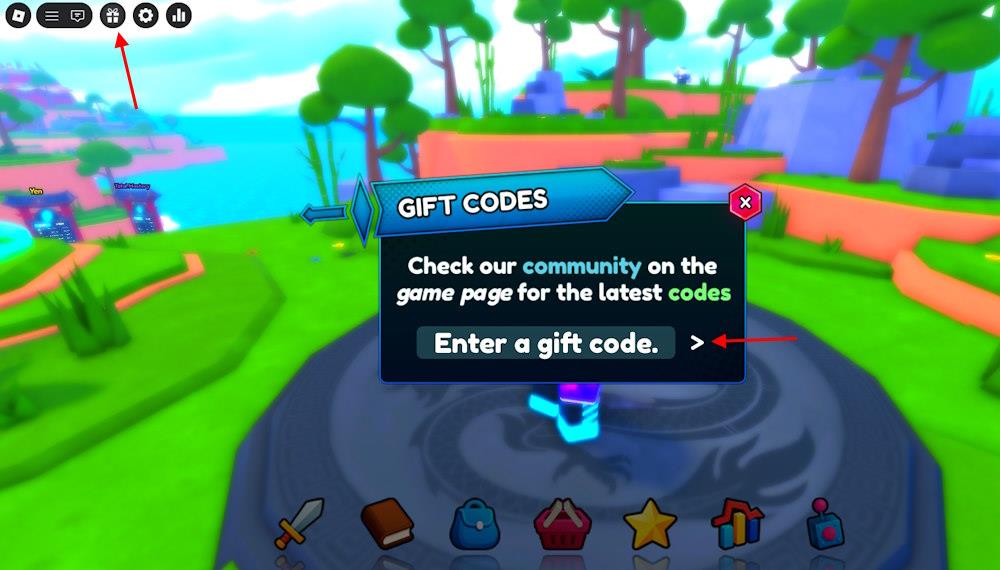
To redeem Anime Weapons codes, launch the game on Roblox and click the Twitter Codes icon on the main screen. Enter a working code from the list into the text box exactly as shown, then press Redeem to claim your free rewards. Make sure to use valid, unexpired codes, as they can change frequently, and check for new ones in the game’s official social channels or developer updates.
To redeem the codes for Anime Weapons and claim the rewards, you must follow these simple steps:
- Launch Anime Weapons on Roblox.
- Click the Codes button from the top left menu.
- Type a working code in the text box.
- Click the >button to redeem rewards.
How to Get More Anime Weapons Codes
New codes for Anime Weapons often appear through the game’s official social media channels, Discord server, and developer posts on Roblox. Players can check these sources regularly or join community groups where fans share newly released codes quickly. Keeping notifications on for announcements helps you stay updated and redeem bonuses before they expire.
Staying up to date with the latest codes is easy right here on our page. We keep the list refreshed and move old codes straight to the expired section. That’s why it’s best to bookmark this page for the active codes for Anime Weapons.
Of course, you can also hunt them down on your own. The official Anime Weapons Discord server and the AlphaXnewera Roblox communities are the main spots to find working codes. If you are on the Discord server, just head over to the codes channel to grab them all. You can also get the ‘codes’ role to get regular notifications.
Since the game is still new, don’t wait too long to redeem these freebies. If a code doesn’t work, check for typos or simply copy it from our list to be safe. With no set expiry dates, a failed redemption usually means the code has run its course.
How to redeem Anime Weapons codes step by step
Anime Weapons codes on Roblox are redeemed through a straightforward in-game menu. Multiple guides confirm the steps remain consistent across updates.
Step-by-Step Redemption
Follow these exact steps to claim codes in Anime Weapons:
-
Launch Anime Weapons via the Roblox app or website.
-
Locate the gift, codes, or gear icon in the top-left (or top-right) corner of the screen and click it to open the code entry menu.
-
Enter a valid code exactly as listed (case-sensitive; copy-paste to avoid typos).
-
Press the right arrow (>) or Enter button to submit and receive rewards instantly if active.
Troubleshooting Tips
-
Codes expire quickly, so test recent ones like those from November 2025 (e.g., PATCHUPDT, 30KCCU).
-
Ensure no extra spaces; close/reopen the game if errors occur.
-
Check the official Discord or Roblox group for updates, as menus rarely change.
Show where the code button is in the Anime Weapons UI
The code redemption button in Anime Weapons appears in the top-left or top-right corner of the game’s UI on Roblox. Guides and gameplay videos consistently describe it as a gift box, gear, or codes icon for easy access.
Button Location Details
The button’s position varies slightly by update, but follows these patterns:
-
Top-left corner: Most common, shown as a gift box icon next to player stats or menu options. Click it to open the “Enter a gift code” text box.
-
Top-right corner: Some videos note a quotes or gear icon (settings-like) in the top bar for newer updates like Update 5.
-
Zoom or highlight: In-game HUD includes health/mana bars; the code button sits prominently above them to avoid clutter.
Visual Confirmation
Gameplay footage zooms in on the top bar: “It’s up here, guys… This is where the code redeem is.” No major UI changes reported into January 2026.