A new batch of Throw a Basketball codes dropped in November 2025, giving players fresh ways to boost their stats, brew unique potions, and sharpen their scoring game in Arteta Games’ hit title.
Use the Throw a Basketball codes to get free potions or other in-game rewards. Utilize the rewards to speed up your grind and get ahead before the next big update hits.
All New Throw a Basketball Codes
Players can use the newest Throw a Basketball codes to claim free boosts, potions, and other rewards from Arteta Games. These codes help you gain extra progress faster, making it easier to collect points and upgrade your basketball skills. Check the latest active codes below before they expire and enjoy smoother gameplay throughout November 2025.
- update2: Double Power Potion (NEW)
- RELEASE: Double Wins Potion (NEW)
- update1: Double Wins Potion (NEW)
Expired Throw a Basketball Codes
There are no expired codes in the game. Once the active codes expire, we will add them to this section.
While waiting for new codes, you can check some other popular games on Roblox, like Steal a Brainrot and Blox Fruits. If you are looking for more fun games, check our Roblox game codes list. You can also try some of the top Roblox games, like 99 Nights in the Forest and Plants vs Brainrot.
How to Redeem Throw a Basketball Codes
To redeem Throw a Basketball codes, open the game and head to the Settings menu, then select Redeem Code. Enter the code exactly as shown and confirm to receive your rewards instantly. If a code has already been used or is invalid, you’ll see a message indicating it cannot be redeemed. Codes typically expire after a limited window, so use them as soon as you spot them in guides or announcements.
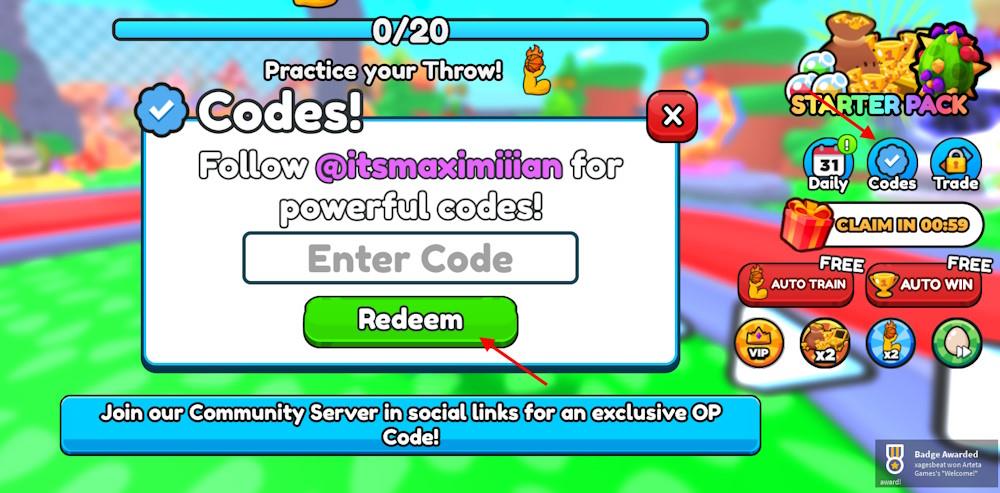
Scoring a point is simple, but redeeming the codes for Throw a Basketball is way easier. Follow the step-by-step process and claim your free rewards:
- Launch the Throw a Basketball game on Roblox.
- Click the Codes button from the right menu.
- Type a working code in the pop-up box.
- Click the Redeem button to get the rewards.
How to Get More Throw a Basketball Codes
Improve your throws with quick drills, practice timing, and stable footwork to boost accuracy and power in every release.
You can get more codes for Throw a Basketball from the official Arteta Games Discord Server. There is a separate #codes channel in the server where new codes are released. You can also join the official Arteta Games Roblox community for new codes.
Finding codes by yourself can be a challenge in itself, as there is no specific time or date for the codes’ release. Your best option will be to bookmark our post. Whenever developers release new code, we will be the first to add it to our list. So, if you want to find more codes for this fun simulator game, then this is the best place on the internet.
How to redeem update3 code in Throw a Basketball
To redeem the update3 code in Throw a Basketball on Roblox, follow these simple steps. This code rewards a Luck Potion to boost your rewards. Codes remain case-sensitive, so enter it exactly as shown.
Redemption Steps
-
Launch Throw a Basketball from the Roblox platform.
-
Locate and click the Codes button (blue checkmark icon) on the right side of the screen.
-
Enter update3 into the Enter Code text field that pops up.
-
Press Redeem to claim your Luck Potion instantly.
Troubleshooting Tips
Codes like update3 are confirmed active as of late 2025 checks, but copy-paste directly to avoid typos. If it fails, ensure you’re not on a private server or check for expiration via the Arteta Games Discord. Redeem during training sessions for maximum benefit on wins and power gains.
How to find the Codes button in Throw a Basketball Roblox
In Throw a Basketball on Roblox, the Codes button appears on the right side of your screen once you load into the game. Look for a blue checkmark icon in that menu area, as multiple guides confirm this exact location.
Locating the Button
-
Spawn into the main court area after joining the game.
-
Check the right-hand vertical menu bar (not the top-right corner in all cases).
-
The Codes button (blue checkmark) sits among other icons like training or shop options.
Visual Tips
Clicking it opens the Enter Code box directly for rewards like potions from update3. If the menu feels cluttered, zoom out or resize your Roblox window to spot it easily-it’s always visible post-spawn. Videos show it as a coach-related button in some updates.