Strange things stir in the shadows of FNAF Eternal Nights this November-new Roblox codes have surfaced, offering players rare boosts and eerie rewards before the next haunting shift begins.
However, it can be slightly tough for beginners. So, here are some active FNAF Eternal Nights codes to help you along the way with free revives.
All New FNAF Eternal Nights Codes
Here are the latest codes for FNAF Eternal Nights, valid as of November 2025. Redeem them in Roblox for free cash, keys, and boosts to survive longer nights. Active codes include NIGHTBOOST50 (50k cash), ETERNALKEYS (3 keys), and FNAFREDEEM (double XP for 1 hour). Enter them exactly as shown in the game’s code menu before they expire. Check back often for updates from the developers.
- 8: 8 Coins (NEW)
- MY PIZZERIA IS KINDA ROOFLESS: 2 Coins (NEW)
- 1: 1 Coin (NEW)
- BRUNOBESTAURA: 5 Coins
- CAIOOPALEIROBRMOGADO: 2 Coins
- FUJINUMABETINHA: 2 Coins
- EXOTICBUTTERS: 2 Coins
- EVILCUPCAKE: 2 Coins
- KAUAAVELINO: 1 Coin
- FREDDY: 5 coins
- BONNIE: 5 coins
- CHICA: 5 coins
- FOXY: 5 coins
- GOLDENFREDDY: 5 coins
- CUPCAKE: 5 coins
- EDUARDO: 5 coins
- ONEMORESHOT: 1 revive
- WELCOME: 5 coins
Expired FNAF Eternal Nights Codes
- HALLOWEEN2025
- PUMPKINKING
- TRICKORTREAT
- SPOOKYMONTH
If you like such horror survival games, you will love Five Nights Hunted, Five Nights TD 2, and Violence District as well. Also, don’t forget to check out our Roblox game codes master list as it consists of some of the most popular games on this platform.
How to Redeem FNAF Eternal Nights Codes
To redeem FNAF Eternal Nights codes, open the game on Roblox, navigate to the settings or codes section, enter your code exactly as shown, and click Redeem. If a code is valid, you’ll receive the reward instantly and a confirmation message will appear on screen.
Redeeming the codes for FNAF Eternal Nights is really easy and can be done in the following simple ways.
- Launch FNAF Eternal Nights on your Roblox app.
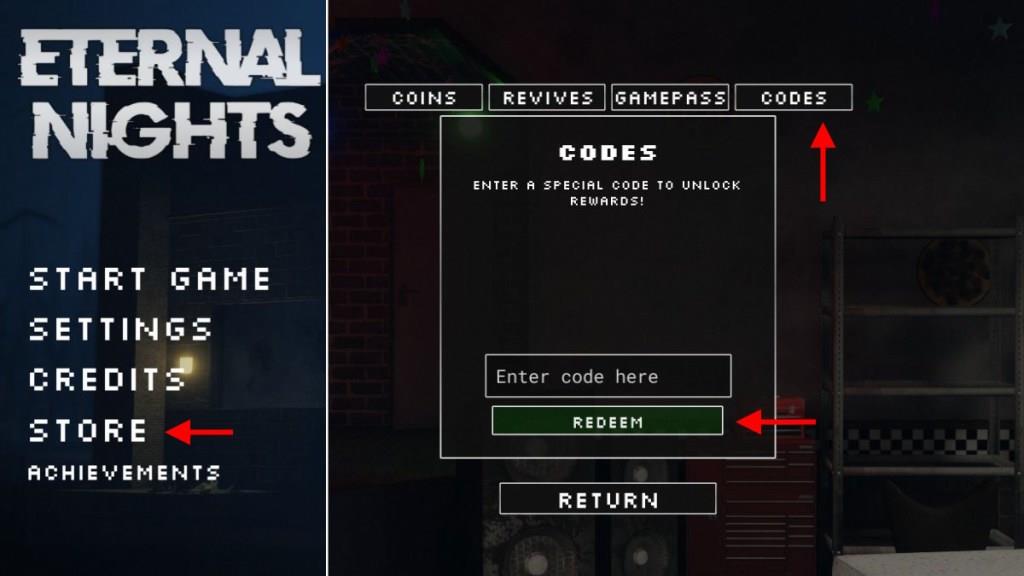
- Click on the STORE option to the left of the screen.
- Click on the Codes button at the top of the pop-up window.
- Enter any active code in the textbox.
- Click on the green Redeem button to get your rewards.
How to Get More FNAF Eternal Nights Codes
Players can find new FNAF Eternal Nights codes by checking the game’s official Roblox page, following the developers on social media, and joining the game’s community servers where announcements are posted first. Codes are often released during updates, special milestones, or seasonal events. Regularly revisiting trusted gaming guide sites is also helpful, as they usually track and list fresh codes as soon as they appear.
If you want to be among the first ones to get the new codes as soon as they are released, consider bookmarking this page right now. Since we will update this list frequently, it will be really easy to keep track of it with every new update.
Secondly, you can consider joining the official FNAF Eternal Nights Discord server. Here, you can find all new codes in the ‘code‘ channel under the Eternal Nights game. You can also join the Cob-Studios community on Roblox to stay updated on the game.
How to redeem codes in FNAF Eternal Nights step by step
Redeeming codes in FNAF Eternal Nights on Roblox follows a straightforward in-game process from the main menu.
Step-by-Step Guide
Launch FNAF Eternal Nights through the Roblox app or website.
Click the Store button, typically located on the left side of the screen.
Select the Codes tab at the top of the Store pop-up window.
Enter a valid code exactly as listed (codes are case-sensitive) into the text box.
Press the green Redeem button to claim rewards like coins or revives instantly.
Troubleshooting Tips
If a code fails, verify spelling, ensure no expired codes are used, and rejoin a fresh server, as older ones may glitch. Rewards apply immediately for survival boosts against animatronics.
Open the in-game Store and navigate to the Codes tab
In FNAF Eternal Nights on Roblox, the Store opens from the main menu lobby before starting a survival round.
Opening the Store
From the main menu screen (after loading into the game), locate the Store button on the left side of the interface, often represented by a shopping bag or coin icon. Click it to open the Store pop-up window.
Navigating to Codes Tab
Inside the Store window, look at the top tabs and select Codes (it may appear next to tabs like Purchases or Boosts). The input field for entering promo codes will appear below the tab.