Ghoulars are on the loose in MonsterVerze, and these November 2025 Roblox codes could be your ticket to powerful boosts and rare rewards that keep you ahead of rival tamers.
But to create your favorite monster and roleplay, you need a ton of Ghourlars. So, use MonsterVerze codes to grab yourself some free Ghoulars and many other exclusive cosmetics.
All New MonsterVerze Codes
Discover the latest MonsterVerze codes for Roblox in November 2025, offering fresh boosts and in-game rewards. This guide highlights how to redeem quickly, with tips on maximizing Ghoulars and progression. Stay tuned for upcoming releases and tips to stay ahead in MonsterVerze gameplay.
- MV4MILLION: 20k Ghoulars (NEW)
- WEAREBACK: Nautical Nacre Halo and 5k Ghoulars (NEW)
- MV1MILLION: Shattered Love Crown (NEW)
- BUGFIXES02: 10k Ghoulars (NEW)
- MVHOMECOMING: Homecoming Balloons, Opal Plushie, and 6k Ghoulers (NEW)
Expired MonsterVerze Codes
Currently, there are no expired codes for this Roblox experience. Once the above codes expire, they will be moved to this section.
If you love MonsterVerze, then you will also love these other games on Roblox. I recommend trying out Dress to Impress, Berry Avenue, and Mermaid Isle. If you are bored with dress-up games, take a look at our Roblox game codes list and choose one that fits your taste.
How to Redeem MonsterVerze Codes
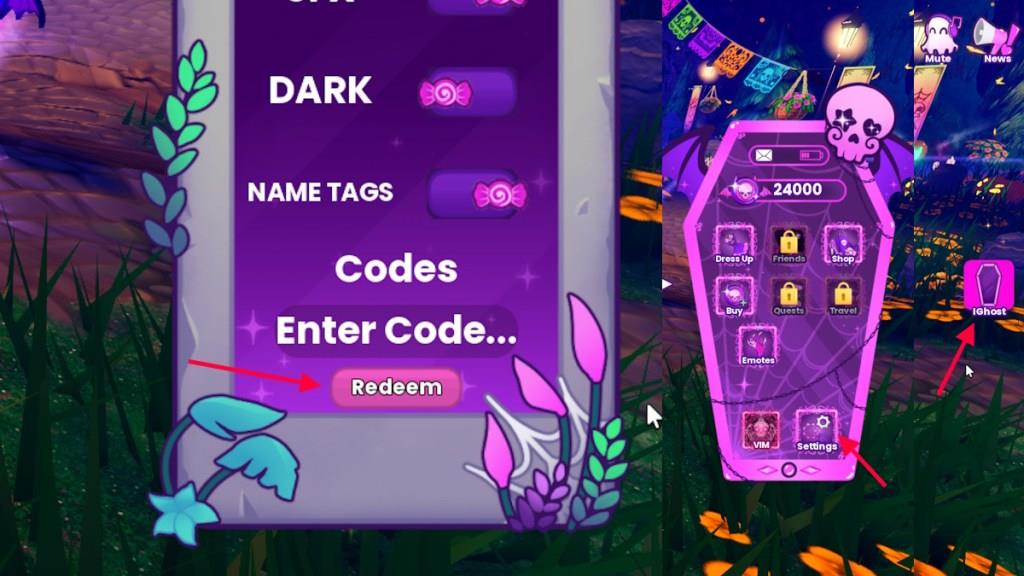
To redeem MonsterVerze codes, open Roblox and launch the MonsterVerze game. Click the Menu icon on the main screen and select the Codes option. Copy a working code from the list, paste it into the text box, and press Redeem to claim your rewards. Make sure to enter each code exactly as shown, since they are case-sensitive and may expire quickly.
If you are looking to get your hands on those tasty rewards from codes for MonsterVerze, then here are the steps to redeem them:
- Launch MonsterVerze on Roblox.
- Click on the Ghost option on the right side of the screen.
- Select the Settings option.
- Type the active code in the ‘Enter Code…’ box.
- Click Redeem to claim the rewards.
How to Get More MonsterVerze Codes
Complete daily login bonuses, participate in special events, and trade with friends to maximize your codes.
Codes for MonsterVerze are generally released on the game’s social accounts. However, the codes are often released haphazardly, making it difficult for normal players to keep track of them. So, what you can do is bookmark our post here and visit time to time to find the latest codes. We promise to update this page with the latest codes as soon as they are released.
Other than that, you can also join the PlayGirldom Discord server to connect with other players or find new codes. Also, follow @MonsterVerzze on Twitter and subscribe to their YouTube channel to stay updated on their upcoming updates.
How to redeem MonsterVerze codes step by step
Redeeming MonsterVerze codes in Roblox follows a straightforward in-game process using the phone interface. Multiple guides confirm the steps remain consistent as of early 2026.
Step-by-Step Guide
Follow these exact steps to claim rewards like Ghoulars and cosmetics:
-
Launch MonsterVerze on Roblox and join a server.
-
Locate the Ghost, iGhost, or phone icon on the right side of the screen and click it.
-
Select the Settings option from the menu that appears.
-
Enter the code exactly as listed (case-sensitive) into the Enter Code text box.
-
Click Redeem to instantly receive your rewards, which appear in your inventory.
Troubleshooting Tips
Copy-paste codes to avoid typos or extra spaces, which prevent redemption. Switch servers or check for updates if a code fails, as some activate post-patch.
Open the MonsterVerze settings menu in-game guide
Open the MonsterVerze settings menu by accessing the iGhost phone interface in-game. This menu handles codes, customization, and other options.
Opening the Menu
Locate the phone or iGhost icon on the right side of your screen once in the open world after the tutorial. Click it to expand the full in-game menu, which includes Dress Up, Shop, VIP Monster, and Settings tabs.
Accessing Settings
From the iGhost menu, select the Settings tab directly (often shown as a gear icon or labeled option). Enter codes here in the provided text field and tap Redeem for rewards.
Common Issues
Ensure you’re past the tutorial and in a stable server, as the icon may not appear during cutscenes. Restart or rejoin if the menu lags.