Stranded at sea, a makeshift raft becomes a ticking clock as Robloxborn shells and wits collide in a fight for survival.
But, it’s not all the same as Survive on a Raft introduces multiple character types that have different passive buffs. But to unlock them, you need Shells. Use Survive on a Raft codes to obtain free Shells and buy the character you want the most.
All New Survive on a Raft Codes
All new Survive on a Raft codes bring updated rewards for players eager to gather more Shells, materials, and valuable tools to improve their raft and survive longer at sea. These codes can give you quick boosts, helping you craft faster, expand your base, and stay ahead of the challenges that appear with each wave. Keep an eye on official updates and community pages to make sure you claim every active code before it expires.
- FlyingDutchman: 25 Shells (NEW)
Expired Survive on a Raft Codes
- SorryForBugs
- 25KLikes
- KrakenAndGardener
While you are looking for more codes, why not try out some of the other survival games on Roblox? Check out Criminality, Survive the Elevator, and Roblox 99 Nights in the Forest. For more options, visit our Roblox game codes list.
How to Redeem Survive on a Raft Codes
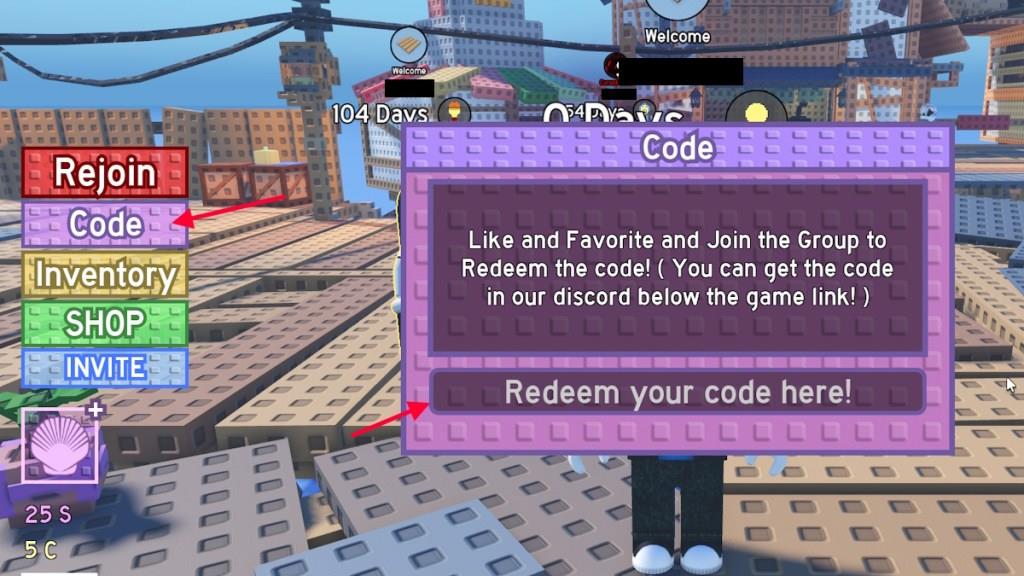
To redeem codes in Survive on a Raft, open the game on Roblox and tap the Menu button on the side of your screen. From there, select the Codes option to open the redemption window. Enter a valid code in the text box, then press Redeem to claim your rewards. Make sure you type the code exactly as shown, since capitalization or extra spaces can cause errors.
Before you can redeem codes for Survive on a Raft, you will have to like the game and join The Raft Studio Roblox group. Once you have done that, follow these steps to redeem the codes.
- Launch Survive on a Raft on Roblox.
- Click on the Codes option on the left side of the screen.
- Type the active code in the text box.
- Press the Enter key to claim the rewards.
How to Get More Survive on a Raft Codes
Checking for new Survive on a Raft codes often helps you claim free rewards like shells and items faster. Follow the game’s official Roblox page, join the developer’s Discord server, and keep an eye on community posts or Twitter updates. Many creators also share active codes on YouTube or Reddit soon after they appear, so staying connected to those channels increases your chances of finding the latest ones before they expire.
The best place to get more codes for Survive on a Raft is right here. We add all the latest codes without delay, so all you have to do is visit our list when you need some extra Shells. Bookmark our list for ease of access, and you will never miss out on a code again.
Other than following our list, you can join the official Survive on a Raft Discord server. This way, you can stay connected to the community and be notified about the upcoming updates.
How do I redeem Survive on a Raft codes in-game
To redeem codes in Survive on a Raft on Roblox, first join The Raft Studio group, like the game, and favorite it to unlock the feature.
Redemption Steps
Follow these exact steps once in-game:
-
Launch Survive on a Raft and load into the lobby or raft area.
-
Click the Codes or Code button on the left side of the screen.
-
Enter the code precisely (case-sensitive) into the “Redeem your code here!” text box.
-
Press Enter on your keyboard to claim Shells instantly.
Troubleshooting Tips
Codes fail if you skipped group join/like/favorite, mistyped (copy-paste recommended), already redeemed it once per account, or it’s expired-rejoin a new server if needed. Codes like MerryChristmas give 25 Shells for class unlocks.
Open the game’s Roblox group page to join it
Go to the Survive on a Raft game page on Roblox to access its group directly.
Finding the Group
Open Roblox.com or the app, search for “Survive on a Raft,” and navigate to the game’s page. Under the game title, locate the developer’s group name (“The Raft Studio”) and click it to open the group page.
Joining Steps
On the group page, click the prominent Join Group button (blue if open). You’ll see a confirmation message like “Successfully joined the group” upon approval-most game groups like this one accept instantly.
Quick Access Tip
From prior guides, the direct link is typically found via the game page at roblox.com/games/xxxxx (use in-game description or search); joining enables code redemption in the lobby.
