New codes have surfaced in Rogue Piece this November, granting players fresh boosts and rewards to sharpen their pirate skills. Whether you’re chasing more Beli or rare stat resets, these updates can tilt the odds in your favor before they expire.
To expand the fun, use the Rogue Piece codes that give boosts, Beli, or other valuable in-game rewards. Use the rewards wisely and be the strongest in the adventure.
All New Rogue Piece Codes
New Rogue Piece codes offer players a quick way to claim free rewards such as Beli, gems, and stat resets. These limited-time codes can boost your progress and help you train faster or obtain rare items without extra grinding. Make sure to redeem them as soon as possible, since expired codes won’t grant any benefits.
- 9KLikes!: Gems and Cash (NEW)
- 1MVisits!: Gems and Cash (NEW)
- 5KFavs!: Gems and Cash (NEW)
- Beginner: Gems and Cash (NEW)
Expired Rogue Piece Codes
- 7KLikes!
- 800KVisits!
- Shutdown
- Halloween
- SorryForDelay
- Apologize
- Mini
- RaceUpdate
- Buggy
- MBFORSHUTDOWN
- 10KMembers
- 2KLikes
- Treachery
- 150KVisits!
- 1KFavorite
- RarityIncident
- 1KLikes!
- INeeDmOREfISh
- 50KVisits!
- SorryForShutdown
- 1KActive
- AWSDown
- 10KVisits!
- RELEASE
While waiting for more codes, you can try out some other games by checking out our Roblox games codes master list. If you specifically want to try more of One Piece, try Blox Fruits or Fruit Battlegrounds. However, if you’re looking for some awesome anime experiences, do check out Blue Lock Rivals or Jujutsu Infinite.
How to Redeem Rogue Piece Codes
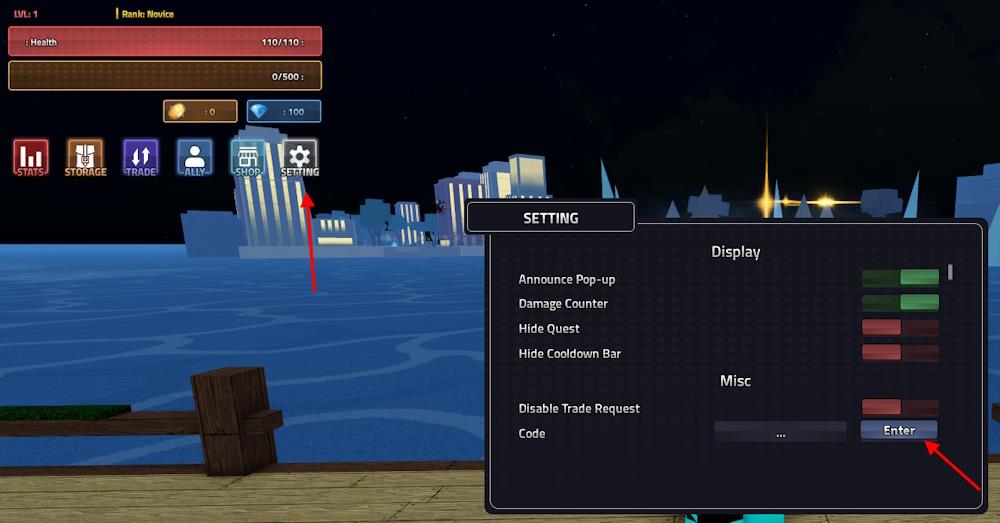
To redeem Rogue Piece codes, open the Roblox game and click the Menu button on your screen. Then, select the “Codes” option from the list that appears. Copy a working code from the list provided and paste it into the input box. Press “Enter” or “Redeem” to claim your rewards instantly, such as Beli, stat resets, or boosts. Make sure to enter each code exactly as shown, since they are case-sensitive and may expire after a limited time.
To get the rewards from the codes for Rogue Piece, all you need to do is follow these quick steps:
- Launch Rogue Piece in the Roblox app.
- Click on the Setting icon on the left of the screen.
- Type a working code in the ‘…’ area.
- Click the Enter button to claim your rewards.
How to Get More Rogue Piece Codes
Players can find new Rogue Piece codes by following the game’s official Roblox page, joining the developer’s Discord server, and checking their X (Twitter) account for news about updates or events. Developers often release new codes during milestones, holidays, or after major patches, so staying active in these communities helps you claim rewards faster. You can also bookmark trusted fan sites that track current and expired codes to avoid missing any free spins or in-game items.
Consider joining the official Rogue Piece Discord server for the official source of news and updates. On the server, keep checking the ‘update-log’ channel for all new codes released in the game. The developers also share new code in other channels, so staying vigilant is the key. Furthermore, you can try joining Vox’s House community on Roblox for all sorts of game news.
Finally, we highly recommend bookmarking this page now, as we regularly check the game for new updates. Hence, you won’t miss out on any codes, and ultimately, no rewards will go ignored. This will let you focus on the grind in the game while we keep the new codes in check.
How to redeem codes in Rogue Piece step by step
Rogue Piece features a straightforward code redemption process hidden in its settings menu. Follow these steps carefully to claim rewards like gems, rerolls, or chests.
Step-by-Step Redemption
Launch Rogue Piece through Roblox and fully load into the game world, as codes cannot be redeemed from the menu screen.
Click the gear icon (Settings) on the left side of your screen, typically above the chat box.
Scroll to the bottom of the settings overlay to the “Misc” section, where a text box labeled “Enter Code” or “…” appears.
Type the code exactly as shown (case-sensitive, no extra spaces) and press Enter on your keyboard to instantly receive rewards, which display at the top of the screen.
Troubleshooting Tips
Ensure no trailing spaces if copy-pasting codes, and verify you’re in-game rather than the lobby.
Codes expire quickly after updates, so test them promptly; invalid ones show an error message in the box.
Locate the settings menu in Rogue Piece where codes are entered
The settings menu in Rogue Piece, where codes are entered, is accessed via a gear or cogwheel icon on the left side of the screen.
Exact Location Details
Once in-game (not the lobby), locate the gear/cogwheel icon positioned vertically on the left interface, often near or above the chat area and below stats displays.
Clicking it opens the settings overlay; scroll to the bottom of this menu to find the code input field, typically labeled with “…” or “Enter Code” in the “Misc” section.
Visual Confirmation
Videos confirm this spot: left-side gear → scroll down → text box at very bottom for typing codes before hitting Enter.
