Players can snag fresh codes in Spin a Brainrot this November 2025 to grab free spins, boosts, and rare items before they vanish. Stay sharp-these rewards drop fast, and missing one could mean falling behind in Roblox’s quirkiest brain-twisting game yet.
But dice don’t come cheap, and some are locked behind exclusive events. So, use Spin a Brainrot codes to obtain exclusive dice and other rewards.
All New Spin a Brainrot Codes
The latest Spin a Brainrot codes offer free spins, coins, and other rewards to boost your progress in the game. Players can redeem these codes directly in Roblox to gain quick advantages without extra grinding. Since codes often expire quickly, it’s smart to use them as soon as they’re released. Keep an eye on updates from the developers for new codes and seasonal bonuses that can give you a solid edge in your next round.
- 10KLikes: 1 Divine Luck Potion (NEW)
- 2MVisits: 2 Ascendant Dice (NEW)
- Halloween: 2 Diamond Dice (NEW)
- HalloweenDice: 1 Halloween Dice (NEW)
Expired Spin a Brainrot Codes
- 1MVisits
Love playing around with Brainrots? Then, Roblox has many more games that you may enjoy. Try out Steal a Brainrot, Plants vs Brainrot, and Race a Brainrot. For more variety, check our Roblox game codes list.
How to Redeem Spin a Brainrot Codes
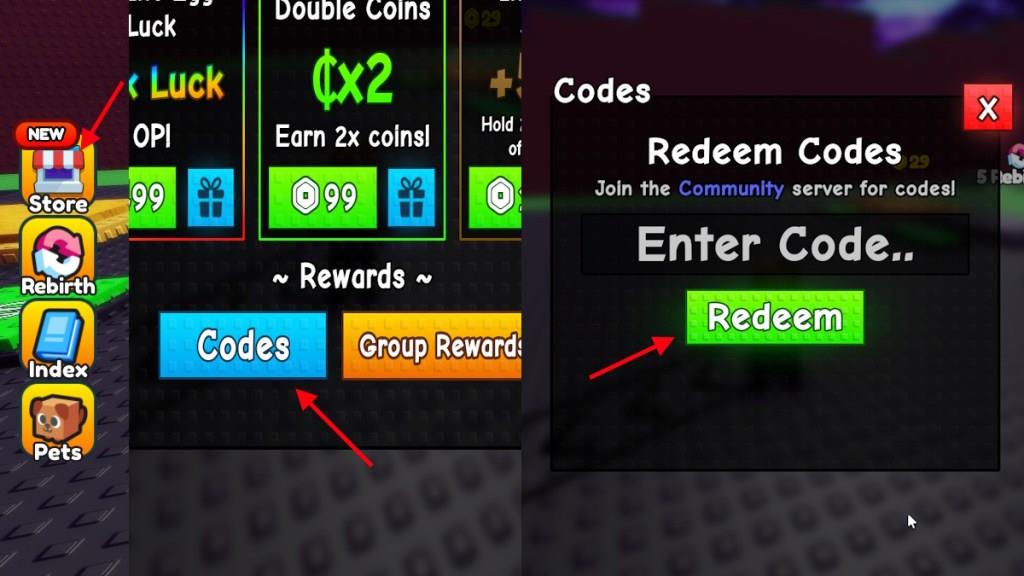
To redeem Spin a Brainrot codes, open Roblox and launch the game. Click on the Codes button, usually found on the main menu or settings screen. A text box will appear – type or paste your active code there and press Redeem. If the code is valid, your rewards will be added to your account instantly. Make sure to check for typos and only use codes that haven’t expired.
If you want to get your exclusive dice, then you will need to redeem the codes for Spin a Brainrot. Here is how you can do it:
- Launch Spin a Brainrot on Roblox.
- Click on the Store option on the left side of the screen.
- Scroll down to the codes section.
- Type the active code in the text box.
- Click Redeem to claim the rewards.
How to Get More Spin a Brainrot Codes
You can get more Spin a Brainrot codes by following the game’s official Roblox page, joining its Discord server, and keeping an eye on social media posts from the developers. New codes often drop during game updates, events, or special milestones. Checking community forums and fan groups can also help you find newly shared codes early before they expire.
This game is all about getting the correct dice, so you cannot pass up the chance of grabbing free dice from codes. So, you will need a place to get the newly released codes regularly. Thankfully, you have already arrived at that place! All you have to do is bookmark our post here and visit regularly to find codes for Spin a Brainrot.
Other than that, you can also join the Spin a Brainrot Discord server, or join the RNG Creationss Roblox group. This way, you will be able to stay updated on the upcoming events, while we keep you updated on the latest codes.
Which Spin a Brainrot codes are currently active
As of January 2026, the currently active codes for Roblox’s Spin a Brainrot provide free potions to boost luck, coins, and spins for collecting rare brainrots.
Active Codes
These codes remain valid based on the latest checks:
-
NewYear: One Divine Luck Potion
-
Christmas: One Prismatic Potion
-
Biomes: One Divine Coin Potion
-
60KLikes: One Divine Luck Potion
Redemption Guide
Open Spin a Brainrot in Roblox, select the Store on the left side, scroll to Codes at the bottom, enter the code (case-sensitive), and press Redeem. New codes often drop via Discord or updates, so verify in-game as they expire quickly. Codes like 20KLikes, 10MVisits, and 50KLikes are now expired.
How do I redeem Spin a Brainrot codes in Roblox
Launch Spin a Brainrot on Roblox and wait for it to load fully. Click the Store button on the left side of the screen, then scroll down to the Codes or Rewards section at the bottom.
Step-by-Step Guide
Follow these exact steps to redeem codes successfully:
-
Open the Store menu on the left.
-
Scroll to the Codes button (often blue or in Rewards).
-
Click Codes to open the text input box.
-
Enter the code exactly as shown (case-sensitive, no spaces).
-
Press Redeem to claim rewards like potions.
Rewards appear instantly if the code is active. Codes expire quickly with updates, so test them in-game and join the official Discord for the latest.