Collect rare pets and boost your progress with the latest Pet Quest codes for October 2025. These fresh rewards can give your Roblox adventure the edge it needs-before they expire!
But grinding in this game can be a hassle if you don’t use boost potions. So, use Pet Quest codes from our list here to obtain free coins and boost potions.
All New Pet Quest Codes
Stay ahead in Pet Quest by using the newest active codes released this month. These codes can grant rewards like coins, boosts, and special items to help you progress faster in your pet collection and battles. Make sure to redeem them as soon as possible, as some may expire quickly or be replaced by new ones during updates.
- Trading: 5 Coin V Potion, 5 Damage V Potion, 5 Luck V Potion, 5 Gems V Potion, and 5 Luck V Potion (NEW)
- Update2: 2 Coin VI Potion, 2 Damage VI Potion, 2 Luck VI Potion, 2 Fast Hatch VI Potion, and 2 Shiny Luck VI (NEW)
- Update1: 2 Coin VI Potion, 2 Damage VI Potion, 2 Luck VI Potion, 2 Fast Hatch VI Potion, and 2 Shiny Luck VI (NEW)
- luckypots: 20 Luck II Potion and 10 Luck IV Potion (NEW)
- pet quest: 5 Luck II Potion, 5 Fast Hatch II Potion, and 5 Shiny Luck II Potion (NEW)
- release: 250 Coins, 3 Coins III Potion, 3 Damage III Potion, 10 Luck I Potion, and 3 Gems III Potion (NEW)
Expired Pet Quest Codes
- Fall
- 100kvisits
- thankyou
- 250kvisits
- 500kvisits
- twothousand
If you have become bored with collecting pets, try becoming one instead. Check out Capybara Evolution and Brainrot Evolution to step into the shoes of your pets for once. Not your cup of tea? Check out Blue Lock Rivals and Grow a Garden, which are two of the most popular games on Roblox. If still not satisfied, take a look at our Roblox game codes list and pick whatever suits your tastes.
How to Redeem Pet Quest Codes
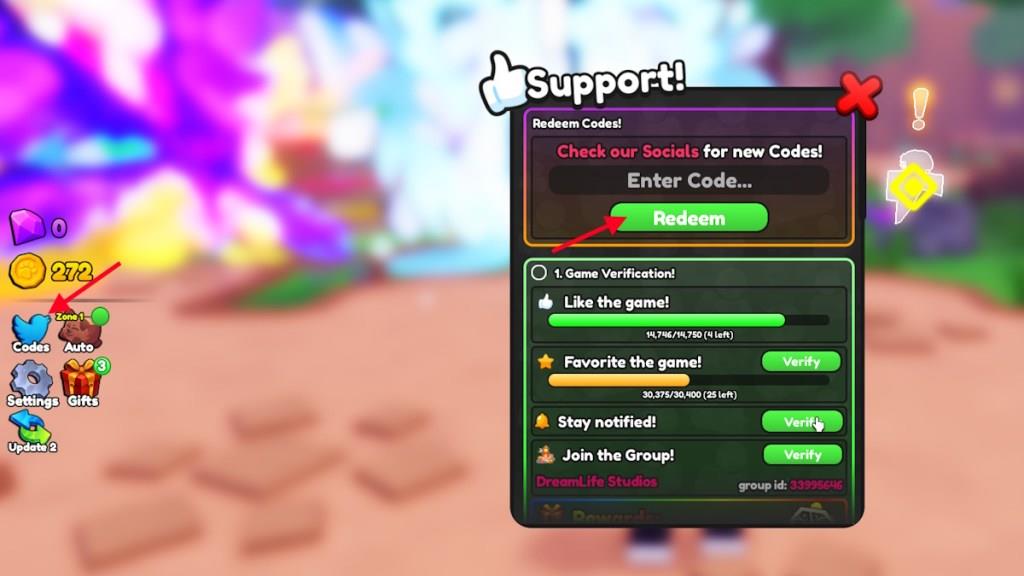
To redeem Pet Quest codes, open the game on Roblox and select the Twitter or Codes icon on the main screen. Type a valid code exactly as it appears, including any capital letters or symbols, then press the “Redeem” button. If the code is active, you’ll instantly receive the reward, such as coins, boosts, or special pets. If it doesn’t work, check for typos or verify that the code hasn’t expired.
Cannot wait to level up quickly? Then you need to grab the active codes as quickly as possible. To redeem codes for Pet Quest, all you have to do is follow these simple steps.
- Launch Pet Quest on Roblox.
- Click on the Codes option on the left side of the screen.
- Type the active code in the “Enter Code…” box.
- Click Redeem to claim the rewards.
How to Get More Pet Quest Codes
To obtain more Pet Quest codes, regularly check the game’s official social media accounts, including Twitter, Discord, and the developer’s Roblox group. Developers frequently release new codes during special events, updates, or when the game reaches player milestones. You can also subscribe to Roblox YouTubers and content creators who cover Pet Quest, as they often share newly released codes with their audience. Bookmark reliable code websites that track active and expired codes, and visit them weekly to stay current with the latest releases.
Pet Quest codes are a great way to speed up your progress in the game. But finding these codes is quite a hassle. The best place to find codes for Pet Quest is right here. Simply bookmark this post and revisit from time to time to find new codes. But if you want to find the codes by yourself, we can help you with that as well.
Simply, join the DreamLife Studios Discord server or follow @DreamLifeRBX on X. Other than that, you can also join the DreamLife Studios Roblox group to stay notified on all upcoming updates. The codes are generally released on their Discord, so keep an eye on the “announcement” channel.
How to redeem Pet Quest codes step by step
Redeeming Pet Quest codes on Roblox is straightforward using the in-game menu. Follow these steps carefully since codes are often case-sensitive and can expire quickly.
Step-by-Step Guide
-
Launch Pet Quest on Roblox and ensure you’re in the game lobby or main area.
-
Locate the Codes button (often a blue bird/Twitter icon or labeled “Codes”) on the left side of the screen.
-
Click it to open the redemption window, which includes a text box labeled “Enter Code…” or similar.
-
Type or paste an active code exactly as listed (e.g., no extra spaces).
-
Press Redeem (or Verify in some versions) to claim rewards like gems, coins, or boosts.
Troubleshooting Tips
Codes may fail if expired, mistyped, or already redeemed on your account-try rejoining the game for a fresh server. Check recent updates from sources like Beebom or TryHardGuides for January 2026 validity, as October 2025 lists evolve.
Open the Codes menu in Pet Quest where is it located
The Codes menu in Pet Quest opens from a specific button on the game’s left-side interface. This location remains consistent across guides for easy access during gameplay.
Exact Location
The Codes button appears on the left side of the screen, typically represented by a blue Twitter/X bird icon or a labeled “Codes” option. It sits among other menu icons in the main lobby or gameplay area, often near inventory or settings.
Opening Steps
Click the blue bird/Codes icon directly to expand the redemption window with the code entry field. Ensure you’re in-game on Roblox for it to appear; it may not show in loading screens.