Crush your rivals and rule the battlefield with the latest Tank Game codes for October 2025 – grab free boosts, skins, and upgrades before they’re gone!
Whether it’s giving the tank multiple turrets, changing your bullets to flame or freeze attacks, or even increasing the overall damage, regeneration power, bullet speed, and so on. All these upgrades will eventually help you beat other powerful players in the arena. So, if you need a quick XP boost or want to get some gems for free, check out these active Tank Game codes given below.
All New Tank Game Codes
Stay up to date with the newest Tank Game codes released this month. These fresh codes can grant you extra coins, exclusive skins, or special boosts to make your battles more exciting. Check each code carefully and redeem it before it expires to take full advantage of the latest rewards offered by the developers.
- COOLIO: 3000 Gems (NEW)
- IAMGROUP: 10,000 XP (NEW)
- DISCSPECIALXD: 5000 Gems
- ALLCODESASPROMISED: 20,000 XP
- FINALLY: 2500 Gems
- MEMORIES: 2500 Gems
- RELEASE: 5000 XP
Expired Tank Game Codes
As of now, there are no expired codes in the game, and you can redeem all of the above ones right away to get the rewards.
So, if you’re looking for more such fun arcade options, do play Heads Please, Raise Animals, and Gone Hunting. However, if you find these games anything but fun, check out our Roblox game codes master list to find a list of some of the best experiences on this platform.
How to Redeem Tank Game Codes
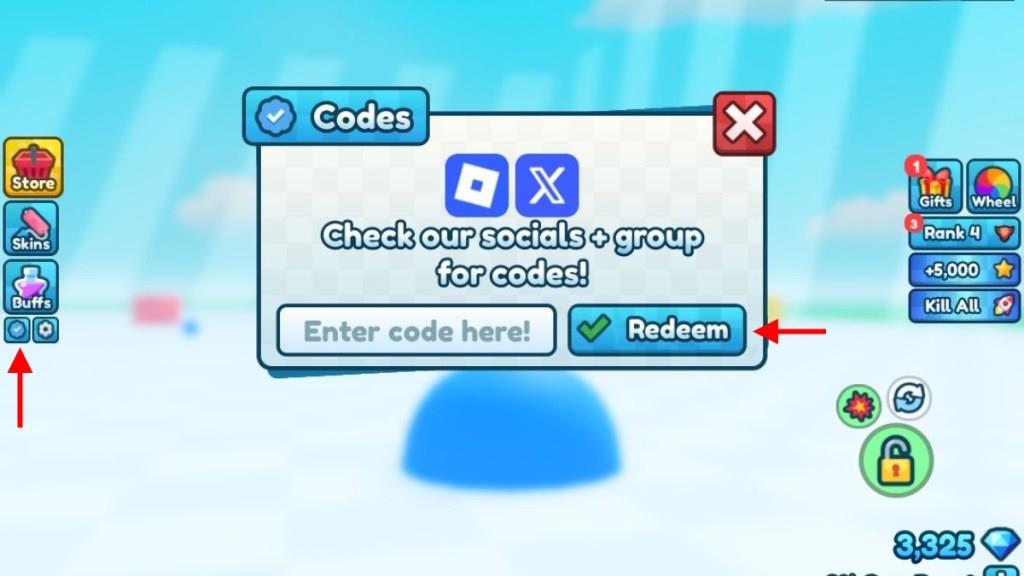
To redeem Tank Game codes, open Roblox and launch the game. Once in the main menu, find the Twitter or Codes button, usually displayed on the side of the screen. Click it to open the redemption window, then type or paste a working code into the text box. Press the confirm or redeem button to claim your reward, which will be added to your account automatically if the code is active.
Now, if you’re ready to get all the free rewards and XP boosts, follow the given steps to redeem the codes for Tank Game:
- Launch Tank Game on Roblox.
- Click on the Blue Tick icon on the left side of the screen.
- Enter a working code in the text box on the pop-up window.
- Click the Redeem button to get all the rewards.
How to Get More Tank Game Codes
Check the game’s official Discord server and Roblox group page daily for new code announcements from developers. Follow Tank Game on social media platforms like Twitter and YouTube, where they share updates during events or milestones. Join Roblox code communities on Reddit and Discord to catch player-shared lists quickly. Test codes right away in the game, as they expire fast. Bookmark reliable code sites that track releases monthly.
We know that finding all the active codes in the game at the right moment can take a long time. And that is why we suggest you bookmark this page right away, so that you can check all the latest changes with just a single click.
Next, you can try joining the official Tank Game Discord server. Here, you will find all the active codes in the ‘codes‘ channel. Lastly, we recommend that you join the official 7×3 group on the Roblox platform to get a very exclusive reward in the game.
How to redeem Tank Game codes in Roblox
Redeeming codes in Tank Game on Roblox is straightforward and quick. Follow these steps from the lobby to claim free Gems and EXP without interruptions.
Redemption Steps
Launch Tank Game on Roblox.
Click the blue tick icon or codes button on the left side of the screen.
Enter the code exactly into the text box (case-sensitive).
Press Redeem to instantly receive rewards.
Tips
Codes apply in the main lobby to avoid dying mid-game. If invalid, double-check spelling or check for expiration-no expired ones yet. Rewards boost your tank upgrades right away.
Steps to find the codes button in Tank Game
Finding the codes button in Tank Game on Roblox takes just a few seconds in the lobby. It’s a small, easily overlooked icon designed for quick access to rewards.
Location Details
Look on the left side of the screen for a small blue tick/check mark icon (also called a verification or blue checkmark). This button opens the code entry window directly.
Step-by-Step Access
-
Enter the main lobby first to avoid gameplay interruptions.
-
Scan the left UI panel-the icon sits among other menu buttons.
-
Click or tap it to reveal the “Enter code here!” text box and Redeem button.
Troubleshooting
If hidden by UI scaling, zoom out or play in landscape mode on mobile. Always redeem from the lobby for safety, as the game doesn’t pause.