Players are racing to grab the latest Roblox NFT Battle codes for October 2025, trading digital stars and rare items to boost their power before the next tournament drops.
However, opening NFT crates isn’t cheap, and you need a ton of stars to begin. So, use NFT Battle codes from our guide here and obtain free stars.
All New NFT Battle Codes
The all-new NFT Battle Codes bring fresh energy to Roblox, letting players compete for limited rewards, exclusive gear, and NFT-based collectibles. Each code offers different bonuses that enhance your gameplay and help you stand out among other competitors. These unique updates keep battles exciting and give fans more reasons to test their skills while collecting rare in-game items.
- 2KACTIVE: 122,222 Stars (NEW)
- UPD2: 70,000 Stars (NEW)
- CHARTS: 200,000 Stars (NEW)
Expired NFT Battle Codes
- TOTHEMOON
- 1stUPD
- GRANDSLAM
- SORRY
NFT Battle is a one-of-a-kind game, but it can get boring fast. I am sure you would like some action to spice up your time. If I hit the nail correctly, then check out Anime Last Stand, Hunty Zombies, and Plants vs Brainrots to have some fun. Not satisfied with these options? Take a peek at our massive Roblox game codes list and pick the game you fancy.
How to Redeem NFT Battle Codes
To redeem Roblox NFT Battle codes, open Roblox and launch the NFT Battle game. Click the “Codes” or “Redeem” button on the main screen, then enter an active code exactly as shown. Press “Confirm” or “Redeem” to claim your reward. If the code is valid, the bonus items or tokens will appear in your inventory instantly. Make sure to check for typos and note that expired codes will not work.
Landing your targeted NFT is all up to luck, but redeeming the codes for NFT Battle is completely in your control. Here is how you can redeem the codes for this game:
- Launch NFT Battle on Roblox.
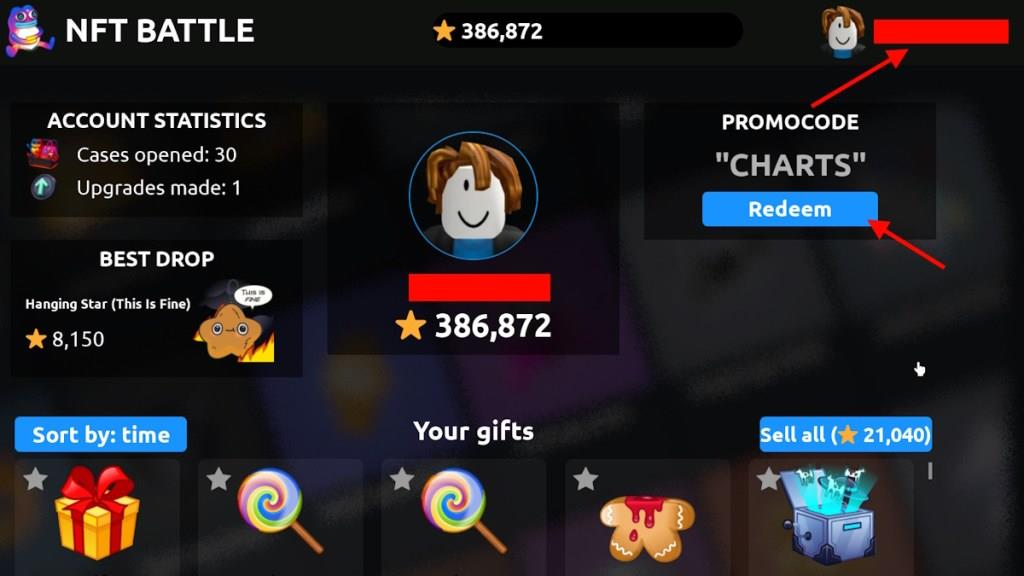
- Click on your username at the top right corner.
- Type the active code in the Promocode box.
- Click Redeem to claim the rewards.
How to Get More NFT Battle Codes
Players can get more NFT Battle codes by following the official Roblox NFT Battle social media accounts and participating in special events or collaborations announced there. Joining the game’s Discord server or community groups can also help, as codes are often shared among active members. Keeping an eye on influencer streams or YouTube videos related to Roblox NFT Battle may reveal new codes as well.
Codes for NFT Battle are very important for a player’s progression in the game. They provide a ton of stars that let you open premium crates for the ultra-rare loot. So, grabbing the codes when they drop is very important. That’s why the best place you can obtain the codes is right here. We waste no time in adding newly released codes, so you won’t waste time searching for them. Simply bookmark our post here and revisit whenever you want to find new codes for this experience.
Other than following us, you can also join the NFT Battle Discord server. This way, you will stay up to date with the latest announcements from the devs and can interact with other players at the same time.
How to redeem codes in NFT Battle
Redeeming codes in NFT Battle is simple and takes just a few steps within the game’s profile menu. This process works consistently across guides from October 2025 through January 2026.
Redemption Steps
Follow these exact steps to claim your Stars or rewards without issues.
-
Launch Roblox and join NFT Battle.
-
Click your avatar, username, or profile icon in the top-right corner to open the menu.
-
Locate the Promocode text box (sometimes labeled as such exactly).
-
Enter or paste a valid code (case-sensitive, no spaces).
-
Press the Redeem button to instantly receive rewards like Stars.
Troubleshooting Tips
Codes may fail if expired, already used on your account, or mistyped-double-check spelling from recent lists. You can redeem multiple codes quickly in one session, but act fast as they often expire with updates. No in-game purchase or VIP is needed for redemption.
Where is the Promocode box located in the game menu
The Promocode box in NFT Battle appears in the profile menu after clicking your avatar or username. This matches consistent descriptions from multiple guides spanning late 2025.
Exact Location Steps
Access it through the top-right profile menu for quick redemption.
-
Click your avatar/username at the top-right of the screen to open the profile menu.
-
Look for the Promocode text input box directly in that menu (often labeled exactly as “Promocode”).
-
Type the code and hit Redeem right there-no extra tabs or sub-menus needed.
Visual Notes
Guides note the box is prominently placed below your profile stats in the opened menu, avoiding confusion with main game menus. If not visible, ensure you’re in the main lobby, not mid-battle.
