Cash piling up is easier than ever with the latest Makeup Store Simulator codes for October 2025-grab free rewards, boost your store’s growth, and climb the Roblox beauty business ranks before they expire.
At the end of the day, the store closes, summarising your total gains and expenses in stock refilling and upgrading your store as well. So, if you’re short on some cash, consider redeeming the following active Makeup Store Simulator codes for free money.
All New Makeup Store Simulator Codes
Stay updated with the latest Makeup Store Simulator codes to claim free cash and in-game rewards. These codes can help you expand your store, stock up on beauty products, and attract more customers without spending your earned money. Make sure to redeem them quickly, as expired ones won’t grant any bonuses.
- FACEGLOW: Get 950 Cash (NEW)
Expired Makeup Store Simulator Codes
- LIPSTICK2025
- MakeUp
If you like such store simulation games, consider playing similar experiences like Clothing Store Simulator, Supermarket Simulator, and Restaurant Tycoon 2. Furthermore, you should check out our Roblox game codes master list to find all the best games to play on this platform.
How to Redeem Makeup Store Simulator Codes
Open the Makeup Store Simulator game on Roblox. Click the gear icon for settings. Enter a code exactly as shown in the input box. Press redeem to claim your cash rewards. Codes expire, so use them quickly.
If you’re ready to get some free cash and jump-start your business, follow the given steps to redeem the codes for Makeup Store Simulator:
- Launch Makeup Store Simulator on your Roblox app.
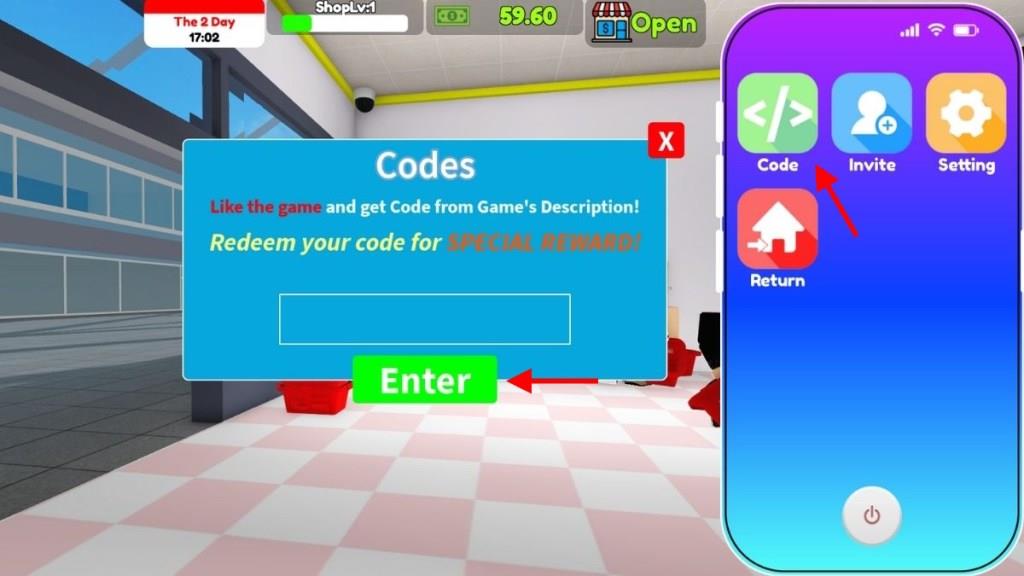
- Press the ‘Z‘ key on your keyboard to open the cell phone on the screen.
- Click on the Code app and enter any active code in the pop-up window.
- Click on the Enter button to get your rewards.
How to Get More Makeup Store Simulator Codes
Joining the game’s official Roblox group, following the developers on social media platforms such as X (Twitter) or Discord, and checking the game’s description page often are the best ways to find new Makeup Store Simulator codes. Developers usually share codes during updates, special milestones, or seasonal events. Players can also keep an eye on community forums and fan pages, where active users often post the latest codes shortly after they’re released.
To get more codes in the game, you can consider joining the official Makeup Store Simulator Discord server. However, there aren’t any specific channels that list out all the codes. Instead, you can find the latest working codes on the official game page on Roblox.
If you don’t want to stress out on finding all the codes by yourself every time by visiting the site, consider bookmarking this page. Since we update the list frequently, you will have no issues with missing out on the new rewards. Finally, I would suggest that you join the MagicCoreStudio community on Roblox to know more about this game.
How do I redeem codes on mobile vs PC
Makeup Store Simulator uses in-game code redemption, which differs slightly from Roblox-wide promo codes. On both mobile and PC, access it via the phone interface in-game, but controls vary by platform.
PC Redemption
Launch the game in Roblox, press Z to open your phone, click the Codes button (or icon), enter the code exactly (case-sensitive), and press Enter. Rewards like cash appear instantly if valid.
Mobile Redemption
Open the game on your device, tap the phone icon (usually on-screen or via touch controls), select Codes, type the code, and tap Redeem. Use the on-screen keyboard; avoid Roblox app browsers for in-game codes-stay within the game client.
Key Tips
-
Codes are case-sensitive; copy-paste from lists like PALETTEGIFT.
-
If invalid, check for typos or expiration (e.g., LIPSTICK2025 is expired).
-
Works on tablet too; restart game if UI glitches.
Open the Roblox redeem page on mobile browser steps
To access the official Roblox code redemption page (roblox.com/redeem) on a mobile browser, follow these platform-specific steps, as the Roblox app lacks direct in-app support for this-use a browser instead.
Steps on Mobile Browser
Open Safari (iPhone/iPad), Chrome, or your preferred browser app. Type roblox.com/redeem directly into the address bar and hit Go/Enter-ignore any app prompts and select “Continue in browser”. Log in with your Roblox credentials if prompted.
After Loading the Page
Enter your code (e.g., gift card PIN or promo) into the box, ensuring no spaces or typos, then tap Redeem. Check your account balance afterward via the Roblox app or site; credits appear instantly if valid.
Troubleshooting
Clear browser cache or try incognito mode if login fails. Avoid the Roblox app browser, as it redirects poorly. This works for promo codes or gift cards, separate from Makeup Store Simulator’s in-game phone redemption.