Unlock the hidden codes that turn Roblox bucks into real street-cred-October’s Be a Beggar guide pulls back the curtain on cash tricks you won’t want to miss.
However, starting off your empire is quite taxing as you will only earn pennies for hours of begging. The easiest way to earn quick cash and get your important upgrades is by using Be a Beggar codes. Check the codes from our list here and get free cash in the game.
All New Be a Beggar Codes
New Be a Beggar codes can help players earn extra cash, boosts, and other rewards that make progress faster and easier. These codes are regularly updated, so it’s worth checking often for the latest ones before they expire. Redeeming them takes only a few seconds and can give you a real advantage as you try to build your wealth in the game.
- ROBBER: 50k Cash (NEW)
Expired Be a Beggar Codes
Currently, there are no expired codes in this game. Once the above codes expire, they will be moved to this section.
Roblox is home to many weird games, but only some of them are fun to play. If you are looking for more fun games, check our Roblox game codes list and pick any that you like. Those who are tired of weird games and are looking for something more mainstream, try out Blue Lock Rivals, Grow a Garden, and Basketball Legends.
How to Redeem Be a Beggar Codes
Use Be a Beggar Codes in Roblox by entering them in the codes menu from the main lobby, then claim the rewards before the code expires.
Begging is not for everyone. So, instead of begging, here is how you can redeem the codes for Be a Beggar and earn huge rewards:
- Launch Be a Beggar on Roblox.
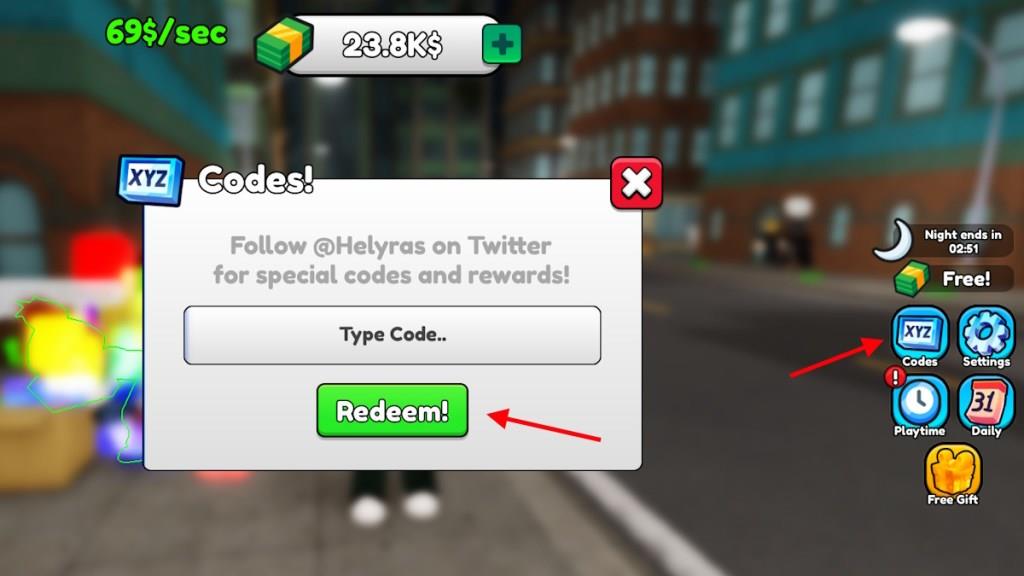
- Click on the Codes option on the right side of the screen.
- Type the active code in the ‘Type Code..’ box.
- Click Redeem! to claim the rewards.
How to Get More Be a Beggar Codes
Players can get more Be a Beggar codes by following the game’s official Roblox page, joining the developer’s Discord server, and checking their social media accounts for announcements. New codes are often released when the game reaches milestones, updates, or during special events. It also helps to bookmark fan sites or community forums that regularly share updated code lists and verify their validity before using them.
Codes for Be a Beggar are not easy to find on the internet. The best way to get them is by visiting our code list here. We scour the game’s socials for any newly released codes, adding them to our list instantly when they are revealed. The codes for this game are removed quickly, so tracking them is hard for most people. Simply bookmark our post and let us get the codes for you.
How to redeem ROBBER code in Be a Beggar
Redeeming the ROBBER Code
Launch Be a Beggar on Roblox and complete the tutorial if it’s your first time. The ROBBER code provides around 50,000 cash to boost your early-game progress.
Step-by-Step Process
Click the Codes button on the right side of the screen to open the redemption window. Enter “ROBBER” exactly into the text field (case-sensitive), then hit the green Redeem button to claim the reward instantly.
Rewards appear right away if the code is valid, with no expired codes reported yet. Copy-paste the code to avoid typos, and check back for updates since codes can expire quickly.
Steps to reach the Codes button in Be a Beggar faster
Accessing Codes Quickly
The Codes button appears on the right side of the main screen immediately after launching Be a Beggar on Roblox. Skip straight to it by avoiding unnecessary actions during startup.
Fastest Path
Complete the brief tutorial in under 30 seconds by following on-screen prompts without delay, as it unlocks the full interface with the Codes button visible right away. Once loaded, the button stays fixed on the right-no menus or travel required.
Pro Tips
Use a stable internet connection to minimize load times, and play on PC or console for sharper UI visibility compared to mobile. If the tutorial repeats, rejoin the server to reset directly to the main begging area with Codes accessible instantly.