Power up your team in Anime Apex this September 2025 with the newest Roblox codes that grant free boosts, rare upgrades, and exclusive rewards before they expire.
So, grab Anime Apex codes from our list and obtain free boost potions and gems to level up faster and obtain the strongest characters.
All New Anime Apex Codes
All new Anime Apex codes bring fresh rewards for players eager to boost their progress. These updated codes can grant bonus coins, exclusive items, and in-game boosts that make leveling up faster and more exciting. Make sure to redeem them as soon as possible, since some may expire quickly and new ones appear each month.
- WELCOME: 50 Gems and 2 Random Potion Box (NEW)
- RELEASE: 50 Gems and 2 Random Potion Box (NEW)
Expired Anime Apex Codes
Currently, there are no expired codes in this game. Once the above codes expire, they will be moved to this section.
Love collecting anime characters? Then, Roblox has many games that are perfect for you. Try out Jujutsu Infinite, Blox Fruits, and Anime Immortals. Want more chaos and fun? Check our Roblox game codes master list, where you can find several other games based on different anime series.
How to Redeem Anime Apex Codes
To redeem Anime Apex codes, open Roblox and launch the Anime Apex game. Once inside, select the Twitter or Codes icon, usually found on the main screen. Enter a working code exactly as shown, paying attention to capitalization, and press the redeem button. If the code is valid and active, you’ll receive your in-game rewards instantly.
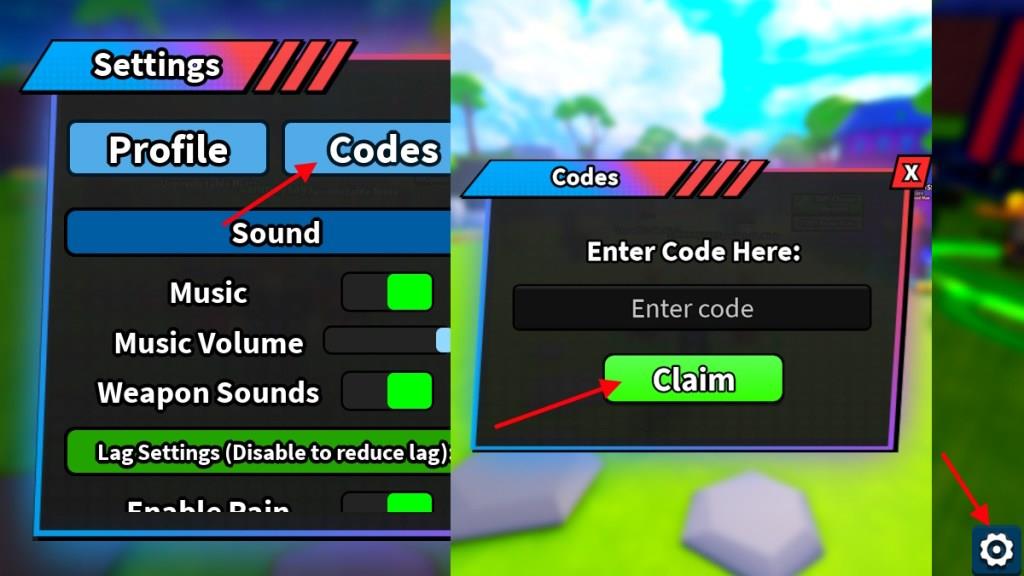
With your hands on the active codes, you will need a way to claim them in the game. Here is how you can redeem the codes for Anime Apex:
- Launch Anime Apex on Roblox.
- Select the Settings icon in the bottom right corner.
- Click on the Codes option.
- Type the active code in the ‘Enter code’ box.
- Click Claim to redeem the rewards.
How to Get More Anime Apex Codes
Find reliable sources, follow official Roblox social channels, and regularly check event pages for fresh codes. Act quickly when a code pops up, as these rewards rotate, and redeem them within the expiry window to maximize your chances of snagging rare items.
Cannot wait to get your hands on some more codes for Anime Apex? Then simply grab them from our list here. This is the best place for all your codes, as we update our list regularly. Bookmark this list and drop by when you need a freebie.
Otherwise, you can also join the Anime Apex Discord server to have fruitful discussions with other players. You will also find newly released codes there, but hidden under other announcements. Our list is still the best place to get your codes for this experience.
Claim rewards for WELCOME and RELEASE codes now
To claim rewards for the WELCOME and RELEASE codes in Anime Apex on Roblox, follow these steps directly in the game.
Redemption Process
Launch Anime Apex via the Roblox app or website. Locate the Settings icon (gear symbol) in the bottom-right corner of the screen, then select the “Codes” tab. Enter “WELCOME” exactly (case-sensitive) and tap Claim to receive 50 Gems + 2 Random Potion Boxes; repeat with “RELEASE” for the same rewards.
Troubleshooting Tips
Rewards appear instantly if the code is valid and unused on your account-check your inventory. If nothing happens, restart the game, ensure you’re logged into the correct Roblox account, or verify no typos occurred. Codes from September 2025 may have expired by January 2026, so test them promptly.
How to redeem Clash Royale WELCOME code step by step
Clash Royale does not have a “WELCOME” code; codes are typically event-specific promo codes like emotes or chests, redeemable via the Supercell Store website. Follow these steps to redeem any valid code step by step.
Prerequisites
Ensure you have a Supercell ID linked to your Clash Royale account. Open the game, tap the three-line menu (top right), select “Supercell ID,” and log in or create one.
Redemption Steps
-
Visit store.supercell.com in your browser and select Clash Royale.
-
Log in with your Supercell ID to access the store page.
-
Scroll to the bottom and find “Redeem a Store Code”.
-
Enter the code exactly (case-sensitive, e.g., if it were WELCOME) and click Submit.
-
Confirm the reward on the pop-up; it applies instantly or on next login.
Troubleshooting
Codes expire quickly, so verify active ones from official sources. Rewards appear in-game under your account; restart if needed. No in-game redemption exists-always use the web store.