Dive into Spin a Baddie Codes this February and unlock surprises that reshape Roblox adventures.
All New Spin a Baddie Codes
Discover the latest Spin a Baddie codes for February 2026, including how to redeem them, what rewards you can snag, and tips to verify code validity to maximize your in-game boosts.
- GEMSGEMSGEMS1: 250 Gems (NEW)
- GOLDENDICE: 50 Golden Dice (NEW)
Expired Spin a Baddie Codes
Currently, there are no expired codes for this Roblox experience. Once the above codes expire, they will be moved to this section.
Enjoying grabbing the latest baddies? If your love isn’t limited to anime girls, but goes beyond it to all farming games. Then you will also enjoy playing Grow a Garden. Not your cup of tea? Check out the Forge or Blue Lock Rivals. If not yet satisfied, check out the Roblox game codes list and pick a game that fits your taste.
How to Redeem Spin a Baddie Codes
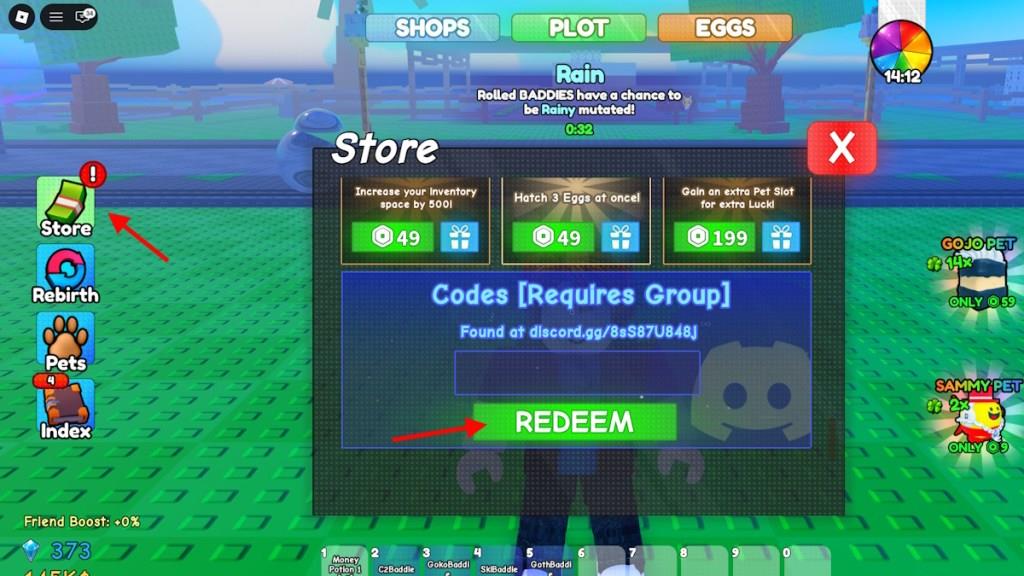
To redeem Spin a Baddie codes, open Roblox and launch Spin a Baddie, tap the menu or settings, select Codes, enter your code exactly as shown, and hit Redeem to receive the rewards.
To redeem the codes for Spin a Baddie, you will first need to join the 44th class Roblox community. Once you have done that, here is what you need to do:
- Launch Spin a Baddie on Roblox.
- Click Store on the left side.
- Scroll down to the Codes section.
- Type a working code in the empty box.
- Click the Redeem button to claim rewards.
How to Get More Spin a Baddie Codes
New Spin a Baddie codes often drop through the game’s official social media accounts, Discord server, or Roblox group, so it’s smart to check them frequently for fresh rewards. Players can also join community forums where users share newly released codes and updates. Keeping notifications on for the developers’ posts helps catch time-limited codes before they expire, ensuring you don’t miss free spins or bonuses.
To find more codes for Spin a Baddie, you only need to bookmark our post and visit it frequently. This is the best place to find codes, as we make sure to update and add active codes faster than anyone on the internet.
Other than following us, you can join the 44th’s Community Server Discord server. This way, you will stay on top of the latest announcements and upcoming events.
Why Are My Spin a Baddie Codes Not Working?
If your Spin a Baddie codes aren’t working, check for typing errors or extra spaces, as codes must match exactly. Some codes expire after a short time or become inactive after a new update. It’s also possible the code has already been redeemed on your account. Make sure you’re entering the code in the correct in-game section and that the game version you’re using is current.
If the Spin a Baddie codes are not working for you, it can be due to various reasons. The obvious one would be that the code has expired. Other than that, make sure you are typing the code correctly.
Simply copy and paste the code from our list to avoid typos. If that also doesn’t work, try waiting for a couple of hours before trying again. Codes released after a new update often only work in new servers, so waiting for the servers to refresh can fix the issue.
Son Baddie Codes güncel kodlar 2026 Şubatuar
Şubat 2026 itibarıyla en güncel Spin a Baddie kodları şöyle görünüyor:
-
GEMSGEMSGEMS1 – 250 Gems
-
GOLDENDICE – 50 Golden Dice
Türkçe özetle: Bu kodlar size ücretsiz taş (gems) ve golden dice veriyor; nadir “baddie” karakterleri açmak için kullanabiliyorsunuz. Kodları birebir büyük-küçük harfe dikkat ederek yazmanız gerekiyor; aksi halde sistem geçersiz sayabiliyor.
Eğer istediğiniz farklı bir oyun (örneğin “Baddies”, “Baddies Brawl” veya “Cool a Baddie”) ise, tam oyun adını yazarsan o oyun için de Şubat 2026 kodlarını tek tek listeleyebilirim.
Spin a Baddie kodlarını nasıl kullanırım
Spin a Baddie kodlarını kullanmak için oyunun içindeki “Store/Shop” menüsünü açıp en alta inmen gerekiyor.
Adım adım nasıl yaparsın?
-
Roblox’ta 44th class grubuna katıl (bazı rehberler grup ödülleri ve kodlar için bunu öneriyor).
-
Roblox üzerinden Spin a Baddie oyununu aç ve kısa öğreticiyi (tutorial) bitir.
-
Ekranın sol tarafındaki Store / Shop tuşuna tıkla.
-
Açılan mağaza menüsünde en alta kadar kaydır; Codes veya kod yazma kutusunu göreceksin.
-
Kodunu (örnek: GEMSGEMSGEMS1, GOLDENDICE) harf hatası yapmadan kutuya yaz ya da yapıştır.
-
Yanındaki Redeem / onay tuşuna bas; ödüllerin (Gems, Golden Dice vb.) hemen hesabına eklenir.
Çalışmıyorsa nelere dikkat etmelisin?
-
Kodlar büyük-küçük harfe duyarlı, yanlış yazarsan geçersiz sayılır.
-
Kodların süresi dolmuş olabilir; resmi rehberlerden “February 2026” olarak güncel listelere bakman gerekir.
-
Sunucudan atılma veya bağlantı hatası varsa yeniden girip tekrar dene; bazen yoğunlukta ilk denemede işlemeyebiliyor.
İstersen, elindeki belirli bir kodu yazarsan, o kodun ne verdiğini de söyleyebilirim (örneğin kaç Gems veya kaç Golden Dice).
