Confused players are asking if Epic Games secretly pulled the plug on Fortnite’s Zero Build mode after a recent menu shuffle. Has the fan-favorite way to play vanished, or is it just hiding behind new options?
This is because, after the release of the Fortnite 39.40 update, players are having a hard time locating the Zero Build tile in the game’s expansive Discover tab. Here’s everything you need to know about the changes made to Zero Build with the most recent Fortnite update.
Did Epic Remove Zero Build from Fortnite Battle Royale?
Epic Games hasn’t removed Zero Build from Fortnite Battle Royale, but recent menu changes have made it harder to find. The mode still exists and can be accessed through the “Discover” tab, where it’s listed under different categories depending on the current season or event layout. Some players thought it was gone because it’s no longer displayed as prominently on the main mode selection screen, but Epic confirmed that Zero Build remains a permanent option for those who prefer matches without building mechanics.
No, Epic Games has not removed Zero Build from Fortnite. The developers know that Zero Build is one of the most popular ways to play Fortnite, especially for players who value gunplay skills over building prowess. The confusion regarding the mode stems from Fortnite’s recent Valentine’s Day update.
In order to reduce clutter in the “Discover” tab and streamline the mode selection process, Epic has consolidated several game modes into a single playlist. This means that Fortnite Zero Build did not get the axe; it just got tucked inside a new sub-menu.
Where is Zero Build in Fortnite Chapter 7 Season 1?
Zero Build is still in Fortnite Chapter 7 Season 1, but it no longer sits as a standalone tile in the Discover menu; instead, it now appears inside the Fortnite Battle Royale mode settings, where players must pick Zero Build from the list before queuing up.
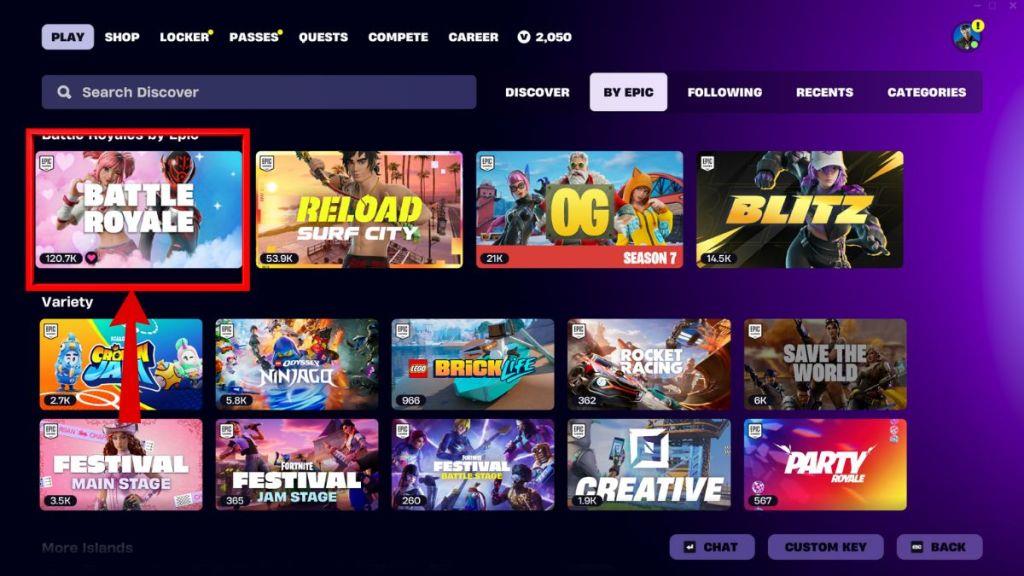
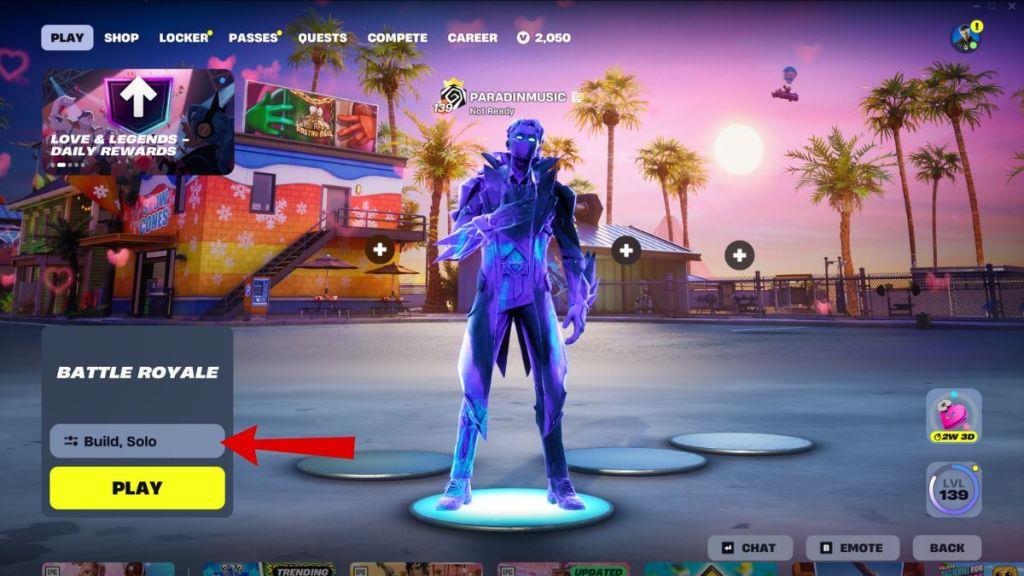
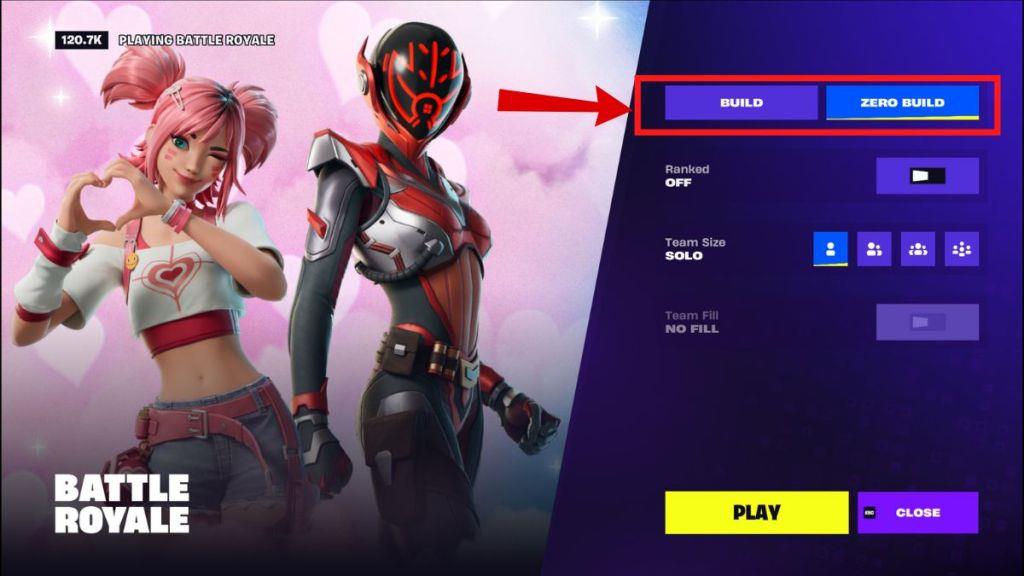
As of the Love and Legends update, finding Zero Build in Fortnite now requires an extra click or two, as it has been grouped under the primary Battle Royale category rather than its own dedicated discover tile. Here is how you can find and access Zero Build in Fortnite Chapter 7 Season 1:
- From the main lobby, scroll down to reach the Discover menu.
- Head to the “By Epic” section of the Discover menu.
- Here, select the standard Battle Royale mode.
- Click on the mode options over the yellow Play button.
- Choose between Build and Zero Build in the menu that opens up.
It is important to remember that Fortnite Zero Build does not show up even if you type ‘Zero Build’ in the search bar. The only way you can access Zero Build after the 39.40 update is through the Battle Royale mode selection screen.
How to access Zero Build in the new Discover menu
Here’s how to access Zero Build in the new Discover menu after the recent update.
Step-by-step in the new Discover
-
From the main lobby, scroll down to the Discover section.
-
In Discover, go to the “By Epic” / Battle Royale category and select Battle Royale (don’t look for a separate Zero Build tile; it’s no longer listed on its own).
-
After selecting Battle Royale, scroll back up to the main lobby view and look just above the PLAY button for the mode selector button (this is where you also choose Solo/Duos/Squads/Ranked).
-
Open that selector and switch from Build to Zero Build (and optionally Ranked Zero Build if it’s available for you).
-
Pick your team size (Solo, Duos, Squads), then press PLAY.
Once you’ve selected it, the game usually remembers your last choice, so Zero Build should stay set as your default mode until you change it again.
Why did Epic reorganize the Discover menu in the Feb 5 update
Epic has not given a very detailed public “design diary” for the 5 Feb v39.40 change, but their broader goal with the new Discover layout is to make browsing islands and modes feel more like a unified content platform and less like a simple mode picker.
Stated/obvious goals
-
Turn Fortnite into a platform, not just BR. Discover has been repeatedly reworked to surface Epic-made modes, Creative/UEFN islands, and collections (like LEGO or TMNT) in one place, aligning with their long-term “Fortnite ecosystem” push.
-
Easier browsing and search. The recent Discover revamp added a persistent top bar (Search, Following, By Epic, Recents, Categories), so filters are always visible while you scroll, reducing friction when jumping between types of content.
-
Highlight curated content and collections. New “Collections” rows and billboards make it easier for Epic to promote specific genres, events, and partner content without relying on the old static playlist screen.
Likely motivations behind the Feb 5 change
-
Improve discoverability for Creative/UEFN maps. Epic has said Discover is meant to help players find more varied experiences; consolidating everything into the Discover interface gives Creative maps equal “entry point” status with Battle Royale modes.
-
Reduce UI clutter and clicks. Moving to a tabbed, single-interface Discover with a sticky top bar is framed by Epic and creators as a quality-of-life improvement that should make navigation faster once players adapt.
-
Analytics and engagement. Community discussion around prior Discover iterations notes that Epic is experimenting with layouts to improve session starts and time spent in different islands, suggesting they are iterating toward what keeps players engaged across the ecosystem, not just BR.
Why it feels worse (player perspective)
-
Many players feel core BR playlists are now “buried” under multiple rows of other content, so finding things like Zero Build or Ranked can take more scrolling than before.
-
Creative map makers also argue that some Discover versions actually hurt small creators by primarily pushing already-popular or Epic-made modes, so the reorganizations can benefit some groups while frustrating others.
In short, Epic reorganized Discover in the Feb 5 update as part of a long-running push to make Fortnite’s front end a unified, content-driven hub (with better search, tabs, and collections), even though that has made accessing specific modes like Zero Build feel more cumbersome for many players.
