New February 2026 codes for Be a YouTuber have arrived, giving Roblox players fresh boosts to grow their channels faster, earn more cash, and climb the creator ranks before these limited rewards expire.
All New Be a YouTuber Codes
The latest Be a YouTuber codes for February 2026 bring players new ways to earn rewards, cash, and upgrades for their virtual channels. Redeeming these fresh codes can give you an edge by boosting your progress faster and helping you expand your studio setup. Make sure to use them soon, as Roblox promo codes often expire quickly and get replaced with new ones each month.
- 30klikes: 5 Rebirth Coins (NEW)
- 20KLikes: 250 Cash (NEW)
- release: 5 Rebirth Coins
Expired Be a YouTuber Codes
- 10klikes
If you love such simulation or tycoon games, where you can sit and relax, then try RoTube Life 2, Cultivation Simulator, and Fabled Legacy. But, if these aren’t your piece of cake, have a look at our Roblox game codes master list to find some of the best games on the platform.
How to Redeem Be a YouTuber Codes
Follow these steps to redeem Be a YouTuber Codes: open Roblox, launch Be a YouTuber, and press the Menu button, then select Codes. Enter your code exactly as shown, click Redeem, and your rewards will appear in your inventory or be applied to your account immediately.
Before you start to redeem the codes for Be a YouTuber, join their official Roblox community and like their game. Now follow the steps below to get the rewards:
- Launch Be a YouTuber on your Roblox app.
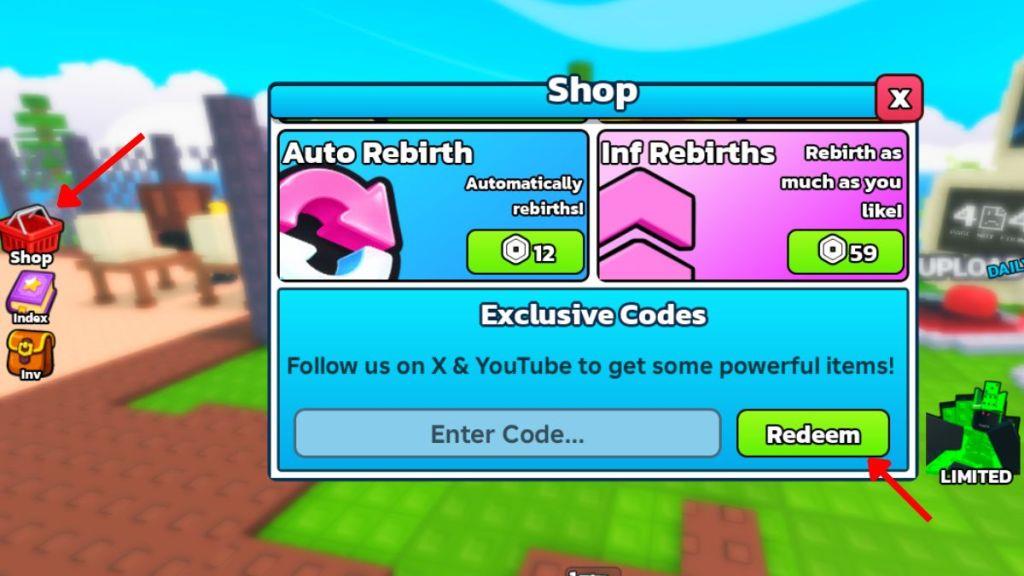
- Click on the Shop icon on the left side of the screen.
- Scroll down and enter a working code in the Code text box.
- Click on the Redeem button to receive all the rewards.
How to Get More Be a YouTuber Codes
Joining the official Be a YouTuber Roblox group, following the game’s creators on social media, and checking the game’s description regularly are the best ways to find new codes. Developers often release fresh codes during updates, events, or milestones, so staying active in the community can help you spot them quickly. You can also follow Roblox code websites or Discord servers dedicated to Be a YouTuber for frequent updates.
If you want to be among the first ones to get the codes in this game, bookmark this page right now. Since we update the list often, you can find and redeem the latest rewards before they expire.
Next, make sure that you join the official Be a YouTuber Discord server. Here, you will find the list of all the latest codes in the ‘game-news‘ channel. Finally, head over to the game site and join the IM A YOUTUBER community to make sure you get the rewards from all codes.
Why Are My Be a YouTuber Codes Not Working?
If your Be a YouTuber codes aren’t working, they may have expired or been entered incorrectly. Double-check the spelling, including capitalization and numbers, since Roblox codes are case-sensitive. It’s also possible that the code is limited to certain servers or events and no longer valid for everyone. Make sure you’re using codes from reliable sources and try restarting the game after entering them to refresh your session.
The codes in the game might not be working due to a variety of reasons. One of the most common problems is that you are present on an older server after the update. Make sure that you exit the game, check your internet connection, and rejoin by selecting a newer server.
It may also happen that the code you’re entering has a wrong spelling. Make sure that you copy the codes from our list and paste them directly into the game. If that too doesn’t work, it may happen that the codes have expired.
How to redeem codes in Be a YouTuber step by step
Here’s a clear, step-by-step way to redeem codes in the Roblox game Be a YouTuber:
-
Open Roblox and start Be a YouTuber from your games list or the game page.
-
Wait for your game to load into your studio/house area so the UI buttons appear.
-
On the left side of the screen, click the Shop button (basket icon).
-
A shop menu will pop up; scroll all the way down to the bottom of this menu.
-
Find the Exclusive Codes section and look for the code text box.
-
Click inside the text box and type or paste a working code (for example, 50klikes or 30klikes).
-
Press the Redeem button next to the box.
-
If the code is valid and not expired, you’ll see a success message and your rewards (cash or rebirth coins) will be added to your account automatically.
Optional but recommended before redeeming:
-
Like the game and join the IM A YOUTUBER Roblox group to make sure all codes work and give rewards properly.
If you tell me whether you’re on PC, phone, or tablet, I can rewrite these steps tailored to your device’s buttons and controls.
What are the active Be a YouTuber codes February 2026
Here are the active Be a YouTuber Roblox codes for February 2026:
Active codes (February 2026)
-
50klikes – 10 Rebirth Coins
-
30klikes – 5 Rebirth Coins
-
20KLikes – 5 Rebirth Coins (some lists say 250 Cash, but most now show 5 Rebirth Coins)
-
release – 250 Cash or 5 Rebirth Coins (reward text differs between trackers, but the code is still active)
Most trackers also note no other active codes and no major expired codes besides 10klikes (expired).
Use them exactly as written (same capitalization) in the in-game Shop → code box → Redeem.
