Unlock exclusive Roblox UGC items without spending a dime-grab these September 2025 codes before they vanish.
All New Click For Free UGC Items Codes
Grab these fresh codes for free UGC items in Roblox. They drop monthly, so check back often for the latest batch from September 2025. Redeem them quickly through the official site or in-game menu to claim limited hats, accessories, and gear before they expire. Follow our simple steps to avoid errors and score your rewards fast.
- NEWUGC: 50K CLICKS (NEW)
- 99NIGHT: 65K CLICKS
- OWL: 20K CLICKS
Expired Click For Free UGC Items Codes
- EMOTE
- SORRY4DELAY
- UGC
- DEER
- UGC
- SAMMY
- JANDEL
If you love such clicker idle games on the platform, do try out Race Clicker, Brainrot Evolution, and Flashpoint Worlds Collide. Once you’re done checking them out, do play a few games from our Roblox game codes master list as well.
How to Redeem Click For Free UGC Items Codes
To redeem Click For Free UGC Items codes, open Roblox and go to the code redemption page. Log in to your account, then copy a valid code from the list and paste it into the code box. Click the Redeem button, and the item will be added to your inventory automatically. Make sure the code hasn’t expired and is entered exactly as shown to avoid errors.
To get all the rewards in this game, check out the following steps to redeem the codes for Click For Free UGC Items:
- Launch Click For Free UGC Items on your Roblox app.
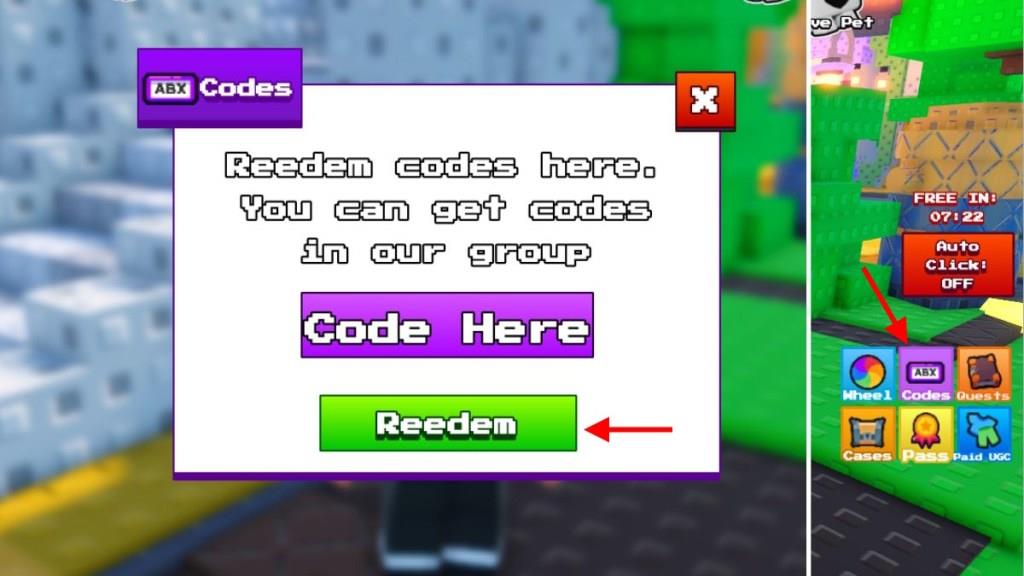
- Click on the ABX button on the right side of the screen
- Type a working code in the text box.
- Click on the green Redeem button to get your rewards.
How to Get More Click For Free UGC Items Codes
Follow social media accounts and Discord servers tied to Click For Free UGC Items. Developers drop codes during live streams, events, and updates. Check the game’s official Roblox page and group wall daily for announcements. Join community forums like Reddit to spot player-shared codes before they expire. Redeem them fast through the in-game menu under the codes section.
If you’re not sure where to look for the new codes released in the game, consider bookmarking this page right now. This way, you will never miss out on any rewards as the list is updated often.
The next thing you can do is join the Click For Free UGC Discord server. Here, you will find the list of new codes in the ‘announcement‘ channel. Finally, join the Peak UGC Games community on roblox to find the latest news posted there.
How to redeem Click For Free UGC codes step by step
To redeem codes in Click For Free UGC Items on Roblox, follow these exact steps.
Step-by-Step Guide
Launch the Click For Free UGC Items experience directly from the Roblox app or website.
Click the ABX or Codes button, typically located on the right or left side of the screen to open the redemption window.
Enter the code precisely (case-sensitive) into the text field, then press the green Redeem button to claim your clicks or rewards.
Troubleshooting Tips
Rejoin the game server if a code fails, as some are one-time use per account or server-specific. Codes from September 2025 like NEWUGC or 99NIGHT may have expired by January 2026, so test recent ones from updated lists. Copy-paste codes to avoid typos.
Show where the Codes or ABX button is in the game interface
In Click For Free UGC Items on Roblox, the Codes or ABX button appears as a labeled icon on the main game screen after spawning in.
Button Location
The button is typically positioned on the right side of the interface, often near the top or middle amid other quick-action icons like multipliers or boosts. It may display “ABX,” “Codes,” or a gift/box symbol for easy spotting. On mobile, it remains in the same spot but scales smaller-zoom out or rotate to landscape if hidden.
Visual Identification
Look for a rectangular or circular button amid vertical stacks of UI elements on the right; hover or tap to confirm it opens the code input field. If missing, rejoin the server, as it spawns post-loading. Videos from similar updates show it consistently right-aligned for thumb access.
