Unlock free EXP boosts and rare items in Jujutsu Seas-grab these September 2025 Roblox codes before they vanish.
Moreover, rolling for races and clans can earn your character some passive boosts to help along the journey. Since there are a few roll spins to begin with, redeem the following active Jujutsu Seas codes to earn some for free and a couple of XP boosts aas well.
All New Jujutsu Seas Codes
Grab the freshest Jujutsu Seas codes for September 2025. Redeem them now in this Roblox game to claim free EXP boosts and speed up your power gains. Check back often since developers release new ones with updates. Follow the steps in our guide to activate them without hassle.
- 10KLIKESS: 15 min EXP boost (NEW)
- 200KVISITS: 15 min EXP boost (NEW)
- 150KVISITS: 15 min EXP boost (NEW)
- 5KFavssss: 10 Race Spins (NEW)
- 5KLIKESSSLEZGO: 10 Clan Spins (NEW)
- 10kCOMMUNITYMEMBERS: 15 min EXP boost
Expired Jujutsu Seas Codes
- 2KLIKESNICE
- 75kVISTTTSS
- DAY3GIFT
- JUJUTSUPEAK
- 1Kheart
- 1Klikes
- EnjoyJujutsuSeas
- Otaku
- RTQ
- Rahumi
- SteveVLX
- Alpha
If anime-inspired games do not entertain you, try checking our Roblox game codes master list, where you will find a rich list of fun experiences like Racket Rivals. However, if you love Jujutsu Kaisen and games inspired by it, do consider playing Jujutsu Infinite, Jujutsu Beatdown, and Kaizen as well.
How to Redeem Jujutsu Seas Codes
To redeem Jujutsu Seas Codes, open the Roblox game, access the in-game menu, select Codes, enter your code exactly as shown, and claim your EXP boost instantly.
Before you redeem the codes for Jujutsu Seas, make sure that you join their social communities and like the experience on the official site. Once done, follow the give steps to get the free goodies:
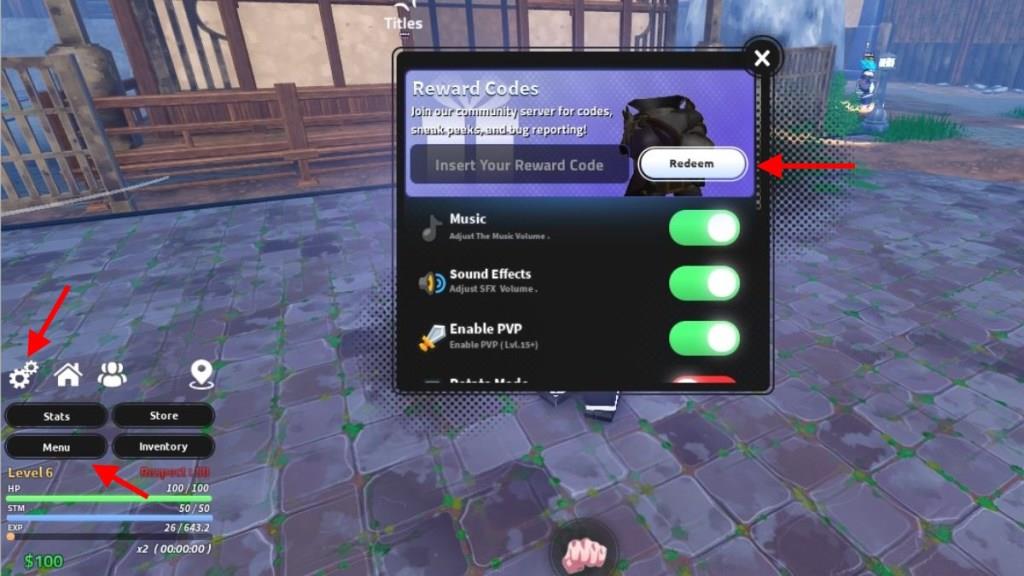
- Launch Jujutsu Seas in the Roblox player.
- Click the Menu button at the bottom left of the screen.
- Then, click on the Cog Wheel icon to open a pop-up window.
- Enter a working code in the text box here.
- Click the Redeem button to get your rewards.
How to Get More Jujutsu Seas Codes
Boost your Jujutsu Seas Codes by joining daily community events, checking the official Roblox group for code drops, and following the game’s social channels for time-limited releases.
Since the game is fairly new, you can expect frequent updates and, therefore, more chances of getting new codes as well. So, if you want to be among the first ones to get the free rewards, make sure you bookmark this page. Since we update the code list often, you won’t miss out on the free stuff.
For those who like to hunt down codes by themselves, go ahead and join the official Jujutsu Seas Discord server. Here, you’ll find the list of all active ones in the ‘jjs-codes‘ channel. Finally, join their Jujutsu Seas community on the Roblox app, since it’s a prerequisite to redeem the codes in the game.
How do I redeem codes in Jujutsu Seas
To redeem codes in Jujutsu Seas on Roblox, start by launching the game and ensuring you’re in the Jujutsu Seas TM Roblox group, as it’s often required. Click the Menu button (or settings icon) at the bottom left of the screen, then select the gear/cog icon to open the code input field.
Step-by-Step Guide
Follow these steps precisely for success:
-
Join the official Jujutsu Seas Roblox group and like the game if prompted.
-
Open the in-game menu on the left side, then click the cog/gear icon.
-
Enter the code exactly (case-sensitive, no spaces) into the text box.
-
Press the Redeem button to claim rewards like EXP boosts or spins instantly.
Troubleshooting Tips
Codes may fail if expired, misspelled, or already used-copy-paste directly and retry after rejoining. Server lag or not meeting prerequisites (like group join) are common issues; check the official Discord’s #jjs-codes channel for updates. Rewards are one-time per account across PC, mobile, or console.
Where is the Redeem code button located in the game menu
In Jujutsu Seas on Roblox, the redeem code button is accessed through the in-game menu. Open the menu (typically a button on the left side of the screen), then navigate to the forums or settings option, where the redeem code feature appears on the right side.
Precise Location
Start in the main game lobby or hub area. Tap or click the Menu icon (often a hamburger or list symbol at the bottom-left), select Forums to load that page, and look for the Redeem Code button positioned on the right panel.
Activation Steps
-
Ensure you’re in the Jujutsu Seas Roblox group beforehand, as it’s required for codes to work.
-
After clicking Redeem Code, paste the code (uppercase, no spaces) and confirm-rewards like EXP boosts apply instantly if valid.
-
If hidden, rejoin the server or verify group membership, as UI glitches can occur.
