Code your way to victory in Plants vs Brainrots this September 2025 with the latest Roblox codes that drop exclusive boosts, rare plants, and quirky rewards every player craves.
In this guide, find all the working Plants vs Brainrots codes, which give free cash and other rewards. Use the freebies and make the best plant and Brainrot collection.
All New Plants vs Brainrots Codes
Check out the latest Plants vs Brainrots codes for September 2025. Redeem them now for free boosts, coins, and plant upgrades to crush those brainrots faster. Codes drop regularly, so grab them before they expire and dominate the leaderboard.
- based: Redeem for 5000 Cash (NEW)
Expired Plants vs Brainrots Codes
Currently, there are no expired codes, so you might want to redeem the current ones before they expire.
While you wait for more codes, you can try out Brainrot Evolution and Brainrot Training, if you want to stick to Brainrot games. But if you are looking for something different, then I would suggest Grow a Garden and Blue Lock Rivals. Moreover, you can visit our Roblox game codes master list and find your next adventure.
How to Redeem Plants vs Brainrots Codes
Open the Plants vs Brainrots game on Roblox and find the Settings menu, usually in the top-right corner or main lobby. Click the Codes button to reveal the text box. Enter a valid code from our September 2025 list exactly as shown, without spaces or extras. Hit Redeem or Submit to claim your rewards instantly. Check your inventory if nothing appears right away, as codes expire quickly.
Surviving the brainrot hordes can be difficult, but to get the free rewards, follow the simple steps below and redeem the codes for Plants vs Brainrots:
- Launch Plants vs Brainrots on the Roblox app.
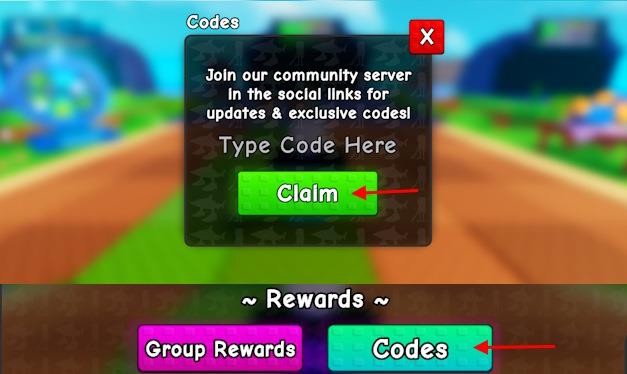
- Click the Shop –> Codes button on the left screen.
- Type a working code in the pop-up box.
- Click the Claim button to obtain rewards.
How to Get More Plants vs Brainrots Codes
Check the game’s official Discord server and Roblox group page daily for announcements from developers. Follow Plants vs Brainrots on Twitter or X and turn on notifications to catch code drops during events or updates. Join Roblox code-sharing communities on Reddit or Discord that focus on the game. Test codes right away in the game’s redeem menu, as they expire fast. Ask in the in-game chat or developer forums if players share fresh ones.
Looking for the best way to get more codes for Plants vs Brainrots? Bookmarking this page is your best bet, as we are always on the lookout for new updates. So, when in doubt for new Roblox game codes, check back and you’ll find them here.
If you want to take matters into your own hands, then you should join the official Plants vs Brainrots Discord server. Check out the codes channel in the server for all the latest freebies. You can also check the Yo Gurt Studio Roblox community for the latest news on the game. By joining it, you can earn even more rewards in Plants vs Brainrots.
How to redeem Plants vs Brainrots codes
To redeem Plants vs Brainrots codes in Roblox, you need to open the in-game Shop and then go to the Codes menu, where you can enter and claim any active code for instant rewards.
Step-by-step redemption
-
Launch Plants vs Brainrots from the Roblox app and, if you are new, finish the short tutorial so the full UI appears.
-
Look to the left side of the screen and click the Shop icon (usually a cart or red basket).
-
In the Shop menu, either:
-
Press the Rewards tab and then hit the Codes button, or
-
Scroll down until you see a dedicated Codes button and click it.
-
-
In the pop-up code text box, type or paste a working code (for example, BASED, STACKS, or FROZEN) and press Claim.
-
Your rewards (cash, potions, grenades, etc.) are added immediately to your balance, hotbar, or inventory, and a confirmation message usually appears.
Common issues and fixes
-
If you see “Invalid Code”, the code is usually expired or mistyped; copying and pasting from a trusted list avoids errors.
-
Some guides note you must clear the tutorial or let the UI fully load before the Shop and Codes buttons show up.
-
Codes can be removed with updates, so redeem them as soon as you find them and check updated code lists or the game’s Discord for new ones.
Steps to find the Codes button in-game
In Plants vs Brainrots, the Codes button is inside the in-game Shop menu on the left side of your screen.
Simple route to the Codes button
-
Look at the left side of the HUD and click the Shop icon (red basket/cart symbol).
-
Once the Shop window opens, either:
-
Click the Rewards tab and then press the Codes button, or
-
Scroll within the Shop until you see a Codes button and select it.
-
If you still can’t see it
-
Make sure you have finished the short tutorial and waited a few seconds for the full UI to load, because the Shop and Codes buttons may not appear immediately.
-
If the button still does not show, try rejoining the game or switching device (PC/mobile) as UI bugs sometimes hide interface buttons.
