New codes have surfaced for Reborn Cultivation this September 2025, giving players a fresh boost to strengthen their characters and claim rare rewards. Stay sharp-these limited-time codes could make the difference between a novice cultivator and a true master on Roblox.
We have listed the Reborn Cultivation codes that give you free talent and family Rerolls to stay ahead. Use them and pick the one that makes you stronger than the others.
All New Reborn Cultivation Codes
Reborn Cultivation Codes (September 2025) provides updated Roblox guides to help players maximize growth, access hidden features, and streamline farming methods with user-friendly, step-by-step instructions for both new and seasoned cultivators.
- 1100Likes!: 65 Talent Rerolls and 65 Family Rerolls (NEW)
- 1KLIKES: 140 Talent Rerolls and 140 Family Rerolls
- 900Likes!!: 65 Talent Rerolls and 65 Family Rerolls
- Release: 20 Talent Rerolls and 20 Family Rerolls
- Reborn: 20 Talent Rerolls and 20 Family Rerolls
- Cultivation: 30 Talent Rerolls and 30 Family Rerolls
Expired Reborn Cultivation Codes
Currently, there are no expired codes in this Roblox Experience. Once a code expires, it will be moved to this section.
If you like action games, then there are so many other options that you can try on Roblox. Start with Blox Fruits, Verse Piece, and Grand Piece Online. You can find more amazing games set in the popular anime verse in our Roblox game codes list.
How to Redeem Reborn Cultivation Codes
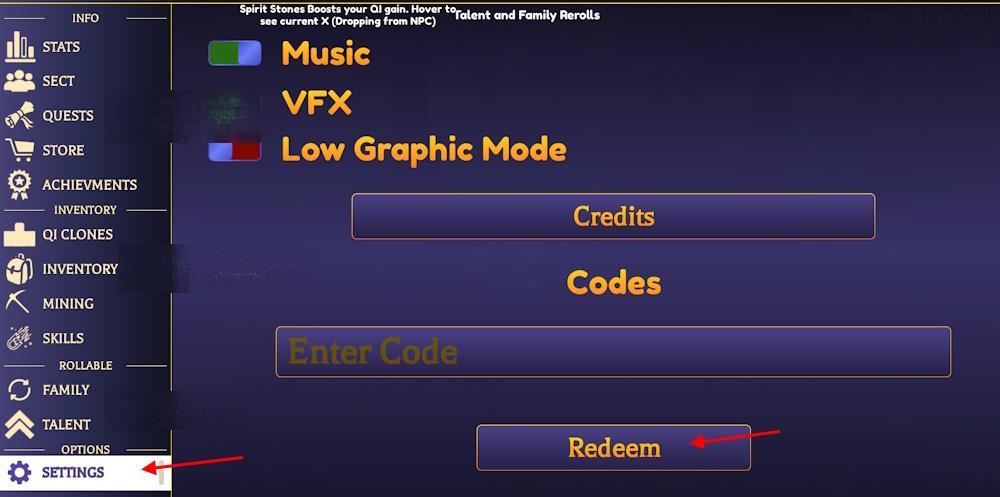
Open the game in Roblox and find the Settings menu on the right side of the screen. Tap the Codes icon or button to bring up the text box. Copy a valid code from our list exactly as shown, paste it into the field, and hit the Redeem button. Check your in-game mail or inventory for the rewards, which arrive right away if the code works. Repeat for each code you want to claim.
Redeeming the codes for Reborn Cultivation is as easy as meditating in the game. Here is how to do it:
- Launch Reborn Cultivation on Roblox.
- Complete the tutorial and press the M key.
- Click the Settings tab and type a working code.
- Click the Redeem button to claim the rewards.
How to Get More Reborn Cultivation Codes
Check the game’s official Discord server and Roblox group page regularly for new code drops from developers. Follow Reborn Cultivation on social media platforms like Twitter and YouTube, where they share updates during events or milestones. Join Roblox code-sharing communities on Reddit or Discord bots that track releases. Redeem codes quickly after announcements, as they often expire fast. Test old codes periodically in case some reactivate.
If you want more codes for Reborn Cultivation, then simply bookmark our list here. We add every new code here once they are released, so you will never miss out on it. Other than that, we also remove any expired codes from our lists regularly, so you will only find the active codes here.
But if you prefer searching for the codes yourself, then start by following the game’s social accounts. Join the official Reborn Cultivation Discord server to stay connected with the community and follow the Kinaro Roblox community.
How to redeem codes in Reborn Cultivation step by step
Redeeming codes in Reborn Cultivation requires accessing the in-game menu after starting a session. Follow these steps precisely, as the process relies on specific key inputs and menu navigation confirmed across guides.
Step-by-Step Guide
-
Launch Reborn Cultivation on Roblox and join a server.
-
Complete the tutorial if playing for the first time to unlock full menu access.
-
Press the M key on your keyboard to open the main menu.
-
Click the Settings option (gear icon or tab, typically in the bottom-left sidebar).
-
Enter the code exactly as listed (case-sensitive) into the Enter Code text box.
-
Hit the Redeem button to claim rewards instantly.
Troubleshooting Tips
Codes may fail due to typos, expiration, prior use, or server lag-try rejoining the game or pasting codes directly. This method remains consistent as of January 2026 updates. Test in-game for current validity.
Show where the Settings tab is located in the menu
The Settings tab in Reborn Cultivation appears in the in-game menu after pressing M. It is typically shown as a gear icon in the bottom-left corner of the menu sidebar.
Visual Location Guide
-
Open Menu: Press M to display the main menu overlay.
-
Spot the Icon: Look at the bottom-left sidebar-the gear (⚙️) symbol represents Settings, often next to tabs like Inventory or Skills.
-
Click to Access: Select it to reveal the code redemption field.
Quick Tips
Visual guides in YouTube code videos (e.g., timestamps around 0:30-1:00) zoom in on this exact spot for clarity. If the menu layout changed post-2025 updates, check the tutorial or Discord for screenshots.