Monthly Super Eleven codes are here-grab your September 2025 rewards before they vanish. From exclusive skins to in-game boosts, each code packs a fresh surprise for Roblox players eager to upgrade their roster and earn extra perks.
So, grab the latest Super Eleven codes, which give you free Yen and spins. While the latter will help you unlock the abilities of your favorite anime character, the former will get you skins, emotes, and more.
All New Super Eleven Codes
Players can grab the latest Super Eleven codes below to earn free coins, boosts, and exclusive items for September 2025. These codes give a quick way to strengthen your team, speed up progress, and collect rare rewards without extra grinding. Make sure to redeem them soon, as many expire quickly after release.
- sorrybug3: Redeem for 7,000 Yen (NEW)
- sorrybug2: Redeem for 7,000 Yen (NEW)
- sorrybug: Redeem for 7,000 Yen (NEW)
- SorryForShutdown: Redeem for 30 Spins and 7,000 Yen
- upd1.4: Redeem for 30 Spins and 5,000 Yen
- 9klikes: Redeem for 10 Spins and 7,000 Yen
- 3klikes: Redeem for 10 Spins and 7,000 Yen
- 2klikes: Redeem for 10 Spins and 7,000 Yen
Expired Super Eleven Codes
- sorryforshutdown2
- 4klikes
- Sorryforbug2
- upd1.3
- wallbug
- Sorryforbug
- Sorryfordelay
- Sorryforshutdown2
- 1KDiscord
- 200CCU
- 300CCU
- Release
This is not the only anime-inspired soccer game on Roblox. There are plenty of other games that bring the same thrill, so don’t forget to check out Blue Lock Rivals codes, Azure Latch codes, and Project Blue Lock codes before you get dribbling. Moreover, check out other popular experiences using our Roblox codes master list.
How to Redeem Super Eleven Codes
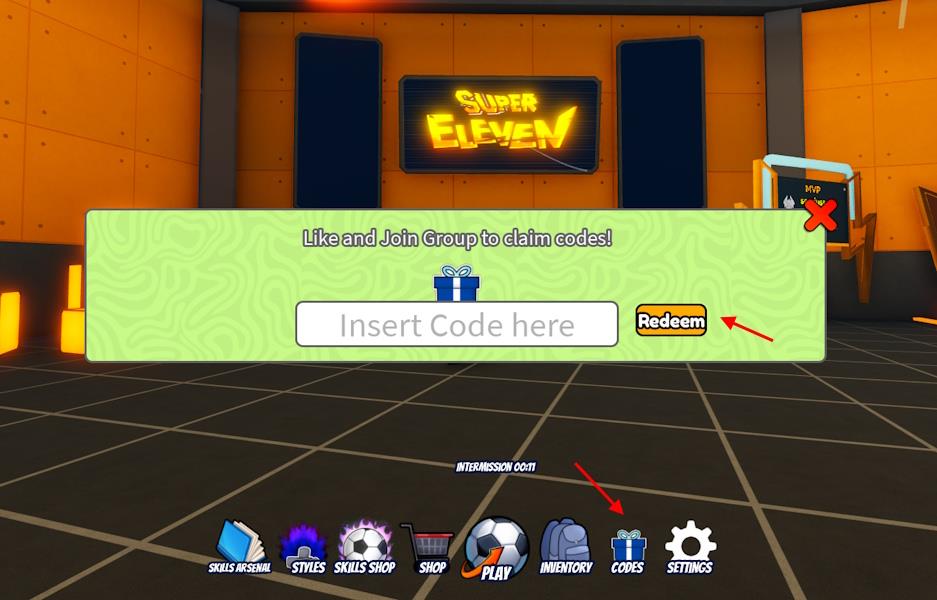
To redeem Super Eleven codes, open Roblox and launch Super Eleven, then navigate to the Codes or Redeem section, enter your code exactly as shown, and click Redeem to receive your rewards instantly.
While scoring a goal may prove to be a challenge, redeeming codes for Super Eleven is as easy as copy-pasting the correct code. So, follow the steps below:
- Launch Super Eleven in the Roblox player.
- Select the ‘Codes‘ option from the bottom bar.
- Then, input a working code in the pop-up window.
- Click the Redeem button to claim your free rewards.
How to Get More Codes for Super Eleven
Players can find more Super Eleven codes by following the game’s official social media pages, joining the Roblox group, or checking the community Discord server for new announcements. Developers often release new codes during special updates, events, and collaborations. Keeping notifications on for posts or update logs ensures that players don’t miss limited-time rewards or surprise promotions.
As we always mention, the easiest method to grab the latest codes is to bookmark our post and keep checking back from time to time. So, if you want more codes for Super Eleven, we will include them in the list above, that too on time. We are actively scouring the developers’ Discord and socials for a sign of new codes.
Don’t want to rely on us and keep track of the latest updates and codes yourself? In that case, we’d recommend that you join the Super Eleven Discord server right away. The server has a dedicated ‘codes’ channel that will give you access to the newly released codes. However, it can get a little cluttered as the developer doesn’t do any housekeeping and remove expired codes.
How do I redeem codes in Super Eleven step by step
Redeeming codes in Super Eleven on Roblox is straightforward and done entirely in-game. Follow these steps carefully, as codes are case-sensitive and expire quickly.
Step-by-Step Guide
-
Launch Super Eleven from the Roblox platform and wait for it to load into the main lobby.
-
Locate the “Codes” button at the bottom of the screen (in the lobby footer bar) and tap it to open the redemption window.
-
Enter a valid code exactly as listed into the “Insert Code here” text box (copy-paste to avoid errors).
-
Press the orange “Redeem” button to submit; rewards like Yen or Spins appear instantly if valid.
-
Check your HUD for updated Yen/Spins balances to confirm the reward.
Troubleshooting Tips
Invalid or expired codes show an error message-try rejoining the game to refresh or test a different code. Codes are single-use per account, so “Already Redeemed” means you’ve claimed it before. For latest codes, check developer Discord or group posts after updates.
Show where the Codes button is located in the lobby
The Codes button in Super Eleven’s lobby appears at the bottom of the screen, typically in the footer navigation bar alongside other menu icons like settings or shop. This matches descriptions from multiple guides, where it’s accessible immediately upon loading into the main lobby area.
Visual Location Guide
-
Bottom-center or bottom-right positioning: Look for a labeled “Codes” icon (often a ticket or gift box symbol) in the horizontal bar below your player HUD-Yen/Spins counters are usually above it.
-
Lobby context: No match setup needed; it’s visible right after spawning in the open lobby field, not hidden or in a sub-menu.
-
Tap to expand the input field; mobile users swipe up if the bar overlaps UI edges.
Common Issues
Players sometimes miss it during crowded lobbies or updates-zoom out or rotate camera to scan the bottom UI strip fully. If absent, rejoin the game, as it’s a core feature unchanged since September 2025 launches.
