Roblox fans race to stack codes before August slips away, chasing rare boosts in Anime Climb and Jump’s newest update.
Use both of them to boost your climbing speed as well as the amount of money generated from every round. Additionally, if you require some free cash, grab on to these active Anime Climb and Jump codes to buy the pets and wings.
All New Anime Climb and Jump Codes
Grab the latest Anime Climb and Jump codes for August 2025. Redeem them now in this Roblox game to claim free boosts, coins, and jumps that speed up your progress through towering climbs and high-flying leaps. These active codes offer quick rewards-paste them into the in-game menu and hit redeem before they expire.
- CLIMB: Get 150 coins (NEW)
- ANIME: Get 150 coins (NEW)
- LAUNCH: Get 150 coins
Expired Anime Climb and Jump Codes
Currently, there aren’t any expired codes in the game, so redeem the rewards available right now before they become unavailable
If you like such tower climbing games, go ahead and check out Climb and Jump Tower, Hell to Heaven Climb, and Climbing Game. However, if these aren’t your taste, you may try other games from our Roblox game codes master list, as these are some of the best ones available on this platform.
How to Redeem Anime Climb and Jump Codes
To redeem Anime Climb and Jump codes, open Roblox and launch Anime Climb and Jump, navigate to the Settings or Redeem Code section, enter your code exactly as shown, and press Redeem. If successful, you’ll receive the in-game rewards instantly; keep any unused codes for future drops and double-check codes on official channels to avoid expired or invalid entries.
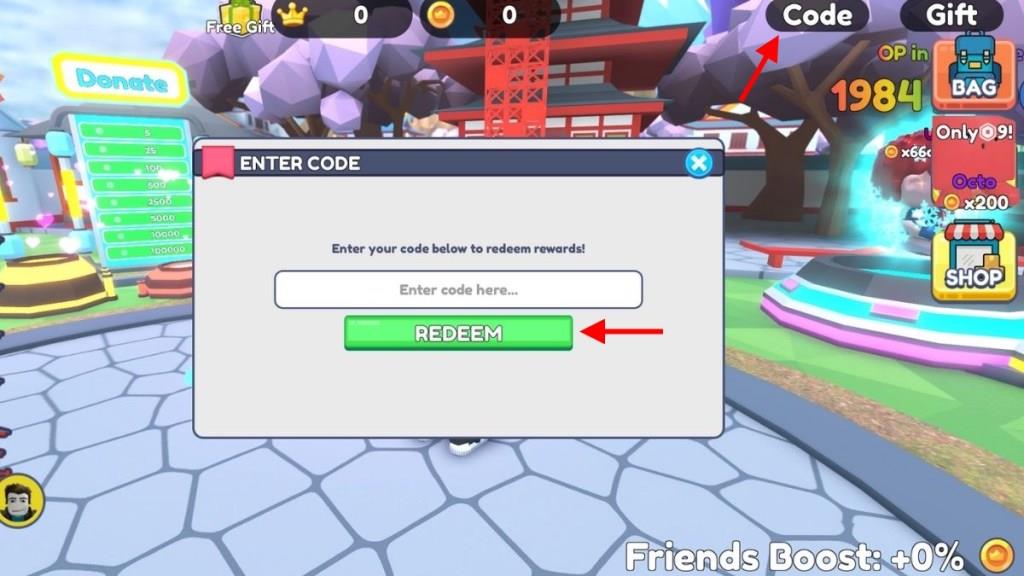
Now that you’re ready for some action, redeem the codes for Anime Climb and Jump from the following steps:
- Launch Anime Climb and Jump on your Roblox app.
- Click on the Code button on the top right of the screen.
- Type any active code in the text area of the pop-up window.
- Click on the Redeem button to get your rewards.
How to Get More Anime Climb and Jump Codes
Check the game’s official Discord server and Roblox group page regularly for code announcements. Follow Anime Climb and Jump on social media platforms like Twitter and YouTube, where developers post updates during events or milestones. Join Roblox code-sharing communities on Reddit or Discord to catch player-shared lists quickly. Redeem codes as soon as they drop since they often expire after a few days. Test old codes periodically in case new ones reactivate them.
We know that hunting all new codes can consume your precious gaming time, and hence, I would recommend that you bookmark this page. It is updated frequently, and so you will not miss out on any rewards in the future.
Currently, there is no official Discord server for the game, and all new codes are updated on the game page on Roblox. You may further join their official Anime Climbers community on Roblox to get some free rewards in the game.
Latest working Anime Climb and Jump codes August 2025 redeem steps
Anime Climb and Jump codes from August 2025 provide free coins and boosts for the Roblox climbing game. These codes were confirmed working in sources dated late August 2025.
Active Codes
Enter these in-game for rewards like coins, speed boosts, and luck potions.
| Code | Reward |
|---|---|
| THANKS | Coins and Boosts |
| ANIME | 2k Coins, 1 Speed Boost, 1 Secret Luck Boost |
| CLIMB | 1.5k Coins, 1 Luck Boost, 1 Super Money Boost |
| LAUNCH | 2k Coins, 1 Money Boost |
Redeem Steps
Join the Anime Climbers Roblox group first. Launch the game, click the Code button (top-right), enter a code in the text field, and press Redeem. Codes are case-sensitive and may expire, so redeem quickly.
How to redeem codes in Anime Climb and Jump step by step
To redeem codes in Anime Climb and Jump on Roblox, follow these step-by-step instructions derived from reliable guides.
Prerequisites
Join the official Anime Climbers Roblox group beforehand, as it’s often required for codes to work. Launch the game through Roblox and ensure you’re logged in.
Step-by-Step Guide
-
Open Anime Climb and Jump and enter the lobby.
-
Locate the Code button (or gear/Twitter icon) in the top-right corner of the screen.
-
Click it to open the redemption window with a text field.
-
Enter a valid code exactly as listed (case-sensitive), such as THANKS, ANIME, CLIMB, or LAUNCH.
-
Press the green Redeem button to claim rewards instantly.
A confirmation message appears if successful; each code works once per account and may expire.
