Shoot higher than ever with fresh Build A Rocket codes for August 2025 – grab free boosts, speed gear, and power-ups to keep your Roblox rocket soaring past the competition.
To give you a head start, we have a list of Build A Rocket codes that hand out free blocks, cash, and other valuable rewards. Use them to craft the ultimate rocket and leave the leaderboards in your space dust.
All New Build A Rocket Codes
The latest Build A Rocket codes for August 2025 bring fresh rewards that help players earn boosts, speed upgrades, and exclusive rocket parts. These updates give fans new ways to improve their builds and progress faster through each launch. Make sure to redeem the active codes soon, as many are limited-time offers and may expire without notice.
- Release: 150 cash (NEW)
Expired Build A Rocket Codes
Currently, there are no expired codes for this Roblox Experience. Once the above codes expire, they will be moved to this section.
While you wait for additional codes, try the anime-inspired games like Anime Shadow 2 or Anime Rangers X. You can also play the other top anime sports games on Roblox, like Volleyball Legends and Basketball Zero. Tired of the typical anime games? Check out our Roblox game codes master list to find your next adventure.
How to Redeem Build A Rocket Codes
To redeem Build A Rocket codes, open the game on Roblox and find the Twitter or Codes icon on the main menu. Click it to open the redemption window, then type or paste an active code into the text box. Press the confirm or redeem button to claim your rewards instantly. Make sure to enter the codes exactly as shown, since they can be case-sensitive and may expire after a limited time.
Once you have the codes for Build A Rocket, follow the simple steps below and claim your rewards:
- Launch Build A Rocket in the Roblox app.
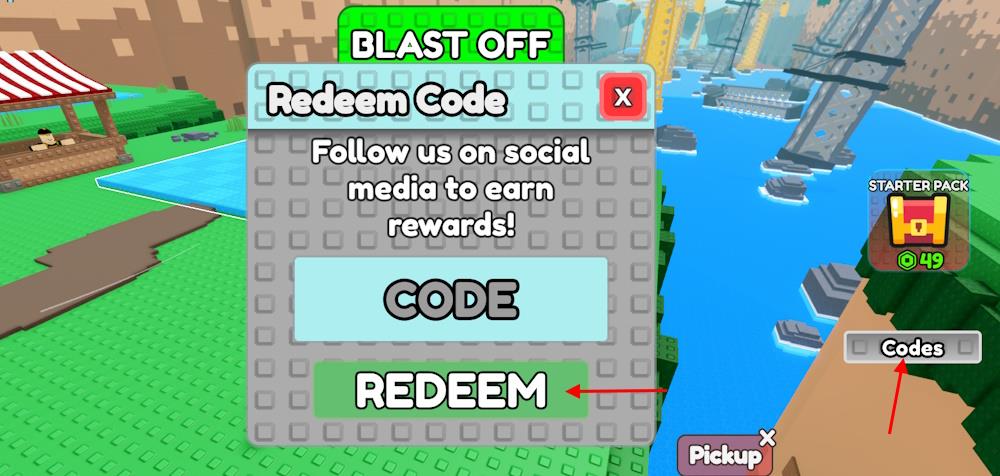
- Click the Codes button on the right side of the screen.
- Type a working code in the CODE area.
- Click the REDEEM button to get the rewards.
How to Get More Build A Rocket Codes
Players can get more Build A Rocket codes by following the game’s official social media pages, such as Twitter and Discord, where developers often post new updates and rewards. Joining community events or special Roblox collaborations can also lead to bonus codes. It’s smart to check fan forums or trusted gaming websites for shared codes, as these sources frequently track the latest releases and expired ones.
Looking for the best way to get more codes for Build A Rocket? Bookmarking this page is your best bet, as we are always on the lookout for new updates. So, when in doubt for new Roblox game codes, check back and you’ll find them here.
If you want to take matters into your own hands, then you should join the Build A Rocket Discord server. In the server, look for the codes channel and follow it for fresh code updates. But before you find the channel, you must verify your account through the verify channel. You can also follow the official Super Original Games Roblox community for the latest news on the game. By joining, you will get all the new codes and find extra rewards such as powerful blocks. Joining the group will give you some special benefits.
How to redeem codes in Build A Rocket step by step
Here is a simple step-by-step way to redeem codes in Build A Rocket on Roblox.
Step-by-step redeem guide
-
Open the game
-
Log into your Roblox account and start Build A Rocket from the experiences list.
-
-
Find the Codes button
-
Once you are in the lobby, look at the right side of your screen for a button labeled Codes or Code.
-
-
Open the code window
-
Click that Codes/Code button to bring up the redemption pop-up with a text box.
-
-
Enter your code
-
Click inside the text box labeled Code or similar, then type or paste a valid code exactly as shown (respect capital letters and avoid extra spaces).
-
-
Redeem and check rewards
-
Press the Redeem button (often green) under the text box.
-
If the code is active, a success message appears and your rewards (usually Cash, blocks, or paints) are added instantly to your account.
-
-
If a code doesn’t work
-
Make sure you typed it correctly (copy-paste helps), check that it hasn’t expired, and remember each code can only be used once per account.
-
Where is the Codes button located in the game lobby
In the Build A Rocket lobby on Roblox, the Codes button is on the right-hand side of your screen, displayed as a small UI button labeled “Codes” (or “Code”) in the main menu area while you are not in a rocket launch.
If you do not see it, make sure you are in the main lobby (not building or flying), then look along the right edge of the screen where the other interface buttons (like Shop or Settings) appear.