New rewards await adventurers in Dungeons Incremental 2! These August 2025 codes bring fresh boosts to your Roblox dungeon runs-grab them before they expire and power up your gear faster than your rivals.
These can be used to speed up the progress for your character, making them the strongest in no time. Here you will find the complete list of active codes.
All New Dungeons Incremental 2 Codes
Players can use the latest Dungeons Incremental 2 codes to claim free gems, boosts, and other bonuses that make progress faster and smoother. These rewards help you strengthen your characters, upgrade gear, and tackle tougher dungeons with ease. Make sure to redeem active codes quickly, as they often expire after a limited time or when new updates arrive.
- CameFromStella: Free Potions (NEW)
- Update2: 25 Tickets (NEW)
Expired Dungeons Incremental 2 Codes
Currently, there are no expired codes on this Roblox Experience. The above codes will be moved to this section when they expire.
Enjoying the Dungeon slaying experience? Try out Dungeon Heroes, Dungeon RNG and Anime Dungeon Fighters for a similar experience. If these don’t entice you, check out Anime Last Stand for some old faction action from our Roblox games codes list.
How to Redeem Dungeons Incremental 2 Codes
To redeem Dungeons Incremental 2 codes, open the game on Roblox and find the Twitter icon on the main screen. Click it to open the code redemption window, then type or paste your active code into the box. Press the confirm or redeem button to claim your free rewards instantly. Make sure to enter each code exactly as shown, since capital letters and spacing matter.
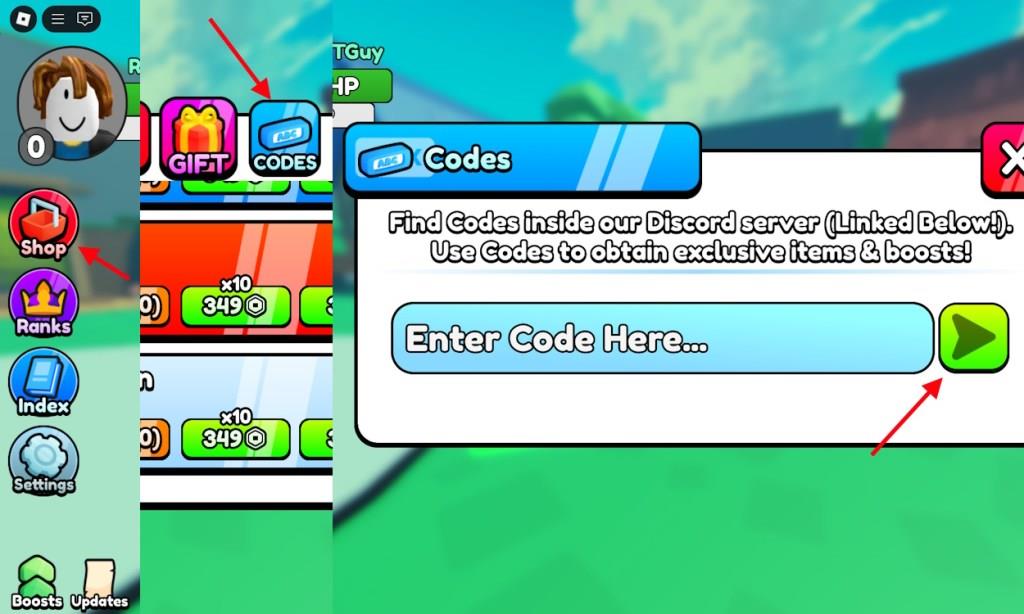
Redeeming codes for Dungeons Incremental 2 is fairly simple. All you have to do is follow these steps:
- Launch Dungeons Incremental 2 in the Roblox Launcher.
- Click Shop on the left side.
- Select the Codes option from the shop menu.
- Type the active code in the ‘Enter Code Here…’ section.
- Click on the Arrow to claim the rewards.
How to Get More Dungeons Incremental 2 Codes
Unlock codes for Dungeons Incremental 2 are distributed across events, social channels, and occasional in-game popups. Check the official Roblox group, follow the developer on social media, and participate in limited-time events to maximize your chances. When a promo becomes available, redeem it quickly in the codes menu to claim rewards before it expires.
The best way to get more codes for Dungeons Incremental 2 is by visiting our list here. We update this code list regularly, so you will never miss out on any newly released codes. Bookmark our post so that you can visit without any hassle. Other than that, you can follow Twitter on X and join their official Discord account.
How to redeem Dungeons Incremental 2 codes
To redeem Dungeons Incremental 2 codes in Roblox, use the in-game Shop menu and then the Codes option to enter each code exactly as written, including capitalization.
Step-by-step redemption
-
Open Dungeons Incremental 2 from the Roblox launcher on your device.
-
Once loaded into the game, click or tap the Shop button on the left side of the screen.
-
In the shop window that appears, select the Codes button at the top of the menu.
-
Type your code into the “Enter Code Here…” text box exactly as shown (codes are case-sensitive).
-
Press the green arrow button next to the text box to submit and claim your rewards.
If a code doesn’t work
-
Double-check spelling and capital letters, as they must match the code exactly.
-
Try rejoining or switching to another server in case the game needs a more recent update for the code to register.
-
If it still fails, the code is likely expired and cannot be redeemed anymore.
Steps to find active codes without leaving the game
In Dungeons Incremental 2 there is currently no built-in way to see “only active” promo codes from inside the game; all public codes have to be typed manually into the Codes menu to check if they still work.
What you can do in-game
While staying in the game, you can still reduce how often you leave the app:
-
Use the Codes box in the Shop to quickly test any code you hear in chat or from friends; if it is expired, the game will reject it and no rewards are added.
-
Watch server chat for players sharing working codes, then copy them straight into the Codes field without closing Roblox.
Low-friction ways to keep codes updated
These still technically use outside sources, but you can avoid fully exiting your session:
-
On PC, put Roblox in windowed mode and keep a browser or Discord on a second monitor, alt-tabbing briefly to copy new codes and paste them into the Codes menu.
-
On mobile, use the system’s split-screen or quick app-switch so the game stays running while you glance at a codes page or group post for new entries.
Because codes are controlled on the developer’s side, truly automatic in-game lists require the developer to add a panel or feed that surfaces all currently valid codes; if that appears in a future update, it will be visible directly in the Shop or Codes UI.