Unearth the secrets behind the Gold Digger shovel in Roblox Dig – from its hidden advantages and upgrade paths to the best ways to speed up treasure collection and outmatch other players in the race for rare finds.
How to Get Gold Digger in Dig
To get the Gold Digger in Dig, players need to progress through the shovel upgrades by collecting enough coins and resources during gameplay. Once you reach the tier that includes the Gold Digger, purchase it from the in-game shop using your accumulated currency. This shovel offers higher digging speed and better rewards than earlier models, making it a strong choice for quicker progress and increased treasure collection.
- Price: $130,000
- Level Requirement: None
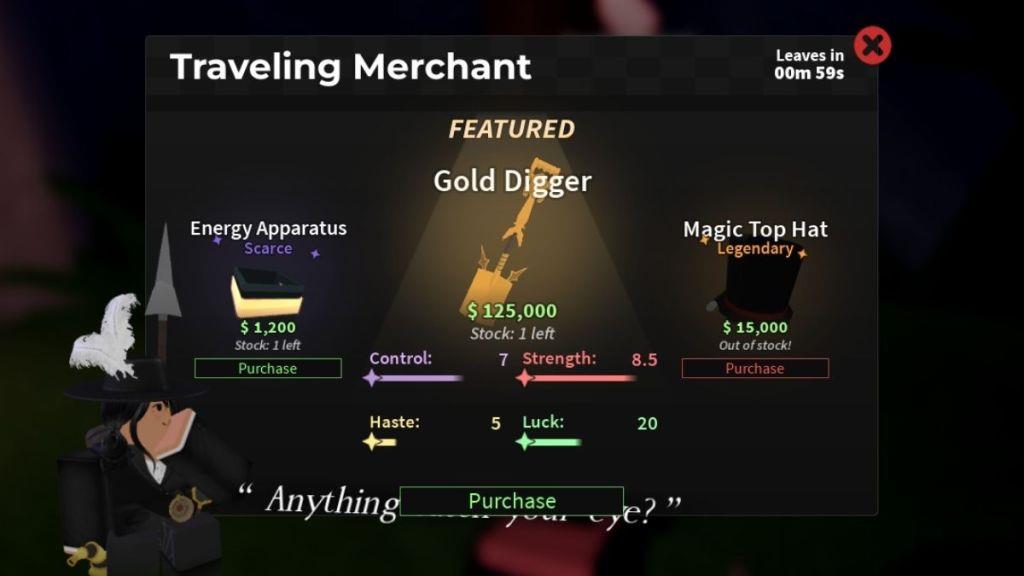
- Location: Traveling Merchant shop
Getting the Training shovel in Dig is simple and just takes a bit of tracking. Look for the Traveling Merchant POI header while exploring and head in that direction to find his moving cart. The Merchant changes location every 10 minutes, refreshing his stock each time. Once you find him, interact to view the catalog and buy the Gold Digger shovel when it appears.

Also Read: Dig Horns Guide: How to Get and Use Them
Gold Digger Shovel Stats and Passive
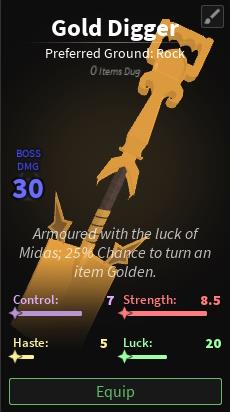
The Gold Digger Shovel features balanced stats that provide a solid mix of power and speed for digging through different soil types in Roblox Dig. It offers moderate energy consumption per use, making it reliable for longer sessions without frequent recharge or rest breaks. Its passive ability increases the chance of uncovering rare ores or gold pieces with each dig, adding extra rewards for consistent effort. Players can upgrade its performance through enhancements that boost digging depth, swing speed, and passive activation rates.
| Shovel | Stats |
|---|---|
| Image |
|
| Strength | 8.5 |
| Control | 7 |
| Haste | 5 |
| Luck | 20 |
| Boss Damage | 30 |
| Passive | 25% Chance for Golden Modification (2.5x Value) |
| Preferred Ground | Rock |
Best Charms for Gold Digger Shovel
Here are some picks for best charms to pair with the Gold Digger Shovel: a shimmering gold coin charm, a glittering pickaxe charm, a glinting ruby charm, and a small compass charm to symbolize luck and direction in your mining quests.
If you’re not yet using Charms in Dig, you’re missing out on a lot. These help in further boosting your shovel’s stats, fixing the weaknesses that enchantments couldn’t cover up completely. So, here are some of the charms that go best with the Gold Digger shovel:
- Energy Apparatus: Increases strength and helps you dig items faster.
- Lifting Belt: With this, your endurance will increase, and the small heart icon will move slowly.
- Rock Pounder: Helps you with boss fights and hits solid rocky grounds with more strength.
Best Enchantments for Gold Digger Shovel
The best enchantments for the Gold Digger Shovel improve speed, durability, and rewards from each dig. Efficiency helps break blocks faster, while Unbreaking extends the shovel’s lifespan during long digging sessions. Fortune increases the number of valuable drops, making it easier to gain more gold and rare items. Mending is also useful, as it repairs the shovel with collected experience, keeping it ready for more digging without frequent replacements.
Applying an enchantment on the Gold Digger shovel is a must if you want to use it in the long run before switching to the Prismatic shovel in Dig. So, here are some of the best enchantments to try on this shovel:
- Strong: Helps you dig faster by increasing the power with which you hit the ground surface.
- Prodigy: Since it’s an end-game shovel, applying this one will help you gain XP fast.
- Lucky: Helps you get rarer items fast by increasing your Luck stat by 10.
Should You Get Gold Digger Shovel in Dig?
The Gold Digger Shovel is a strong upgrade for players aiming to mine faster and gather rare materials with less effort. It offers greater digging power and speed than most starting tools, making it especially useful in deeper areas of the game. While it may cost a fair amount of in-game currency, the investment quickly pays off by saving time and boosting rewards from each excavation. Players focused on progressing quickly or maximizing their loot will find this shovel a smart choice.
There’s no reason why you should not get the Gold Digger shovel, unless you’re completely focused on buying the Prismatic shovel. Well, comparing both of them, the Prismatic one helps in farming cash more efficiently than the Gold Digger shovel; however, the cost is high as well.
So, if you want to experience everything in Dig, purchase all sorts of shovels, enchant them, use charms to make the perfect build for that, and you’re looking for a small upgrade as well, go for the Gold Digger shovel. It’s currently one of the best in the game will surely help you in finding rarer loot.
How to find traveling merchants in Dig Roblox
Traveling Merchants in the Roblox game Dig spawn randomly at key landmarks every 15 minutes and stay for 10 minutes before relocating. Server-wide notifications announce their arrival, such as “The Traveling Merchant has moved to [Location]!”, along with a map waypoint marker.
Spawn Locations
Common spots include central areas of POIs like:
-
Fox Town (near fountain by Bank/Charm building)
-
Verdant Vale
-
Rooftop Woodlands
-
Cinder Ferry (coords: 1524, 75, -131)
-
Cinder Shores (1718, 82, 59)
-
Lighthouse (894, 267, 668)
-
Fernhill near Cinder Cavern (3143, 82, 341)
Finding Tips
Drive or use a vehicle to follow the floating tag icon on the map after the bell chime or announcement. Join low-player servers to avoid stock sellouts from other players. Press E near the merchant’s wagon to access the shop for shovels like Gold Digger ($130k) or charms.
How often does the Traveling Merchant respawn in Dig Roblox
The Traveling Merchant in the Roblox game Dig respawns every 15 minutes server-wide at a random point of interest (POI). It remains available for 10 minutes before despawning and relocating, ensuring near-constant availability across sessions.
Timer Details
The cycle operates on real-time: spawn at 15-minute intervals (e.g., :00, :15, :30, :45), stay for 10 minutes, then vanish. Server notifications and map icons alert players immediately upon arrival.
Practical Advice
Monitor announcements or the overhead POI header to track timers without waiting idly. Low-population servers reduce competition for limited stock during the brief window.
