Chaos meets strategy in Steal a Brainrot, the Roblox sensation taking Discord by storm – here’s where to find the official server and Trello, plus the latest guides every player is chasing.
Knowing about all the Brainrot characters, along with their buying price and the cash they generate, is not an easy task. So, you might be searching for a central resource like an official Steal a Brainrot Trello board and a Discord server where you will get all the information you need. That’s where we come into the picture.
Official Steal a Brainrot Trello Board
Use this official Trello board to track Steal a Brainrot updates, planned features, bug reports, and community suggestions in one place. Each list and card is organized around core gameplay systems, making it easy to follow balance changes, new content, and QoL improvements as they roll out for the Roblox experience.
Unfortunately, there is no official Steal a Brainrot Trello link where you can find information on each and every Brainrot character and the special events in the game. However, you can rely on our Steal a Brainrot character guide for that, since we have tested and reviewed all brainrots either by buying or stealing them.
The game was released in May 2025 and has since been visited by more than 6 billion players and counting. With an average of 500k players active daily, Steal a Brainrot is one of the most popular games on Roblox. So, it won’t be too long before an official Trello board is released. We’ll make sure to update this page right away when that happens.
Also Read: When Is the Next Steal a Brainrot Update? (Lava Mutation Event)
Official Steal a Brainrot Discord Link
Official Steal a Brainrot Discord Link and Trello Link for guides, Roblox, and server setup.
Well, even though the game does not have a Trello board, the official Steal a Brainrot Discord link can be found right here. The server is quite active with more than 1 million members. Here, you’ll find all sorts of information. For example, there’s the ‘bombardiro-news‘ channel if you’re looking for the latest news and updates on the game.
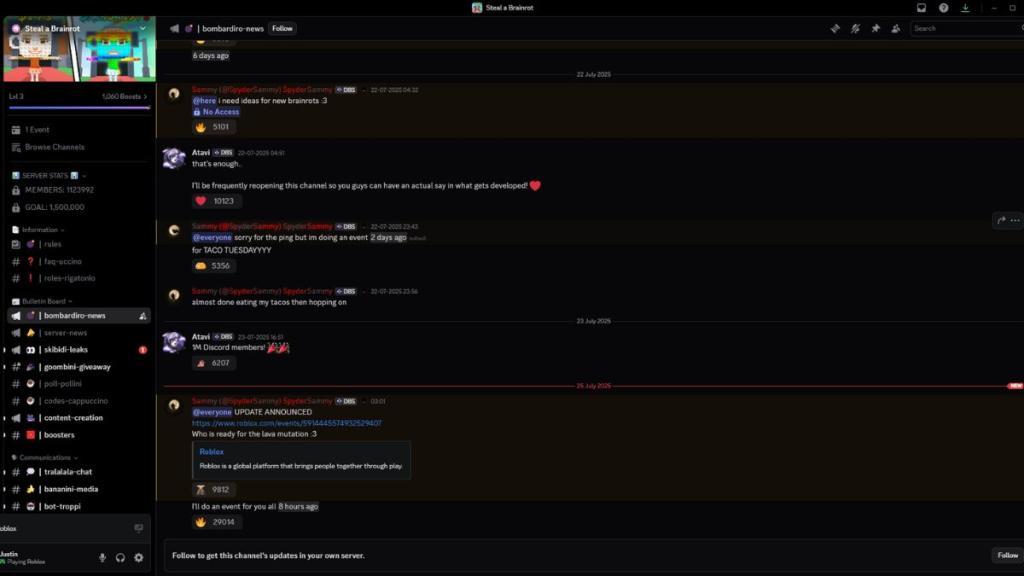
If you’re looking for new characters coming in the next Steal a Brainrot update, there is the ‘skibidi-leaks‘ channel. Although there aren’t any Steal a Brainrot codes right now, you can check the ‘codes-cappuccino‘ channel to find new codes whenever the dev plans to add a code redemption system.
Finally, you can have discussions with other players who enjoy this game in the communications channel. If you like this experience, you’ll like playing Brainrot Evolution and Brainrot Fighting as well.
Get the current Steal a Brainrot Discord invite link
The official Steal a Brainrot Discord server invite link can be accessed directly from the game’s Roblox page.
How to Join
Open the Steal a Brainrot game on Roblox, scroll to the social links section below the play button, and click the Discord icon for the verified invite (often a short vanity link like discord.gg/sab).
This method ensures you get the current, legitimate link without relying on third-party sites, as invites can expire or change.
After joining, complete verification steps like phone number confirmation and rule agreement, which are standard for active Roblox community servers.
Active Servers
Multiple large servers exist with 400k+ members focused on trading, giveaways, admin abuse alerts, and updates:
-
https://discord.com/invite/sab (Steal A Brainrot Trading & Giveaways)
-
https://discord.com/invite/stealabrainrotserver
-
Others like stealabrainrod or stealbrainrots offer similar features but confirm via Roblox first.
Safety Note
Avoid unverified YouTube or random links claiming codes like “GCXZDG U9JE” or “brain rots,” as they may lead to fakes; always prioritize the Roblox game page.
What is the exact Steal a Brainrot Discord invite code
The exact invite code for the official Steal a Brainrot Discord server is “brainrots”.
How to Use It
Open Discord, click the “+” to add a server, select “Join a Server,” and enter brainrots (no spaces, with an “s” at the end) in the invite box, then hit “Join Server.”
Alternatively, visit the Steal a Brainrot Roblox game page, scroll to the social links below the play button, and click the Discord icon for the same verified invite.
After joining, accept the invite, complete verification by reading rules and submitting agreement, and wait out any initial message cooldown (often 10 minutes).
Verification Tips
This code works as a vanity invite shorthand recognized across multiple guides from 2025-2026, linking to the main community server for trading, giveaways, and admin abuse alerts.
Popular vanity links like discord.gg/sab or discord.gg/stealabrainrotserver often redirect equivalently but always cross-check via Roblox to avoid expired or fake ones.