Roblox players are flooding back to Project Basketball this July, chasing new codes that can boost their stats, score rare gear, and give their squads an edge on the court. Here’s what’s active right now-and how to redeem them before they expire.
In this guide, we have listed all the latest Project Basketball codes below for free spins. Use them to unlock flashy styles and powerful abilities to take over the court.
All New Project Basketball Codes
All new Project Basketball codes give players fresh rewards such as coins, boosts, and exclusive items to help improve their gameplay. These codes are periodically added by the developers to celebrate updates or special events. Using the latest codes allows players to customize their skills faster, upgrade their gear, and gain an advantage on the court. Make sure to redeem them quickly, as they often expire after a short time.
- PBB!: 3 Lucky Spins (NEW)
- NUDGZ: 3 Normal Spins (NEW)
- RELEASEYAY: 5 Normal Spins (NEW)
Expired Project Basketball Codes
Currently, there are no expired codes as the game has just been released.
Fans of all sorts of anime might enjoy Untitled Volleyball Game, All Star Tower Defense X, while sports fans can dive into Basketball Zero and Blue Lock Rivals. For some fresh experiences, check out our Roblox game codes master list.
How to Redeem Project Basketball Codes
To redeem Project Basketball codes, open Roblox and launch Project Basketball, then tap the settings or codes button, enter your code exactly as shown, and claim your reward.
To redeem the codes for Project Basketball, you need to join the Sub Studios Roblox community first. Now you may follow the steps below:
- Launch Project Basketball on your Roblox app.
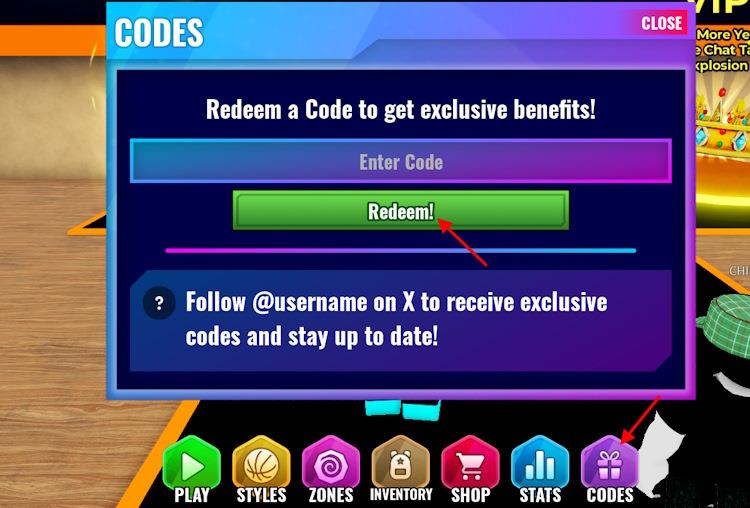
- Click on the Codes icon at the bottom of the screen.
- Enter a working code in the pop-up box.
- Click on the Redeem button to claim your rewards.
How to Get More Project Basketball Codes
Players can find new Project Basketball codes by checking the game’s official Roblox page, joining the developers’ Discord server, or following their social media accounts for announcements. Codes are often shared after updates, events, or milestones, so staying active in the community helps you catch them early. You can also visit trusted Roblox code websites, which regularly update lists with verified rewards.
As the game has limited options to find codes, it can get difficult to search for them. Do not worry; we frequently scour the internet for active codes for Project Basketball. So, bookmark this page and never miss out on the latest freebies. This will be helpful if you do not want to waste time during your basketball grind on the court. But if you are willing to scavenger hunt for the codes, there are certain ways to do so.
The best place to find the codes is the official Discord. Join the Project Basketball Discord server and verify yourself. Keep an eye on the codes channel. We suggest you look around the server for more codes and news as well.
How to redeem codes in Project Basketball step by step
Project Basketball on Roblox uses a straightforward code redemption system tied to the developer Sub Studios group. Redeem codes directly in-game after meeting prerequisites.
Prerequisites
Join the official Sub Studios Roblox group first, as most codes require group membership to activate. Like the game page on Roblox for full eligibility. This ensures all rewards like spins unlock properly.
Step-by-Step Redemption
-
Launch Project Basketball from the Roblox app or website.
-
Wait for the main menu or court lobby to load fully.
-
Click the Codes icon (small gift box or Twitter bird symbol) at the bottom of the screen.
-
Enter a valid code exactly as listed (case-sensitive, no spaces).
-
Hit the Redeem button to claim rewards instantly, such as Lucky Spins or Normal Spins.
Troubleshooting Tips
Codes may fail on older servers-rejoin a fresh game instance. Copy-paste codes to avoid typos, and check the in-game Discord channel for updates if a code shows as expired. Each code works once per account.
Join the Project Basketball Discord server steps
Project Basketball maintains an active Discord server for updates, codes, and community discussions, typically linked from the game’s Roblox page or code guides. Access it through the official invite shared in-game or on developer channels.
Finding the Invite Link
Check the Project Basketball Roblox game description, code redemption guides, or Sub Studios group page for the latest Discord invite-often posted as “discord.gg/[unique code]”. Recent guides from January 2026 confirm it’s available there.
Joining on Desktop
Open the Discord app or browser.
Click the + icon on the left sidebar to add a server.
Select Join a Server, paste the invite link, and click Join to enter channels instantly.
Joining on Mobile
Launch the Discord app.
Tap the + icon at the bottom, then choose Join a Server.
Paste the invite link and tap Join to verify and access announcements or code channels.
Verification Tips
Complete any required verification (e.g., Roblox username link) in the #verify channel upon joining. This unlocks code announcements and avoids expired invite issues-refresh from official sources if needed.
