Pet shards sparkle with promise in Grow a Garden, but snagging the rare Tranquil mutation demands sharp strategy.
Although you can get the mutation from the Zen Aura event or a specific pet, you can mutate your pets to get it easily. In this guide, learn how to obtain the Tranquil pet mutation in Grow a Garden.
How to Obtain Tranquil Pet Mutation in Grow a Garden
To obtain the Tranquil Pet Mutation in Grow a Garden, you need to gather enough Tranquil Pet Shards by completing daily goals, winning garden events, or trading with other players. Once you have the required number of shards, head to the Pet Mutation Lab and combine them with a compatible base pet. The process consumes specific materials and coins, so make sure your inventory is stocked. After the mutation is finished, you’ll receive a unique Tranquil Pet with calming abilities that enhance your garden’s atmosphere and boost certain plant interactions.
Players can get the Tranquil Pet mutation in Grow a Garden using the Pet Shard Tranquil. Here are the simple steps to get the shard:
- Trade Tranquil mutation fruits with Unk the Monk to upgrade the Zen Tree to level 7.
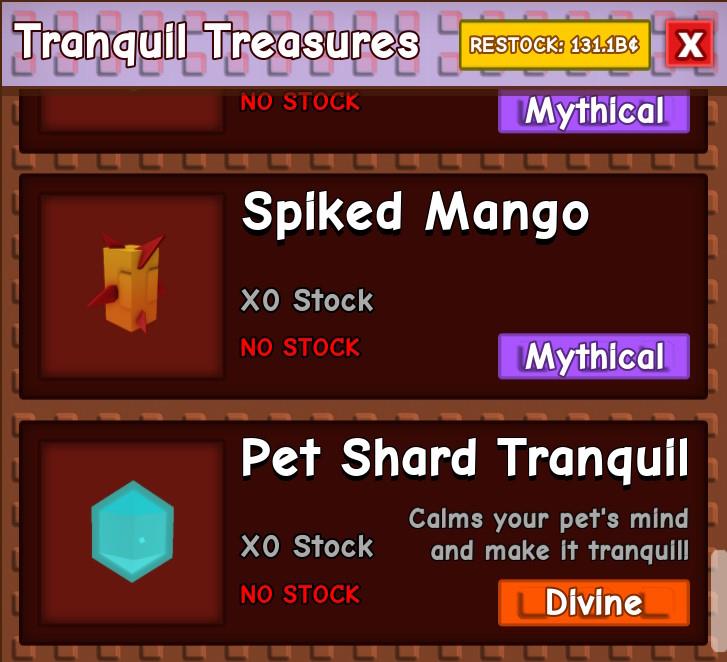
- Now, go to the Zen Shop and scroll down to find the Pet Shard Tranquil.
- When it’s in stock, click on it and spend 100 Chi or 279 Robux to get the item.
Once you have the Pet Shard Tranquil, search for it in your inventory. Then, hold the shard in your hand and hover the cursor on the pet you want to mutate. Click on the highlighted pet to instantly mutate it with the Tranquil mutation. Remember, it only works once, so choose the pet wisely.
| Tranquil Pet Mutation | Stats |
|---|---|
| Image |
|
| Ability | Every 25 minutes, apply the Tranquil mutation to a nearby fruit |
| Multiplier | 20x |
| Obtained from | Pet Shard Tranquil |

Best Tips to Get Tranquil Pet Mutation in Grow a Garden
Focus on collecting enough Tranquil Pet Shards by completing garden tasks and caring for your pets regularly. Use higher-quality fertilizer and maintain your plants’ health to increase the mutation chance. Participate in events or trades if you need extra shards to speed up progress. Keeping your garden balanced with clean water, sunlight, and happy pets makes the mutation more likely to appear.
While the process to obtain the Tranquil Pet mutation is straightforward, there are some tips and tricks you can apply to get it faster. So, without wasting much time, follow the tips below:
- Upgrade Zen Tree first: To upgrade the Zen Tree to level 7, you need a total of 1,250 Zen and grow the tree behind Unk the Monk. So, instead of getting Chi from the Zen Shop first, I would suggest upgrading the tree first. While upgrading the tree, you have a chance to get Chi Points from the monk as well.
- Don’t waste Chi: As the shard is a Divine rarity, there is a high chance you will find Zen Seed Packs and Zen Eggs more in the shop’s stock. Hold onto your Chi and use it on the shard when it is back in stock.
- Hatch Zen Eggs: When you receive the Zen Eggs as a reward from completing the tree upgrades, you must hatch them to get the Tanchozuru pet. This pet gives Tranquil mutation every 10:30 minutes to a nearby fruit.
Should You Get the Tranquil Pet Mutation?
The Tranquil Pet Mutation is a good choice if you prefer a calm and steady companion for your garden tasks. This mutation gives your pet a relaxed demeanor and balanced energy, making it easier to manage other pets or maintain focus during long sessions. However, players who favor fast-paced activities might find it less useful than power- or speed-focused mutations. Consider your playstyle before deciding, as the Tranquil Pet adds stability rather than aggressive advantages.
Given that the Tranquil mutation is the heart and soul of the Zen event update, you will need plenty of them to acquire all the new items. The only ways to get the mutation on your crops are through the Zen Aura weather event, Tanchozuru, or a Tranquil pet. While the Zen Aura event runs every hour, it randomly applies the mutation.
Having a Tranquil pet will improve your chances of getting this new mutation. Especially, if you use the Tranquil mutation on Tanchozuru, it will boost further. While unlocking the shard, you will obtain plenty of Zen Seed packs, crates, Zen Pet eggs, and Chi. So, it is a win-win situation. And with the Tranquil mutation selling for 20 times its value, even after the Zen Event, it will be worth it.
Where to buy Pet Shard Tranquil and stock times
Pet Shard Tranquil is purchased from the Zen Shop NPC in Roblox’s Grow a Garden, accessible after upgrading the Zen Tree to level 7 by trading Tranquil fruits with Unk the Monk.
Purchase Options
Costs 200 Chi or 279 Robux once unlocked; select “Show me Zen Shop” when talking to the NPC.
Stock Details
The shop restocks periodically (exact times vary, often every few hours based on player reports), and items may show “no stock” until refreshed-check frequently or wait 2+ hours after server events.
How to use Pet Shard Tranquil on a pet
Pet Shard Tranquil equips a level 50+ pet with the Tranquil mutation in Roblox’s Grow a Garden, turning it blue and enabling it to apply the mutation to nearby fruits every 24-25 minutes.
Usage Steps
Open your inventory, select the Pet Shard Tranquil, click or hover over an eligible pet (must be level 50 or higher and unmutated), and confirm to apply it instantly.
Key Notes
The mutation is permanent unless overwritten; avoid using on pets you plan to mutate further in the machine, and unequip the pet first if stored elsewhere.