New codes have arrived for Upgrade Your City-grab them before they expire to boost your Roblox city faster and climb the leaderboards with fresh rewards from the July 2025 update.
At first, upgrading to the next tier of crates seems easy, but as you progress, it becomes increasingly tough to reach higher. So, here are some active Upgrade Your City codes that will earn you some of the best buildings in the game or grant you more luck for opening crates.
All New Upgrade Your City Codes
The latest Upgrade Your City codes bring new rewards, boosts, and special items that help players grow their cities faster and make gameplay more fun. These codes often offer coins, resources, or limited collectibles that enhance building progress. Redeem them as soon as possible since many expire quickly and are replaced with fresh ones every few weeks. Keep an eye on updates from the developers to catch the new releases before they run out.
- UpdateSoon!: Get best building of your current crate (NEW)
- OuttaHawaii: Get 2x Luck Crate for 30 minutes (NEW)
Expired Upgrade Your City Codes
As of writing this, there aren’t any expired codes in this game yet. So, redeem the above given ones as soon as you can before they go away.
Once you’re done enjoying this game, try out Grow a Garden, Grow Your Farm, and Grow an Egg to get a similar experience. Next up, you can have a look at our Roblox game codes master list to find some of the best games on this platform.
How to Redeem Upgrade Your City Codes
To redeem Upgrade Your City codes, open Roblox and launch the game. Click the Twitter or Codes icon usually found on the main screen. A text box will appear-enter a valid code exactly as shown, paying attention to capitalization. Press the “Redeem” button to claim your rewards instantly. If a code doesn’t work, it may have expired or been entered incorrectly, so double-check it before trying again.
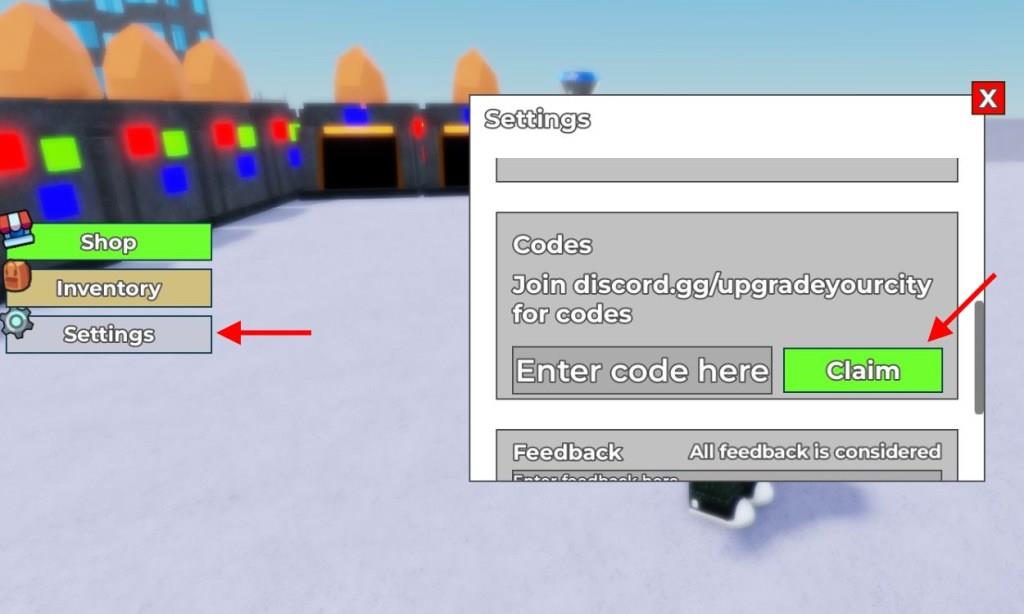
Now that you’re ready to get all the rewards in this game, go through the steps below to redeem the codes for Upgrade Your City on Roblox:
- Launch Upgrade Your City on Roblox.
- Click on the Settings tab on the left of the screen.
- Scroll down and enter a working code in the text box.
- Click the Claim button to get all your rewards.
How to Get More Upgrade Your City Codes
To get more Upgrade Your City codes, keep an eye on the game’s official social media pages and the Roblox group, where developers often share new rewards during updates or events. Joining the game’s Discord server can also help you find the latest codes shared by the community. Make sure to redeem active codes as soon as possible since they can expire quickly after release.
Now, the best way to get all the latest codes in the game is by bookmarking this page right here. This will help you find all working codes in a single place, and you won’t miss out on any rewards.
In addition to this, you can also join the official Upgrade Your City Discord server. All the new codes will be available in the ‘codes‘ channel. Finally, do join the legend’s descent community on the Roblox platform to get all sorts of news around the game right away.
How to redeem Upgrade Your City codes
To redeem codes in Upgrade Your City, you need to access the Settings menu and enter the code in the designated section. The process takes just a few simple steps and rewards are granted instantly.
Redemption Steps
Follow these steps to claim your rewards:
-
Launch Upgrade Your City on Roblox and enter the lobby
-
Click the Settings icon (gear button) located on the left side of your screen
-
Scroll down until you find the Codes section in the settings menu
-
Type or paste your chosen code into the “Enter code here” text box
-
Click the Claim button to receive your rewards instantly
Important Notes
Each code can only be redeemed once per account. If you attempt to redeem a code that has already been used, expired, or is invalid, you will receive an error message. Make sure to redeem codes quickly since they tend to expire without much warning.
Where to find new Upgrade Your City codes updates
The best sources for finding new Upgrade Your City codes are the game’s official Discord server and social media platforms, where developers announce updates first. You can also bookmark regularly updated code guides to receive all working codes in one place.
Official Sources
The developers release new codes through these official channels:
-
Discord Server – Join the official Upgrade Your City Discord server where all new codes are posted first and you can chat with the community
-
Roblox Group – Follow the Legend’s Descent Roblox group to stay updated directly on the Roblox platform
-
Social Media Pages – The developers post announcements on their official social media accounts when new codes drop
Code Release Schedule
New codes typically release during specific occasions in the game. These include major game updates, seasonal events, and milestone celebrations when the game reaches specific numbers of likes, visits, or followers. Since expiration dates aren’t publicly shared, it’s important to redeem codes quickly before they stop working.
