Every code counts in Roblox Sell Junk – and July 2025 brings fresh rewards that can turn your pile of scrap into serious in-game value. Here’s what players are claiming and how you can cash in before these bonuses expire.
While the American Dream vibe is fun to live out, having a little backup never hurts; that’s where we come in as your wingman. Use these Sell Junk codes to grab free spins, cash, and other in-game rewards. They’ll give you a solid head start and help you kick off your junk-selling journey a few steps ahead.
All New Sell Junk Codes
Roblox Sell Junk delivers fresh codes each month, letting players trade worthless items for Robux rewards. July 2025 brings a batch of active codes like SJUNK2025JULY, FREEJUNK10, and SCRAPBOOST25-redeem them in-game via the Sell Junk menu before they expire. Players report quick payouts after verification, turning trash piles into usable currency fast. Check the official Discord or Twitter for updates on new releases.
- 1mvisits: 2 Spins (NEW)
- freecash: 5,000 Cash (NEW)
Expired Sell Junk Codes
As of now, there are no expired codes in the game, so jump right in and redeem the rewards before they expire.
So, if you like such buying and selling games, then Yard Sale and Steal a Brainrot might become your next favorite. For some serious action, try Blue Lock Rivals and Project Egoist, or consider having a look at the Roblox game codes master list, since it consists of the top-tier games on the platform. Especially try Blox Fruits if you’re a fan of the One Piece anime.
How to Redeem Sell Junk Codes
Launch the Roblox Sell Junk game. Tap the Settings icon or code box on the main screen. Enter a valid code exactly as shown, without spaces. Hit the Redeem button. Check your in-game rewards if successful. Codes expire quickly, so use them soon.
Selling junk is easy, but improving your chances of getting rare items can get harder as the game progresses. Luckily, redeeming the codes for Sell Junk is a cakewalk. Here is how to do it:
- Open the Sell Junk game on Roblox.
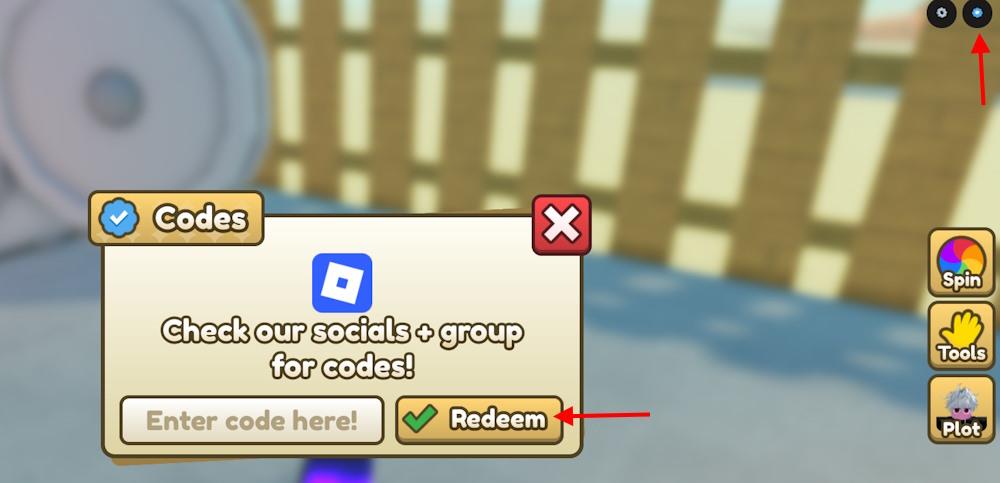
- Click the blue code button on the top right.
- Type a working code in the pop-up text box.
- Click the Redeem button to claim rewards.
How to Get More Sell Junk Codes
Players can get more Sell Junk codes by checking the game’s official social media pages, joining the Roblox group, and following community channels on platforms like Discord. Developers often release new codes during updates, milestones, or special events, so staying active helps catch them early. Fans can also keep an eye on fan forums or trusted gaming websites that regularly post the latest working codes.
Hunting down every code on your own can feel like chasing disgusting junk; time-consuming and easy to miss. That’s why it is smart to bookmark this page. We update the tier list regularly, so you won’t miss any drops or limited-time rewards.
If you see yourself as the best seller on the market, there are a few key paths to unlock all the codes. First, join the official junksters Discord server. Keep an eye on the ‘updates’ and ‘codes’ channels, where the devs drop new codes like rarest gems on the market. Also, don’t forget to follow the junkcels Roblox community for the latest news and updates straight from the source.
Redeem codes in Sell Junk step-by-step guide
Redeeming codes in Sell Junk follows a simple process directly within the Roblox game interface. No additional apps or websites are required beyond launching the game.
Step-by-Step Redemption Guide
-
Launch Sell Junk on Roblox and join a server to load into the game.
-
Locate the blue codes button in the top-right corner of the screen.
-
Click the button to open the code entry pop-up window.
-
Enter a working code exactly as shown (e.g., “Sorry”, “1mvisits”, or “freecash”)-codes are case-sensitive.
-
Press the Redeem or Submit button to claim rewards like cash or spins instantly.
Rewards appear in your inventory right away if valid; otherwise, the code may have expired.
What rewards does Sorry code give in Sell Junk
The “Sorry” code in Roblox Sell Junk provides 2 Spins and 60 minutes of base lock.
Reward Breakdown
Spins allow players to roll for upgrades, weapons, or items to improve junk selling efficiency.
Base lock offers 60 minutes of extra protection against theft by other players, safeguarding your inventory during that period.
This code remains active as of January 2026 lists, redeemable via the blue button in the top-right of the game screen.