Tower clashes, fusions, and waves of enemies never stop in Merge Tower Defense. These July 2025 codes bring you boosts, coins, and surprises that can turn an ordinary match into a victory streak.
The game can be highly addictive and quite challenging. The easiest way to win challenging levels is by using some strong weapons. Use Merge Tower Defense codes from our list to obtain free diamonds, which can be used to purchase stronger weapons from the shop.
All New Merge Tower Defense Codes
Players can use the latest Merge Tower Defense codes to earn free rewards such as gems, coins, and special boosts that help upgrade towers and progress faster. These codes are time-limited, so it’s best to redeem them quickly before they expire. Developers often release new codes during updates or events, giving players extra incentives to stay active and strengthen their defenses.
- Welcome: 500 Diamonds (NEW)
- DiscordMembers: 1000 Diamonds (NEW)
Expired Merge Tower Defense Codes
Currently, there are no expired codes in this Roblox Experience. The above codes will be moved to this section once they expire.
Merge Tower Defense is unlike any on Roblox, but it can get boring quickly if you don’t like repetitive gameplay. Check out games like Blue Lock Rivals or Anime Last Stand, which are both highly popular games and have regular updates. Other than that, you can try out Grow a Garden or Own a Fish Pond for some chill gameplay from our Roblox game codes list.
How to Redeem Merge Tower Defense Codes
To redeem Merge Tower Defense codes, open the game on Roblox and tap the settings gear icon on your screen. Find the text box labeled “Code” and enter a working code exactly as shown, paying attention to capitalization and spacing. Press the “Redeem” button to claim your rewards, which may include coins, gems, or in-game boosts. If a code doesn’t work, it might have expired or already been used.
Creating an impenetrable fortress can be quite challenging, but redeeming the codes for Merge Tower Defense is as easy as it gets. All you have to do is follow these steps:
- Launch Merge Tower Defense in the Roblox Launcher.
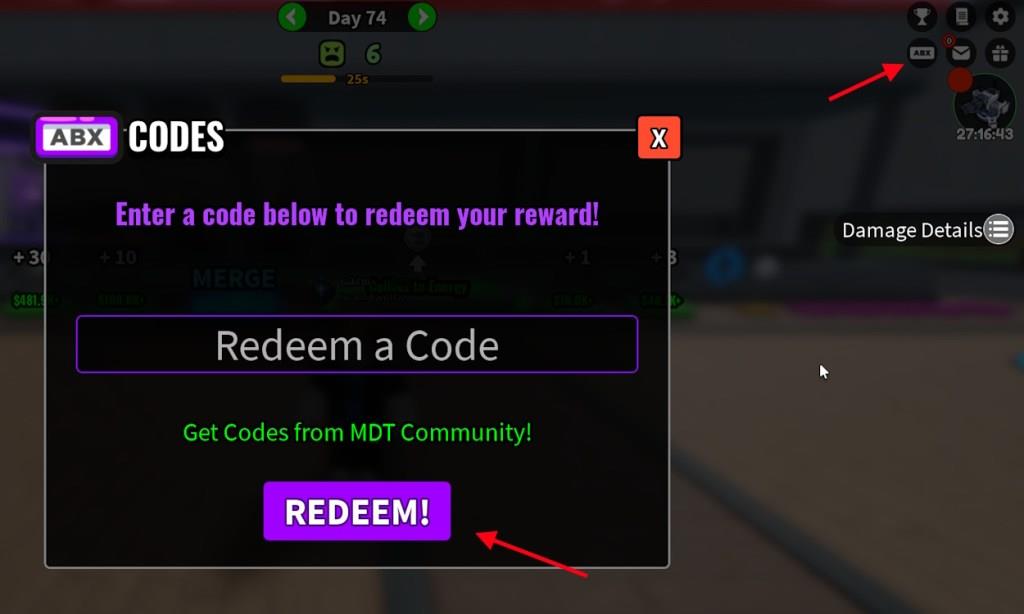
- Click on the Codes icon on the top ride side of the screen.
- Type the active code in the ‘Redeem a Code’ section.
- Click ‘Redeem!‘ to claim the rewards.
How to Get More Merge Tower Defense Codes
New codes are usually shared through the game’s official social media pages, including Twitter, Discord, and the Roblox group. Players can also check the developer’s announcements or community posts for fresh updates. It’s helpful to follow content creators who feature new codes in their videos, as they often post them quickly after release. Keeping notifications on for these channels ensures you don’t miss limited-time rewards.
The best place to find codes for Merge Tower Defense on the entire internet is right here. We update our code lists regularly, so we will have zero complaints when you visit our posts. You will only find the latest active codes on our list, and before anywhere else on the internet. So, bookmark our list and visit whenever you want some new freebies.
However, if you prefer searching for codes yourself, then here is how you can do it. Join the Merge Tower Defense Discord server and keep your eyes on the main ‘Announcement’ channel. That’s where you will most likely find newly released codes.
How to redeem codes in Merge Tower Defense step by step
Redeeming codes in Merge Tower Defense is straightforward using the in-game menu. Follow these steps carefully to claim free Diamonds without issues. Codes are case-sensitive, so copy them exactly as listed.
Step-by-Step Guide
-
Launch Merge Tower Defense on Roblox through the Roblox Launcher or app.
-
Once in the game lobby or main screen, locate the ABX or Codes button in the upper-right corner.
-
Click the ABX/Codes button to open the redemption window, which includes a “Redeem a Code” text box.
-
Enter or paste an active code (like “Welcome” or “DiscordMembers”) into the text field.
-
Click the purple Redeem! button to instantly claim your rewards, such as Diamonds.
Troubleshooting Tips
-
Claim any unclaimed inbox rewards first if the menu doesn’t appear right away.
-
If a code fails, it may have expired-check recent lists from Discord or updates.
-
Rewards apply immediately for valid codes, boosting your tower merges.
Open Merge Tower Defense in Roblox and locate the ABX button
Open Merge Tower Defense on Roblox via the app or website, then join a server to load the game lobby. The ABX button appears prominently in the upper-right corner of the screen once loaded.
Detailed Steps
-
Search for “Merge Tower Defense” in Roblox and click Play to enter the game.
-
Wait for the lobby to fully load-check your screen’s top-right area for the small ABX icon (often purple or highlighted).
-
Hover or tap it to confirm; it opens the code redemption menu directly.
Visual Location
The ABX button sits next to menu icons like settings or shop, making it easy to spot on PC, mobile, or console. If hidden, claim any lobby rewards first or restart the game.