Roblox’s Stick Battles erupts with fresh July 2025 codes, arming players with free boosts and gear to dominate chaotic brawls.
So, grab some free cash using these latest Stick Battles codes and buy new skewers with special abilities.
All New Stick Battles Codes
Grab the freshest codes for Roblox Stick Battles right here. Redeem them fast for free boosts, coins, and exclusive items to dominate matches. These codes drop regularly, so check back often and claim rewards before they expire.
- stick4life: Get 200 Cash (NEW)
- omaoma: Get 100 Cash (NEW)
Expired Stick Battles Codes
- THANKYOU8600
You can check out more such fun games like Slap Battles, Slap Tower, and Yeet a Friend as well. However, if you aren’t skillful enough in this particular genre, consider looking at our Roblox game codes master list to find all new and some of the best experiences on this platform.
How to Redeem Stick Battles Codes
Redeem Roblox Stick Battles codes by launching the game, selecting the Codes or Settings option, and entering the valid code exactly as shown; then press Submit to claim your rewards.
Getting all the rewards from redeeming the codes for Stick Battles is super easy, but you must join their official Discord server first, and the link is given below. After you do so, here is how you can redeem the codes:
- Launch Stick Battles on the Roblox app.
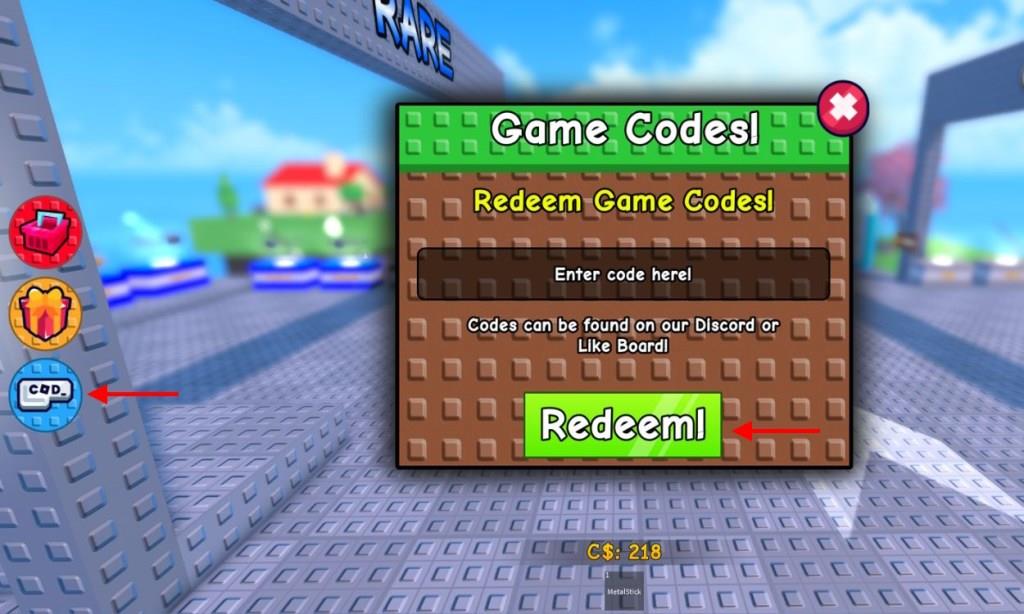
- Click on the Codes icon on the left side of the screen.
- Enter a working code in the text box in the new window.
- Click on the Redeem button to get your free rewards.
How to Get More Stick Battles Codes
Check the game’s Roblox page and official Discord server regularly for announcements. Follow Stick Battles on social media like Twitter and YouTube, where developers post updates. Join the community on Reddit or Roblox groups to catch codes shared by players. Test old codes in-game, as they sometimes reactivate. Bookmark code-tracking sites that update lists monthly.
If you want to know the best place to look for all new codes for the game, you need to bookmark this page right away. Since we update the codes list as soon as new drops are released, you won’t miss out on any new rewards given away by the developers.
Next, you can consider joining the official Stick Battles Discord server. On this server, you will find the list of all new codes in the ‘codes‘ channel. Furthermore, you can also join the Tralalero Meme community on the Roblox platform to know all about the news around the game.
How to redeem Stick Battles codes
Redeeming Stick Battles codes on Roblox is straightforward and quick. Follow the steps below to claim free rewards like Shields and Credits. Codes are case-sensitive, so enter them exactly as shown.
Redemption Steps
Launch Stick Battles through the Roblox app and enter the lobby. Click the Codes or Cod button, typically on the left side of the screen. Enter a valid code into the “Enter code here!” text box and press the green Redeem! button.
Troubleshooting Tips
Rewards appear instantly if the code works; otherwise, double-check spelling or try re-entering. Some guides mention joining the official Discord first, but most sources confirm no extra verification is needed beyond the in-game menu. Restart the game or check for updates if the button doesn’t respond.
What are the active Stick Battles codes
Active Roblox Stick Battles codes as of January 2026 offer Shields, Credits, Stars, and Potions to boost your PvP performance. Redeem them in-game via the Codes menu for instant rewards. Recent updates added holiday-themed codes like stickmas2.
Active Codes
-
stickmas2: 1 Shield (recover streak)
-
stickmas1: Star Potion Tier 2
-
gob: Star Potion Tier 1
-
halloween: 250 Stars
-
NYAN: 250 Stars
-
50Mil: 2 Star Potions Tier 1
-
morestars: 200 Stars
-
stars: 100 Stars
-
freepotion: Star Potion Tier 1
-
secondchance: 1 Shield
-
flabubu: 250 Credits
-
savemystreak: 1 Shield
-
freecredits: 250 Credits
-
freeshield: 1 Shield
-
stick4life: 200-300 Credits
-
omaoma: 100 Credits
-
THANKYOU8600: 150 Credits
Notes
Codes expire over time, so test them promptly; some older ones like roll or THANKYOU900 may no longer work. Check the official Discord or in-game announcements for new releases tied to likes or visits.
