Sharpen your power and claim exclusive rewards this July with the latest Anime Sword Master codes-boost your stats, cut through challenges, and rise through the Roblox ranks before they expire.
All New Anime Sword Master Codes
Grab the freshest Anime Sword Master codes released this month. Redeem them fast in Roblox for free boosts, spins, and rare swords to power up your character. Check back often since developers drop new ones during updates and milestones. Paste each code exactly as listed into the game’s redemption box to claim rewards instantly.
- JOJO: Get 1 Strength Boost Potion (NEW)
- PIRATE: Get 1 Strength Boost Potion (NEW)
Expired Anime Sword Master Codes
As of writing this, there are no expired codes in this game, and you should redeem these as soon as you can to get the rewards fast.
If you like games that test your fighting skills, do try playing Reborn as a Swordsman, Sword Warriors, and Dungeon RNG. You can also consider checking out our Roblox game codes master list to get a detailed overview of some of the best experiences present here.
How to Redeem Anime Sword Master Codes
Open Roblox and launch Anime Sword Master, then tap the Codes button on the main screen. A text box will appear-enter a working code from the list and press Redeem to claim your rewards instantly. Make sure to type each code exactly as shown, since they are case-sensitive and may expire after a short time.
Now that you’ve entered the game and fought a few battles, get ready to ease your progression by redeeming the codes for Anime Sword Master in the following simple steps:
- Launch Anime Sword Master on the Roblox app.
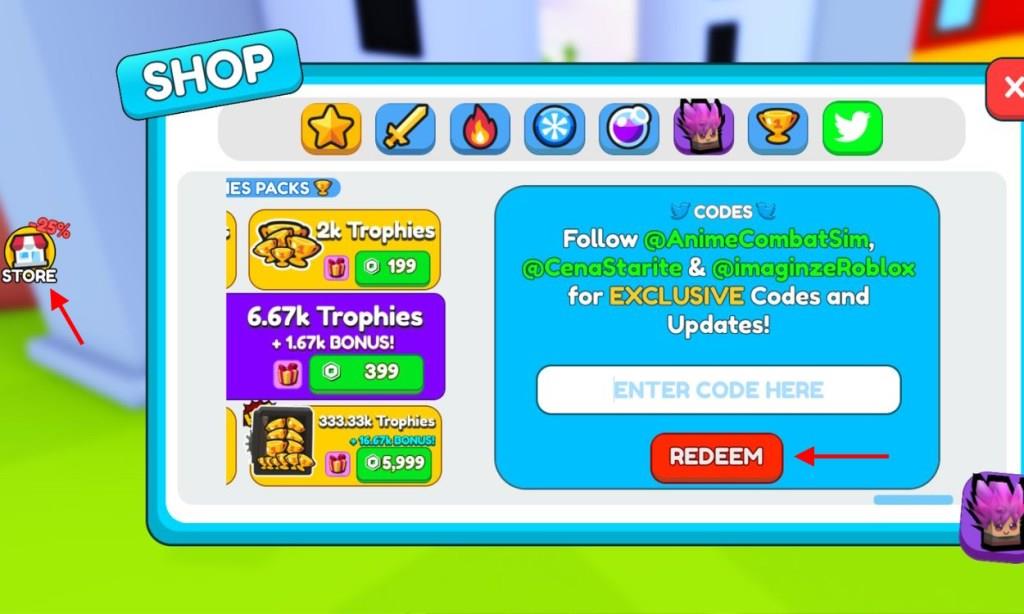
- Click on the Store icon on the left side of the screen.
- Scroll to the very right and input a working code in the text box.
- Click on the Redeem button to get your free rewards.
How to Get More Anime Sword Master Codes
Check the game’s official Discord server and Roblox group page regularly for new code drops. Follow Anime Sword Master on social media platforms like Twitter and YouTube, where developers share updates during events or milestones. Join Roblox code-sharing communities on Reddit or Discord that track Anime Sword Master releases. Test codes as soon as they appear, since they expire quickly. Bookmark reliable code lists from trusted Roblox sites and enable notifications for instant alerts.
Finally comes the part where you’ll need an easy way to get all the new codes for the game. You can consider bookmarking this page first, since with just a single click, you’ll get to know whether any new codes are added. Since we always keep our codes list updated, you won’t miss out on them as well.
The next best thing you can do is join the official Anime Sword Master Discord server. Here, you will get all new codes in the ‘announcements‘ channel. You can also join the Swansa Interactives community on Roblox or follow the developer @L3G3NDARY_STARITE, to get access to some secret codes in the game.
How to redeem codes in Anime Sword Master step by step
To redeem codes in Anime Sword Master on Roblox, follow this straightforward step-by-step process. These steps remain consistent based on the game’s standard interface as of recent updates.
Step-by-Step Redemption
-
Launch Anime Sword Master through the Roblox app or website.
-
Locate and click the Store button (or icon) on the left side of the screen.
-
Scroll to the far right in the Store interface or click the bird/Twitter icon (codes tab) to open the code entry window.
-
Enter a valid code (like JOJO, PIRATE, or RELEASE) exactly as shown, paying attention to capitalization, into the Enter Code Here text box.
-
Click the Redeem button to claim your rewards, such as Strength Boosts or Trophies/Wins.
Troubleshooting Tips
-
Codes are case-sensitive and must be typed precisely; copy-paste from reliable lists to avoid errors.
-
If a code fails, it may have expired-check for updates via the game’s Discord or official socials.
-
Ensure you’re in-game after loading a server, as the menu is available early without needing tutorials.
Open the store and find the codes input location in-game
To open the Store and locate the codes input in Anime Sword Master on Roblox, start from the main game screen. The process uses the game’s left-side UI panel, which remains consistent across updates.
Opening the Store
Click the Store button (shopping bag or icon) on the left side of the screen, typically near the top or middle of the vertical menu bar.
This opens the Store interface, showing purchasable items, boosts, and tabs.
Finding Codes Input
Scroll to the far right within the Store tabs or look for the bird/Twitter icon (codes tab) at the bottom or side of the Store window.
Click it to reveal the Enter Code Here text box and Redeem button-enter codes like JOJO directly there.
Quick Visual Check
If the bird icon isn’t immediately visible, ensure you’re past the loading screen and in a live server; hover or tap tabs to cycle through Store sections.
