Gear up for new heights in Roblox Climbing Game this July 2025-fresh codes are out to give your climb an edge, boost your rewards, and keep you ahead on every wall.
To help you on your climb, we’ve gathered all the latest Climbing Game codes that give you free credits. Use them to grab better gear and make your way to the top of Mount Everest; virtually, of course.
All New Climbing Game Codes
Check back here for the latest Roblox Climbing Game codes in July 2025. Redeem these active codes for free cash, boosts, and pets to speed up your progress and reach higher levels faster. Codes expire quickly, so claim them before they vanish.
- 500k_visits: Get 400 Credits (NEW)
- alarr_coasts: Get 600 Credits (NEW)
- likes2: Get 350 Credits
Expired Climbing Game Codes
- 200k_visits
- 100k_visits
- likes1
While you are scaling up the rocks for more codes, you can get in shape by joining sports games like Blue Lock Rivals and Basketball Zero. You can also check out our Roblox game codes master list to find your next adventure.
How to Redeem Climbing Game Codes
Enter your code in the Roblox game’s redeem page or in the official website’s redeem section, then press Redeem to claim your reward.
Getting to the top of the rocks can be hard, but redeeming the codes for the Climbing Game is a cakewalk. Here is how to do it:
- Launch the Climbing Game on Roblox.
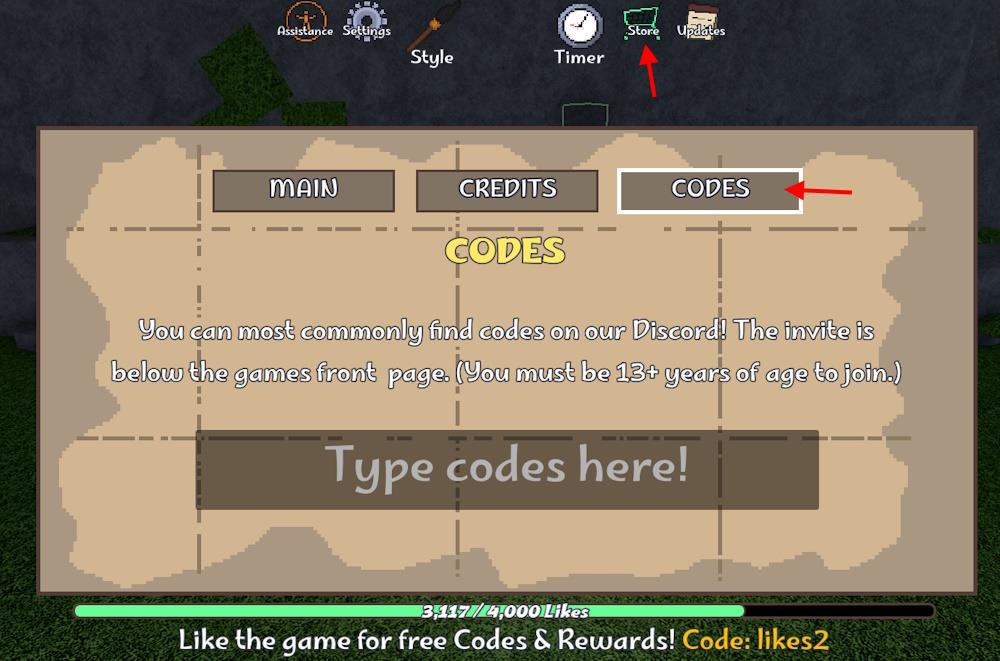
- Click the Store button from the top menu.
- Select the CODES button from the pop-up.
- Type a working code in the textbox.
- Click Enter on your keyboard and get rewards.
How to Get More Climbing Game Codes
Players can find new Climbing Game codes by following the game’s official Roblox page and checking its description for updates. Joining the developer’s Discord server or Roblox group often gives access to new code announcements and community events that share rewards. Social platforms like X (formerly Twitter) and YouTube channels covering Roblox content also post active codes shortly after release, so checking those regularly helps keep your list up to date.
Climbing and finding codes at the same time can be a risky job. If you still want to do it, find the new codes for Climbing Game on the official The Big Community Discord server. On the server, look for the ‘climbing-game’ channel to get the latest ones. However, hunting for the codes through all the messages will take away a lot of your game time. That’s where we come in.
In our code list, you will find all the latest freebies that you can grab. Just as you trust your climbing rope while scaling the mountains, you can trust our code list. Make sure to bookmark our page and revisit us regularly for a new one. If the codes are not working, ensure you are copying the codes directly from our list and pasting them in the required field. Moreover, you can restart the game and check if the code still works.
How to redeem codes step by step in Climbing Game Roblox
Redeeming codes in Roblox’s Climbing Game is straightforward and takes just a few seconds once you’re in-game.
Step-by-Step Guide
Follow these exact steps to claim rewards like cash or titles:
-
Launch Climbing Game on Roblox through the website, app, or client.
-
Locate the Store or Shop button at the top of your screen, typically near the timer or leaderboard icons.
-
Click Store to open the pop-up menu.
-
Switch to the Codes tab or submenu within the Store interface.
-
Enter a valid code (like dunes or likes7) exactly as listed into the “Type codes here!” text box.
-
Press Enter on your keyboard to submit and receive your reward instantly.
Troubleshooting Tips
Codes fail if expired, mistyped, or if group membership is required for certain ones like likes2. Copy-paste directly from lists to avoid errors, and restart the game if a valid code doesn’t work. Check the official Discord for the latest updates, as codes tie to milestones like visits or likes.
Open the in-game Store and find the Codes section
To open the in-game Store and find the Codes section in Roblox’s Climbing Game, start by launching the game and looking at the top of your screen.
Locate the Store Button
The Store (or Shop) button appears prominently at the top center or right side of the interface, often next to icons for leaderboards, timers, or settings.
Click it to open a pop-up or overlay menu-this works on PC, mobile, or console via Roblox.
Access the Codes Section
Once the Store opens, navigate to the Codes tab or submenu, typically a labeled button or toggle within the Store window.
Enter your code in the text field labeled “Type codes here!” or similar, then hit Enter to redeem.
If the tab isn’t immediately visible, ensure you’re fully loaded into a game session, as menus can take a moment to appear.
