Codes in Squid Evolution can turn an ordinary session into a rush of upgrades, surprises, and quick power gains. July 2025 brought a new batch of rewards that reshaped how players climb through each stage of squid evolution-don’t miss the secrets hidden behind these short strings of text.
To help you climb faster, we’ve gathered all the latest Squid Evolution codes that give you free potions to boost your EXP or Wins. Use them wisely, and you’ll rise to the top of the leaderboard in no time.
All New Squid Evolution Codes
The latest Squid Evolution codes for July 2025 bring players a fresh set of rewards, including rare upgrades and bonus coins to boost progress faster. These codes help you evolve your squid characters, strengthen abilities, and gain a competitive edge in each challenge. Make sure to redeem them before they expire, as new codes are often added during special events or game updates.
- I2PERFECT: Get x3 EXP Potions (NEW)
- Magia: Get x3 EXP Potions (NEW)
- Release: Get x1 Wins Potions (NEW)
Expired Squid Evolution Codes
There are no expired codes in this game yet, as the game is new on Roblox. So, get the freebies before a new update hits and the developers remove these codes. This list will be updated as any codes become inactive.
While you wait for additional codes, try similar games like Capybara Evolution or Brainrot Evolution. You can also play the top anime sports games on Roblox, like Volleyball Legends and Basketball Zero. Tired of the typical anime games? Check out our Roblox game codes master list to find your next adventure.
How to Redeem Squid Evolution Codes
To redeem Squid Evolution codes, open the game in Roblox and tap the Codes button on the main screen. A text box will appear-enter a working code exactly as shown and press Redeem to claim your rewards. If the code is active, the rewards will be added to your account right away. Double-check for spelling mistakes or extra spaces, as those can cause the code to fail.
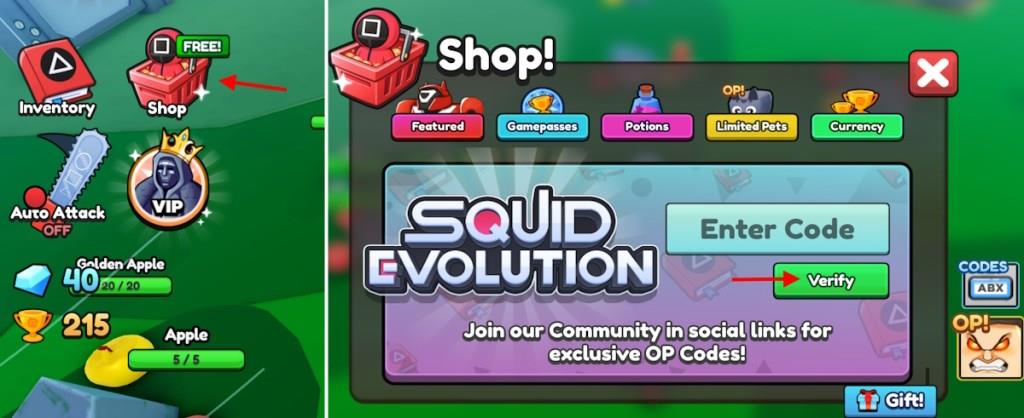
Even though surviving and getting stronger in this game is hard, redeeming the codes for Squid Evolution takes a few steps. Here is how to do it:
- Run Squid Evolution on Roblox.
- Click the Shop button from the left menu.
- Type a working code in the Enter Code area.
- Click the Verify button to get rewards.
How to Get More Squid Evolution Codes
Find the exact steps to redeem Squid Evolution Codes by checking official Roblox group announcements, following verified social channels, and watching for limited-time events. Keep an eye on the in-game News tab and community posts for fresh codes, then redeem them promptly before they expire.
Just like how hard it is to win the Squid Game, finding codes can be a whole chore, especially when you are trying to do it on your own. That is why we suggest you bookmark our page. We regularly check the official sources to find the working codes.
If you still want to grab the codes for Squid Evolution from the official sources, the official Discord server is the best option. When in the Squid Evolution Discord, you won’t find anything in the specific channels. But don’t worry; you can look for the pinned texts across the channels to find the latest codes.
How do I redeem codes in Squid Evolution step by step
To redeem codes in Squid Evolution on Roblox, follow these exact steps for quick rewards like EXP or Wins Potions.
Step-by-Step Guide
-
Launch Squid Evolution from the Roblox platform.
-
Locate and click the Shop button, typically on the left side of the screen or near the bottom right.
-
In the Shop menu, select the Codes button (may appear on the right side, as a notes icon, or by scrolling to the bottom).
-
Enter the code exactly as listed (case-sensitive; copy-paste to avoid errors) into the Enter Code text box.
-
Click Verify to claim your rewards instantly.
Troubleshooting Tips
Codes expire quickly, so redeem them promptly; if one fails, it may be invalid. Check the game’s Discord or Roblox group for the latest. Rewards apply automatically upon success.
How do I redeem codes in Squid Evolution step by step
To redeem codes in Squid Evolution on Roblox, launch the game and access the Shop menu for instant rewards like EXP or Wins Potions.
Step-by-Step Guide
-
Launch Squid Evolution on Roblox.
-
Click the Shop button, usually on the left side of the screen or bottom right (it may appear as a red icon).
-
In the Shop, select the Codes button (on the right, as a notes icon, or by scrolling down).
-
Enter the code exactly (case-sensitive; copy-paste recommended) into the Enter Code text box.
-
Click Verify to claim rewards immediately.
Troubleshooting Tips
Codes are case-sensitive and expire fast, so test promptly. If invalid, check for typos or the game’s Discord for updates. Rewards activate automatically on success.
