Grab the newest Gather Speed codes for July 2025 and boost your Roblox race with free coins and extra rewards before they disappear!
You can use coins to upgrade your acceleration and buy faster characters. Earning coins can be a hassle, so simply use Gather Speed codes from our list to obtain free coins. Use the coins to become the fastest on the server.
All New Gather Speed Codes
The latest Gather Speed codes for July 2025 give players a quick way to earn free coins and boosts that help progress faster in the game. Redeeming these codes can provide items that speed up runs, improve performance, and give an edge in races against friends. Keep an eye out for new codes, as they often appear with special updates and seasonal events.
- 100KGROUPMEMBERS: 300 Coins (NEW)
- 40KLIKES: 300 Coins (NEW)
- 85KGROUPMEMBERS: 350 Coins (NEW)
- 30KLIKES: 350 Coins (NEW)
Expired Gather Speed Codes
- 30KGROUPMEMBERS
- 10KLIKES
Flashing through interdimensional spaces with extreme speed is definitely fun. But why not try something a bit laid back for once? Check out Grow a Garden and Own a Fish Pond for some laid-back chill gameplay. However, if you still prefer something a bit more upbeat, then check out Blue Lock Rivals and Basketball Zero. To find more amazing games like this, check out our Roblox game codes list.
How to Redeem Gather Speed Codes
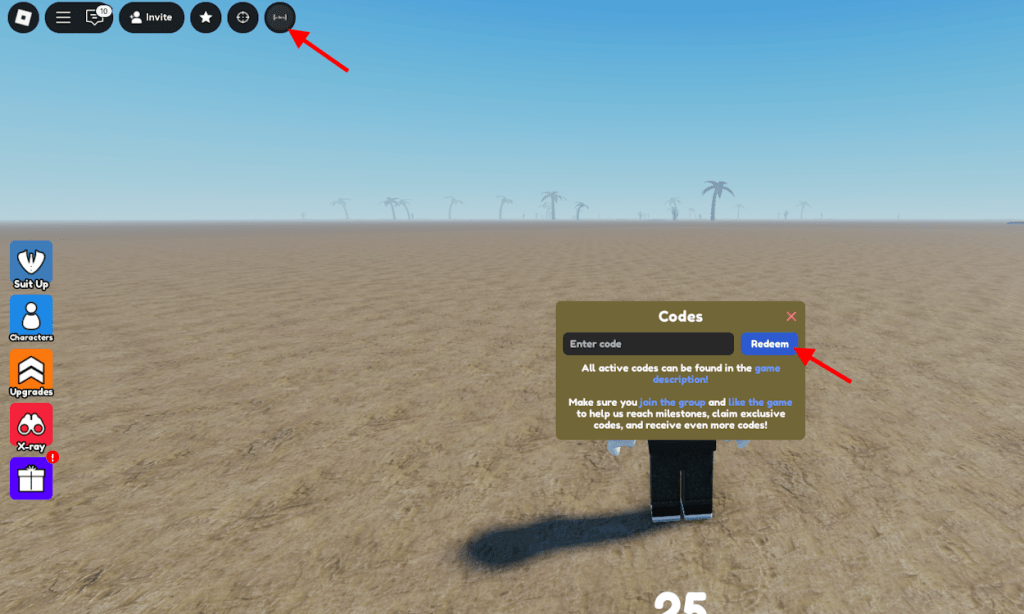
To redeem Gather Speed codes, open Roblox and launch the game. Once inside, tap the Twitter or Codes icon usually located on the main menu. Copy a code from the valid list, paste it into the text box, and press the Redeem button. If the code is active, the reward-such as coins or boosts-will appear in your account immediately. Make sure to enter the code exactly as shown, since typos can prevent it from working.
Before you can redeem the codes for Gather Speed, you need to join the TS Corporation Roblox group. Once you have joined the group, follow the steps below to claim the code rewards.
- Launch Gather Speed in the Roblox Launcher.
- Click on the Codes icon located at the top of the screen.
- Type the active code in the ‘Enter code’ section.
- Click Redeem or press Enter to claim the rewards.
How to Get More Gather Speed Codes
Players can find new Gather Speed codes by checking the game’s official Roblox page, following the developers on social media, or joining the official Discord server. Special codes are often released during updates, collaborations, or milestone celebrations. It’s a good idea to visit reliable fan sites and community forums regularly, as players often share newly released codes there before they expire.
The best place to find more codes for Gather Speed is right here. Simply bookmark this post to visit regularly to find the active codes. The game doesn’t have a social platform other than its Roblox group mentioned above, so the codes are added in the game’s description. This makes it very easy for players to miss out on the latest codes unless they are specifically searching for them.
How to redeem Gather Speed codes in Roblox
To redeem codes in Roblox’s Gather Speed game, first join the TS Corporation Roblox group, as it’s required for codes to work.
Redemption Steps
Follow these steps in order:
-
Launch Gather Speed via the Roblox player.
-
Locate the Codes, ABC, or OTHER button (typically top-left or left side of the screen).
-
Click it to open the code entry field.
-
Enter the code exactly (case-sensitive) and press Redeem or Enter.
Troubleshooting Tips
Codes may fail if not in the group, expired, or mistyped. Test recent ones like 270KGROUPMEMBERS from prior updates, and check the game’s page for new releases.
Join the TS Corporation Roblox group steps
TS Corporation is the required Roblox group for redeeming Gather Speed codes. Joining it is straightforward and often automatic for public groups like this one with over 300,000 members.
Join Steps
Follow these steps on Roblox website or app:
-
Log into your Roblox account and navigate to the Groups section via the left sidebar or top menu (three lines > Groups).
-
Search for “TS Corporation” in the search bar.
-
Click on the group page (direct link: roblox.com/communities/16792806/ts-corporation).
-
Click the blue “Join Group” button; approval is typically instant for open groups.
Verification
Return to Gather Speed after joining to confirm group membership shows in your profile. If codes still fail, recheck spelling or expiration.
