Trading pets and leveling up just got easier! Grab the latest Grow a Friend codes for July 2025 and boost your progress with free rewards before they expire.
Buy eggs and make them grow into your friends, and these ‘friends’ share the names of your actual Roblox friends. The game also features plot skins, so that you can decorate your ‘friend’ farm the way you want. Use Grow a Friend codes to get yourself free exclusive plot skins to liven up your farms.
All New Grow a Friend Codes
New Grow a Friend codes bring players a fresh set of rewards to boost progress and fun in the game. These codes can grant extra coins, pets, or power-ups, helping you level up faster and expand your collection. Be sure to redeem them as soon as possible, since many expire quickly and new ones often appear with game updates or special events.
- UPD3: 1 Summer Egg (NEW)
- UPD2: Swamp Plot Skin
- 1MVISITS: Pastel Plot Skin
Expired Grow a Friend Codes
- SOLAR FLARE
Growing games have flooded Roblox, so you are bound to get tired of it eventually. To get free of the boredom of growing games, why not delve into something exciting? Try out Blue Lock Rivals or Volleyball Legends for fast-paced sports action. Other than that, check out Anime Last Stand and Mugen for some classic close combat action. Also, take a look at our Roblox game codes list to find out more amazing games.
How to Redeem Grow a Friend Codes
Redeem Grow a Friend codes by opening Roblox, selecting Grow a Friend from the menu, and entering the code exactly as shown. Tap Redeem to apply the bonus to your account.
Making friends may not be easy, but redeeming the codes for Grow a Friend is as simple as it gets. Here is how you can do it:
- Launch Grow a Friend in the Roblox Launcher.
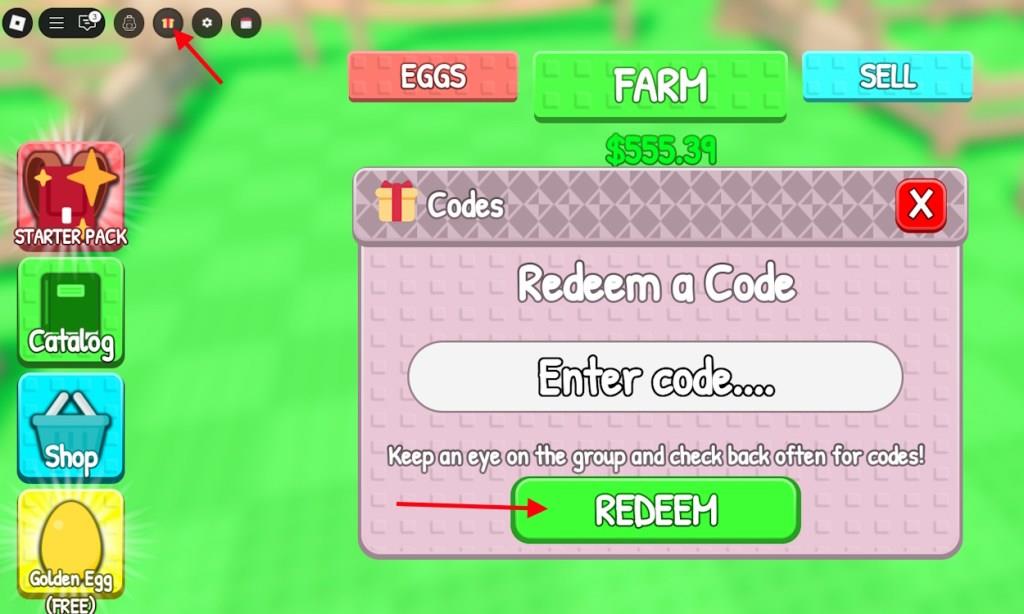
- Click on the Gift icon on the top left part of the screen.
- Write the active code in the ‘Enter code…’ section.
- Click Redeem to claim the rewards.
How to Get More Grow a Friend Codes
Players can get more Grow a Friend codes by following the game’s official Roblox page and joining the developer’s social media channels, such as Twitter, Discord, or YouTube. Developers often post new codes during updates, events, or celebrations, so keeping notifications on helps you grab them quickly. Checking community groups or fan pages is also a good way to find shared codes that may not appear in official announcements.
If you want to stay updated on the latest Grow a Friend updates, then join the Wunmo Discord server. Here you will find all the latest updates on the game, while also staying connected to other players in the community. This is also a great place to spot newly released codes. However, the Discord server includes notifications of multiple games, so finding codes for Grow a Friend can become hard unless you pay attention.
So, instead of wasting your time, why not let us search for the codes instead? We take great pride in updating our code list regularly and being the first responder when a code is released. Simply bookmark this post and revisit when you want some free rewards to find the latest active codes.
How do I redeem codes step by step in Grow a Friend
Redeeming codes in Grow a Friend on Roblox is straightforward and quick once you’re in the game. Follow these steps carefully to claim free rewards like incubators, eggs, and cash without issues.
Step-by-Step Guide
-
Launch Grow a Friend through the Roblox platform on your device.
-
Locate the Gift icon (often a yellow-and-red ribboned present or codes button) in the top-left corner of the screen.
-
Click or tap the icon to open the code redemption window, which includes an “Enter code…” text field and a green Redeem button.
-
Copy and paste a valid code exactly as listed (codes are case-sensitive) into the text field.
-
Press the Redeem button to claim your rewards instantly-a confirmation notification will appear if successful.
Tips for Success
Codes may expire with game updates, so test them promptly and check official sources like the game’s Discord for the latest. Avoid manual typing to prevent errors, and ensure you’ve completed any initial tutorial for UI access.
Open Grow a Friend and show where the Gift icon is located
In Grow a Friend on Roblox, the Gift icon for redeeming codes is located in the top-left corner of the screen. This button, often styled as a present with a ribbon, stands out among other UI options once the game loads.
Visual Location
The top-left area typically includes player stats, cash counters, and the prominent Gift icon-look for the yellow-and-red ribboned gift symbol right after spawning into your plot.
Clicking it reveals the code input field and green Redeem button below.
Quick Access Tips
Once open, the redemption menu overlays the screen without obstructing gameplay.
If the UI feels cluttered, complete the brief tutorial first, as it highlights core buttons including the codes area.