Dive into July 2025’s Own a Fish Pond guides and uncover Roblox codes that turn a simple pond into a splash of fortune.
But finding the rarest fish can come down to luck and a ton of money, unless you use codes. Use Own a Fish Pond codes from our list to obtain free rare buckets that reward rare fish eggs and a ton a money. The more money you make from these freebies, the faster you level up in the game.
All New Own a Fish Pond Codes
Keep your aquarium thriving with the latest Own a Fish Pond codes released in July 2025. These new codes provide useful in-game rewards such as coins, decorations, and resources that help expand your pond faster. Make sure to redeem them before they expire to get the most out of your fish-raising experience and customize your pond just the way you like.
- SUMMERSEASON: 1 Axolotl Pack (NEW)
- WELOVEPOND: 1 Salamander (NEW)
- DEEPSEA: 1 Deep Sea Bucket
Expired Own a Fish Pond Codes
Currently, there are no expired codes in this Roblox Experience. After the above codes expire, they will be moved to this section.
Growing your own fish is fun, but it doesn’t compare to the joy of catching them. Try out Fisch or My Fishing Pier, which are among the best fishing games on Roblox. If you are bored with too many fish, check out Grow a Garden or Build an Island for similar mechanics but in a different environment. Not your cup of tea? Check out our Roblox game codes list to find something that suits you better.
How to Redeem Own a Fish Pond Codes
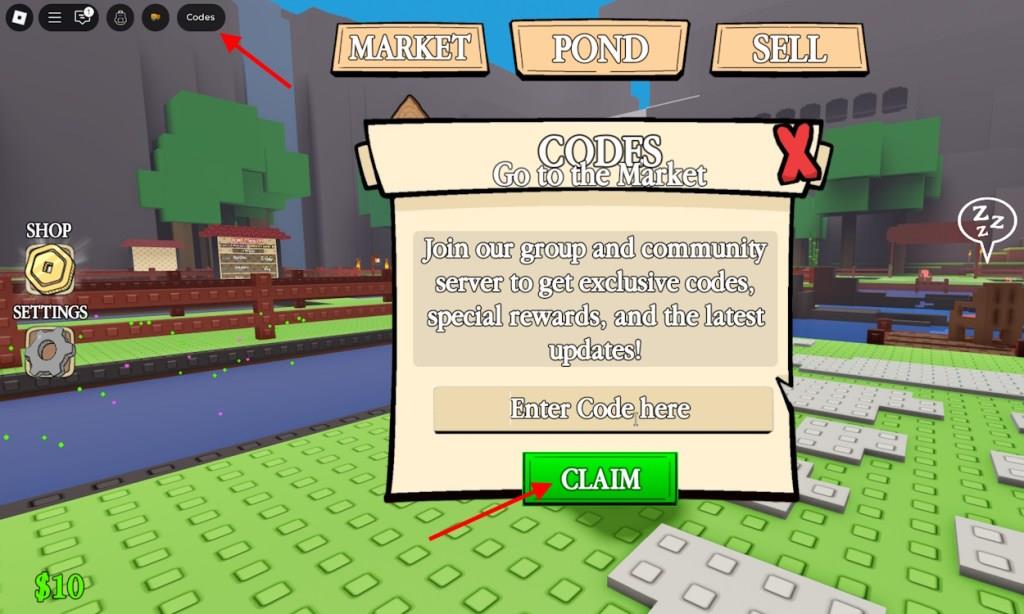
To redeem codes in Own a Fish Pond, launch the game on Roblox and click on the Menu button, usually found on the side of the screen. Select the Codes option from the list, then enter the code exactly as shown, including any capital letters or symbols. Press Redeem to confirm, and the rewards will be added to your account immediately. If a code doesn’t work, it may have expired or been entered incorrectly, so double-check it before trying again.
Growing a fish takes time, but redeeming the codes for Own a Fish Pond is as simple as it gets. Here is how you can do it:
- Launch Own a Fish Pond in the Roblox Launcher.
- Click on the Codes option in the top left of the screen.
- Type the active code in the ‘Enter Code Here’ section.
- Click the Claim button to get the rewards.
How to Get More Own a Fish Pond Codes
Players can often find new Own a Fish Pond codes through the game’s official Roblox page, social media accounts, or community Discord server. Developers frequently share fresh codes during updates, milestones, or special events. Checking these sources regularly and following the creators on platforms like X (Twitter) helps you grab new rewards before they expire.
If you want to stay updated on the latest codes for Own a Fish Pond, then all you need to do is bookmark our post. We constantly scour the game’s social media and communities for new codes. I can assure you that this list is the best place to find Own a Fish Pond codes, so spare yourself the hassle and simply let us help you out.
But, if you prefer searching the codes by yourself, here is how you can do it. First, join the Own a Fish Pond Discord server. The codes are often added in the ‘announcement’ and ‘update’ channels, so keep your eye on them. Next, follow @ClarkonpRBLX on X and Block Stud Studios to be notified of the latest updates.
Which active codes give the best rewards right now
It is not possible to say which codes give the “best” rewards right now without knowing which specific game you mean and checking a live, up-to-date code list.
Why a precise answer is not possible
-
Different games (Roblox titles, Genshin Impact, Pokémon GO, etc.) each have their own active codes and reward structures, and “best” depends on whether you value currency, boosts, or cosmetics.
-
The set of working codes changes frequently as new ones are added and old ones expire, so any fixed list becomes outdated very quickly.
How to find the best current codes
-
Search for your specific game plus “active codes January 2026” and sort by the most recent update date to ensure the codes still work. Many gaming and guide sites maintain rolling “active code” pages for popular games.
-
Within that list, prioritize codes that give:
-
Premium currency (e.g., primogems, crystals, gems)
-
Large bundles of in-game currency or high-rarity items
-
Time-limited or exclusive cosmetics (skins, outfits, avatars)
-
If you tell which exact game you mean (for example, “Own a Fish Pond” on Roblox, Genshin Impact, etc.), it is possible to explain how to judge which of that game’s currently listed codes are the highest value (for example, by comparing the amount of premium currency or rarity of items they give).
How to redeem Pokemon Go promo codes step by step
Pokemon Go promo codes are redeemed via the official web store, not directly in the app, using the same login credentials as your game account. This process works on both iOS and Android devices as of January 2026.
Step-by-Step Redemption
-
Open a web browser (like Chrome or Safari) on your phone or computer and go to pokemongo.com or directly to the offer redemption page at store.pokemongo.com/offer-redemption.
-
Log in with the exact same account you use for Pokemon Go (Google, Apple, Facebook, PTC, or Niantic Kids).
-
Enter the promo code exactly as provided (case-sensitive) in the redemption field and click “Redeem” or “Apply”.
-
Open the Pokemon Go app (restart if already running); rewards like Poke Balls, Potions, or items appear automatically in your inventory with a confirmation message.
Key Tips
-
Codes from events, partners, or social media often expire quickly, so redeem immediately.
-
No in-app redemption option exists anymore; always use the web store.
-
For Twitch-linked codes, first claim the drop on rewards.pokemon.com, then redeem here.
