Roblox players chasing faster growth in Grow a Business will love the July 2025 codes-fresh boosts, rare rewards, and secret perks that can turn a small shop into a booming empire.
To make your journey a bit easier, use Grow a Business codes from our list to obtain free cash and other useful rewards. Using these rewards, you can become the ultimate business tycoon and enjoy a richer virtual life!
All New Grow a Business Codes
Stay ahead in Grow a Business with the newest codes that bring you extra cash, boosts, and exclusive perks. These fresh additions can help speed up your progress and make growing your virtual company smoother and more exciting. Check them out regularly, as codes often change and new rewards can appear at any time.
- SorryDelays: Get Free Cash (NEW)
- Fixes: Get Free Cash (NEW)
- fixes!!: Get 500 Cash
- NewUpd!: Get 500 Cash
Expired Grow a Business Codes
Currently, there are no expired codes in this game. Once the above codes expire, they will be moved to this section.
Growing a business definitely sounds fun, but how about trying to grow other things on Roblox? Try Grow a Garden or Grow Crystals to get a slightly different experience with equal fun. Too bored to grow stuff? Check out our Roblox game codes list and find yourself a thrilling action game like Anime Last Stand or Jump Stars.
How to Redeem Grow a Business Codes
To redeem Grow a Business codes, open Roblox and launch the game. Once inside, tap the Twitter or Codes icon on the main screen. A code redemption box will appear-enter your active code exactly as shown, including capitalization. Press the redeem button to claim your in-game rewards instantly. If a code does not work, double-check for typing errors or verify that it has not expired.
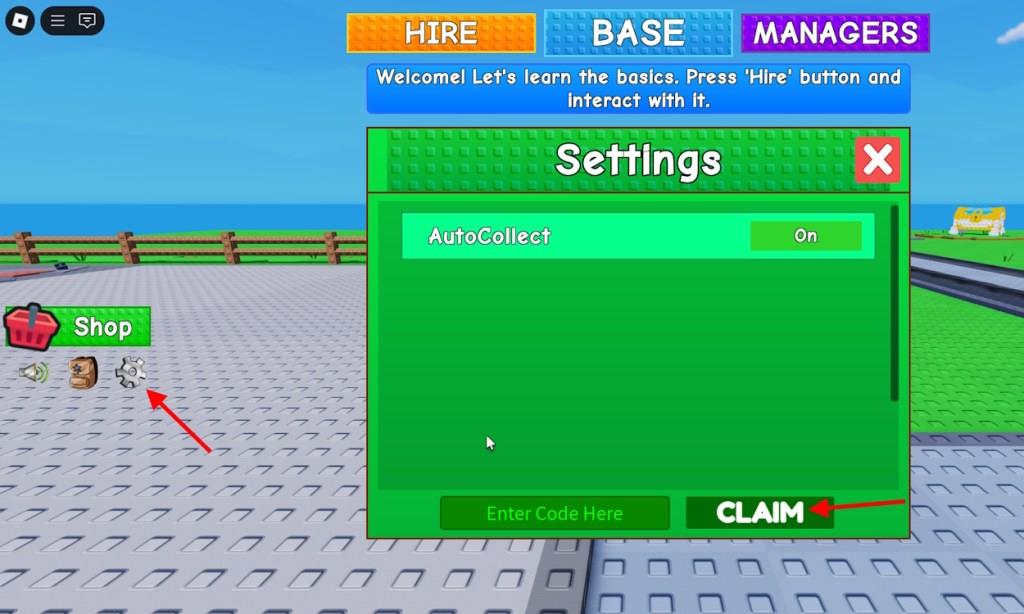
Growing a Business can be challenging, but earning free rewards in the game is relatively easy. To redeem the codes for Grow a Business, follow the simple steps below:
- Launch Grow a Business in the Roblox Launcher.
- Click on the Gear icon on the left side of the screen.
- Type the active code in the ‘Enter Code Here’ section.
- Click Claim to get the rewards.
Where to Find More Grow a Business Codes
You can find more Grow a Business codes by checking the game’s official Roblox page, following the developer’s social media accounts, and joining their community Discord server. Many players also share new and active codes on Reddit or Roblox-related forums shortly after updates. It’s a good idea to bookmark reliable fan sites that frequently post fresh codes and verify which ones are still working.
If you are looking for more codes for this fun Roblox experience, then don’t bother, as we have already added all the currently active codes above. This is the best place to find codes for Grow a Business, as we regularly update the list after scouring the game’s social platforms. Simply bookmark our post and come back when you want a freebie.
But, if you don’t trust as and would rather go through the hassle of searching for codes yourself, here is what you need to do. First, join the Grow a Business Discord server and keep your eyes on all the announcements. Next, you can join the Design Wood Roblox community to get notified of the upcoming events.
How to redeem codes in Grow a Business step by step
Redeeming Codes in Grow a Business
Redeem codes in Grow a Business on Roblox through the in-game settings menu for quick rewards like cash. Follow these steps exactly as confirmed across multiple guides.
Step-by-Step Guide
-
Launch Grow a Business via the Roblox platform on PC, mobile, or tablet.
-
Locate the gear icon (settings cog) on the left sidebar of the screen, typically below the shop button.
-
Click the gear icon to open the settings menu.
-
Find the “Enter Code Here” text field in the menu.
-
Type or paste a valid code exactly as listed (codes are case-sensitive).
-
Press the green “Claim” button to instantly receive rewards if active.
Troubleshooting Tips
Rewards appear immediately upon success; no further action needed. If “invalid” appears, double-check spelling, ensure no spaces, or verify the code hasn’t expired-try again later for server issues. Codes limit once per account, so redeem promptly from official sources like Discord.
What rewards do BugFixes!! and Fusion! codes give
Rewards for BugFixes!! and Fusion! Codes
The BugFixes!! code in Grow a Business on Roblox rewards 250k Cash, added as compensation for recent bug fixes in mid-2025 updates. The Fusion! code provides 500 Cash, tied to a fusion feature or update around June-July 2025, though it may have expired by late 2025.
Verification Notes
These rewards come from code lists tested in July 2025 and later; cash helps buy employees or upgrades faster. Always test in-game via the settings gear icon, as expiration varies by server and developer announcements. Check Discord for current status since January 2026 lists show similar past rewards.