Mysterious new Anime Infinity codes are stirring up July 2025, giving Roblox players fresh ways to strengthen their towers and climb the leaderboards in this fast-paced anime defense adventure.
As you progress and get better units with insane passives, you can alter their traits or link them with other Mythical units to form a powerful defense. So, here are some active Anime Infinity codes that will help you obtain free gems, trait shards, and infinity tickets to make your journey easier and progress in the game quickly. Just use the gems to pull better units or utilize the shards to get some insane traits for your favorite anime characters.
All New Anime Infinity Codes
Explore tips, tricks, and updates for Anime Infinity Codes in July 2025, focusing on how to maximize rewards, redeemables, and progress in this Roblox tower defense title.
- SorryForWeirdBugs: 10x Trait Shards, 10x Stat Rerolls, and 1.25k Gems (NEW)
- StopBeggingPLEASE: 10x Trait Shards, 10x Stat Rerolls, and 1.25k Gems (NEW)
- Update1!: 10x Trait Shards, 10x Stat Rerolls, and 1.25k Gems (NEW)
- IWantToSleepHelp: 10x Trait Shards, 10x Stat Rerolls, and 1.25k Gems
- SryForLongMaintenance!: 10x Trait Shards, 10x Stat Rerolls, and 1.25k Gems
- Update1!: 10x Trait Shards, 10x Stat Rerolls, and 1.25k Gems
- 1MilVisits!: 10x Trait Shards, 10x Stat Rerolls, and 1.25k Gems
- 5KFav!: 5x Trait Shards and 1000 Gems
- 10KLikes!: 5x Trait Shards and 1000 Gems
- 500KVisits!: 10x Trait Shards and 1500 Gems
- SryForShutdown!: 10x Trait Shards
- Update0.5!: 1000 Gems, 5x Stat Rerolls, 5x Trait Shards and 3x Infinity Tickets
- 5KLikes!: 750x Gems, and 5x Trait Shards
- SryForLongMaintenance: 5x Stat Rerolls and 5x Trait Shards
- 200KVisits!: 10x Trait Shards and 2x Infinity Tickets
- 1KFavorite!: 750x Gems
- 1KLikes!: 10x Trait Shards and 5x Infinity Tickets
- SHINY!: 3x Infinity Tickets, 1000x Gems, and 5x Trait Shards
- Release!: 500x Gems
Expired Anime Infinity Codes
As of now, there are no expired codes for the game, and this is when you should jump right in and redeem the available rewards.
If you want to explore more such tower defense games, try playing Anime Vanguards, Anime World Tower Defense, and Anime Rangers X. However, to get a taste of something unique and fresh, you can check out our Roblox game codes master list to find all that is best on this platform.
How to Redeem Anime Infinity Codes
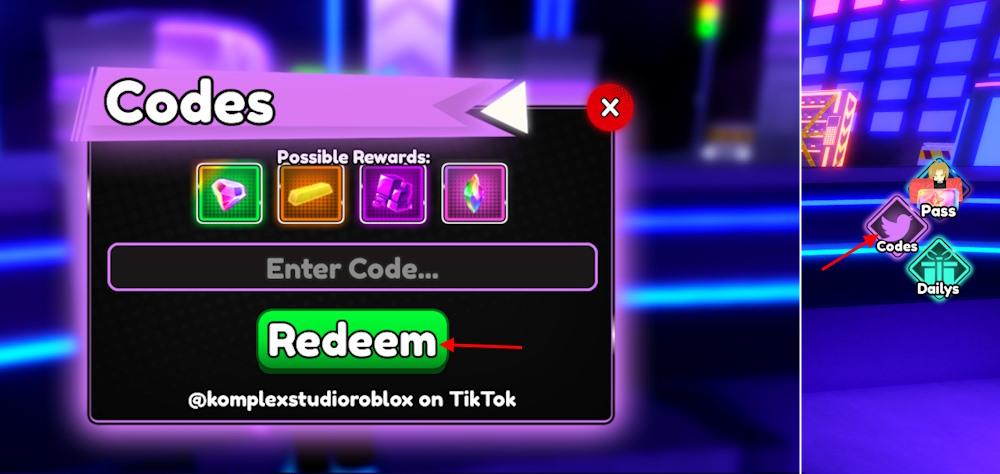
To redeem Anime Infinity codes, open Roblox and launch the game. Tap the menu icon on the side of the screen, then find and select the “Codes” option. A text box will appear where you can type or paste the code you want to use. After entering the code, press the confirm button to claim your reward instantly. If the code is valid, the rewards will appear in your account right away.
So, are you ready to unlock some superior characters with the free gems? Then, follow the given steps to redeem the codes for Anime Infinity:
- Launch Anime Infinity on your Roblox app.
- Click on the Codes icon on the right side of the screen.
- Input a working code in the Enter Code text box.
- Click on the Redeem button to get all your rewards.
How to Get More Anime Infinity Codes
Players can find more Anime Infinity codes by following the game’s official Roblox page, joining the developer’s Discord server, and checking their social media accounts for updates. New codes often appear during milestone celebrations, game updates, or special events. It’s also helpful to bookmark trusted gaming sites that frequently post the latest working codes to avoid missing limited-time rewards.
We know that searching up codes all by yourself is a tough task, and you don’t want to miss out on any new rewards because you didn’t have the time to look them up. Hence, we recommend that you bookmark this page, so that you always stay updated by a simple click of your mouse button
However, if you want to leave the hunting part for yourself, try joining the official Anime Infinity Discord server. Here you can keep an eye on the ‘codes‘ channel to get the list of all new codes in the game. Finally, you can join the official Komplex Studio community on Roblox to get access to all sorts of game news.
How to redeem codes in Anime Infinity on mobile
Redeeming codes in Anime Infinity on mobile follows the same straightforward process as on PC or tablet, since it’s a Roblox game accessible via the Roblox mobile app.
Steps to Redeem
Launch the Roblox app on your mobile device and join Anime Infinity. Tap the Codes button (often a Twitter bird icon) on the right side of the screen to open the redemption menu. Enter the code exactly as listed (case-sensitive) into the text box, then tap Redeem to claim rewards like Gems or Trait Shards.
Mobile Troubleshooting
Ensure the Roblox app is updated, as older versions may hide the button-restart the app or game if it doesn’t appear. Copy-paste codes to avoid typos, and confirm you’re in a supported server (some rewards limit to new servers). If issues persist, check the game’s Discord for mobile-specific updates.
Where is the Codes button located in the mobile UI
In Anime Infinity on mobile, the Codes button appears as a Twitter bird icon (now X logo in some updates) on the right side of the screen, typically in the vertical menu bar alongside other icons like settings or shop.
Finding the Button
Scroll or zoom out in the lobby if the UI feels cluttered-it’s positioned near the top or middle-right of the main interface, separate from the tower placement area. Tap it directly to open the code entry field; no menu diving required on mobile.
Visibility Tips
The button only shows once fully loaded into a server, so rejoin if missing. On smaller screens, enable full-screen mode in Roblox settings to avoid overlap with chat or notifications.
