Sneak through the Roblox chaos with fresh Steal a Capybara codes for July 2025-grab rewards, boost your mischief, and outsmart rival players before the next update changes the game.
But then there’s Steal a Capybara, and let’s just say, it had me at “capybara.” I’ve got a soft spot for weird and chaotic games, and if you throw in a capybara, I’m all in. So of course, I dove right in to swipe capybaras and build my own furry empire. If you’re just as curious (or mildly obsessed), here are the latest Steal a Capybara codes that’ll get you free cash, cosmetic trails, and maybe even a legendary capybara. Make more money using these freebies and create the biggest capybara empire.
All New Steal a Capybara Codes
Check the latest codes for Steal a Capybara, updated for July 2025. Redeem them now to claim free boosts, pets, and cash in this Roblox hit. Active codes include CAPYBARA2025 for 500 cash, STEALBOOST for double steals, and FREEPET for a rare capybara companion. Paste each code into the in-game menu exactly as shown, then hit redeem before they expire. New ones drop monthly, so return often.
- 20MilVisits: 20k Cash (NEW)
- SquidGame: 456 Seconds Base Lock (NEW)
- 100kMembers: 100 Seconds Base Lock
- 30kLikes: 30 Seconds Base Lock
- LABUBU: 5k Cash
- 10MVisits: 10k Cash
- Visits: Get x2.5k Cash
- Like: Get a Ghost Capybara
Expired Steal a Capybara Codes
Currently, there are no expired codes in this experience. Once any of the above codes expire, they will be moved to this section.
If stealing stuff from others has hit you hard enough, I suggest you try some chill experiences like Grow a Garden, Bubble Gum Simulator Infinity, or Yard Sale. However, if you love action and do not want that rush to leave your soul, Jujutsu Infinite, Blue Lock Rivals, and Blox Fruits will be perfect experiences. For players seeking options, we have prepared a master list of Roblox game codes for you.
How to Redeem Steal a Capybara Codes
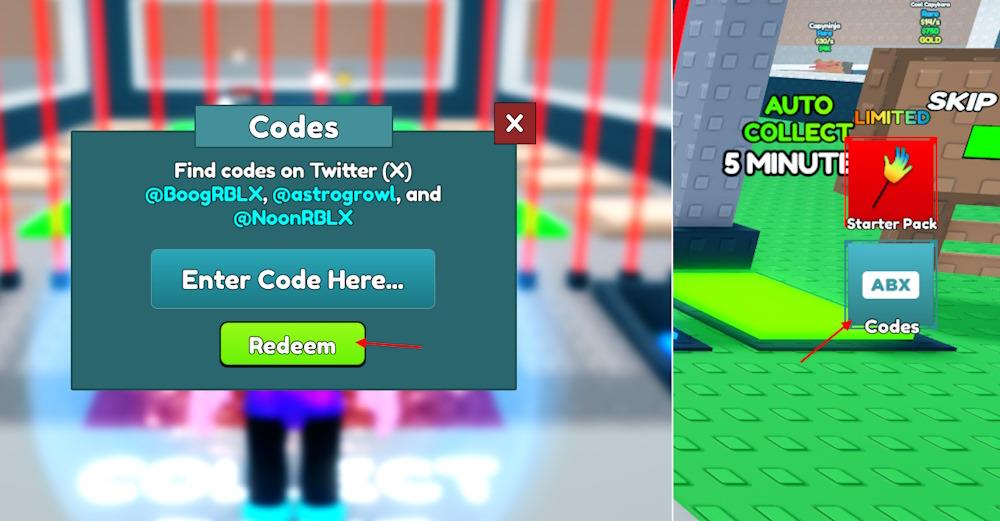
To redeem Steal a Capybara codes, launch the game on Roblox and wait for it to load fully. Then, locate the Twitter or Codes button on the main screen and click it to open the redemption menu. Copy a valid code from the list of active ones, paste it into the input box, and press the confirm or redeem button. If the code is active, your rewards-such as coins or special items-will be added to your account automatically.
Stealing a capybara can be hard in this game, but redeeming the codes for freebies is simple. Follow this step-by-step guide and redeem the codes for Steal a Capybara:
- Run Steal a Capybara on Roblox.
- Click the Codes (ABX) button on the right menu.
- Type a working code in the pop-up box.
- Click the Redeem button to claim your reward.
Where to Find More Steal a Capybara Codes
You can find new Steal a Capybara codes on the game’s official Roblox page, developer’s social media accounts, and community Discord server. Players often share fresh codes through Reddit threads and fan groups dedicated to the game. It’s a good idea to check these sources regularly, as many codes are released during updates or seasonal events and can expire after a short period.
Finding the codes can be tricky since there are only a few official places where they’re all listed. But that’s where we come in. Our list is updated regularly with the latest working codes for Steal a Capybara. We also remove any expired ones, so you don’t waste time on duds. Bookmark this page and check back often to stay ahead with fresh codes for this Roblox game!
Want to hunt down the codes by yourself? Your best bet for finding the working ones is by joining the official Steal a Capybara Discord. On the server, keep an eye on the ‘announcements’ and ‘codes’ channels. The developers share new codes whenever a new update drops or the game reaches a milestone.
How to redeem codes step by step in Steal a Capybara
To redeem codes in Steal a Capybara, follow these steps in order.
Step-by-step redeem guide
-
Open the game
-
Launch Roblox and start Steal a Capybara from your experiences list or the game page.
-
-
Find the Codes button
-
Look to the right side of your screen for the big blue Codes / ABX button.
-
Click this button to open the code redemption window.
-
-
Enter your code
-
In the pop-up, click the text field that says “Enter Code Here”.
-
Carefully type or paste a working code exactly as shown (codes are case-sensitive).
-
-
Redeem the code
-
Press the Redeem button (green button) under the text box.
-
If the code is valid, your cash, base lock time, or capybara reward is added automatically.
-
-
Fix common problems
-
If you see a message like “This code has expired or does not exist,” it usually means the code is expired or typed incorrectly.
-
Try copy-paste from a trusted codes list and make sure there are no extra spaces before or after the code.
-
Open Steal a Capybara and show me the Codes button location
The Codes button in Steal a Capybara is on the right side of your in-game screen, not in a separate menu.
Where the Codes button is
-
While you are inside the game (actually spawned in, not on the Roblox game page), look at the right edge of your screen. The Codes button is a big blue button labeled “Codes” or “Codes (ABX)”, usually under other right-side UI icons.
-
When you click that button, a small window pops up in the center of the screen with a text box labeled “Enter Code Here” and a Redeem button below it.
How to see it clearly
-
Make sure you zoom out a bit (scroll wheel) so the full right UI bar is visible; on very zoomed-in or mobile layouts, part of the right side can be hidden behind notches or chat.
-
On mobile, tilt your device to landscape and look again at the right side; the Codes button stays in the same general position on the right edge.
