Cleaning up your garden mutations just got easier – the Cleaning Spray in Grow a Garden isn’t just another tool, it’s your key to keeping plants healthy and experiments under control. Here’s how to get it, use it, and master its surprising powers in Roblox’s gardening simulator.
Not only does it let you clear mutations, but it’s also a key ingredient in some crafting recipes. So, if you’re trying to get your hands on one, here’s how to find and use the Cleaning Spray in Grow a Garden.
How to Get Cleaning Spray in Grow a Garden
Cleaning Spray in Grow a Garden can be obtained by purchasing it from the in-game shop using coins or gems, depending on the version you are playing. After opening the store menu, go to the “Tools” section and scroll until you find the Cleaning Spray icon. Once bought, it will appear in your inventory and can be equipped for use on plants affected by mutations. You may need to level up your garden or complete small quests before it becomes available for purchase.
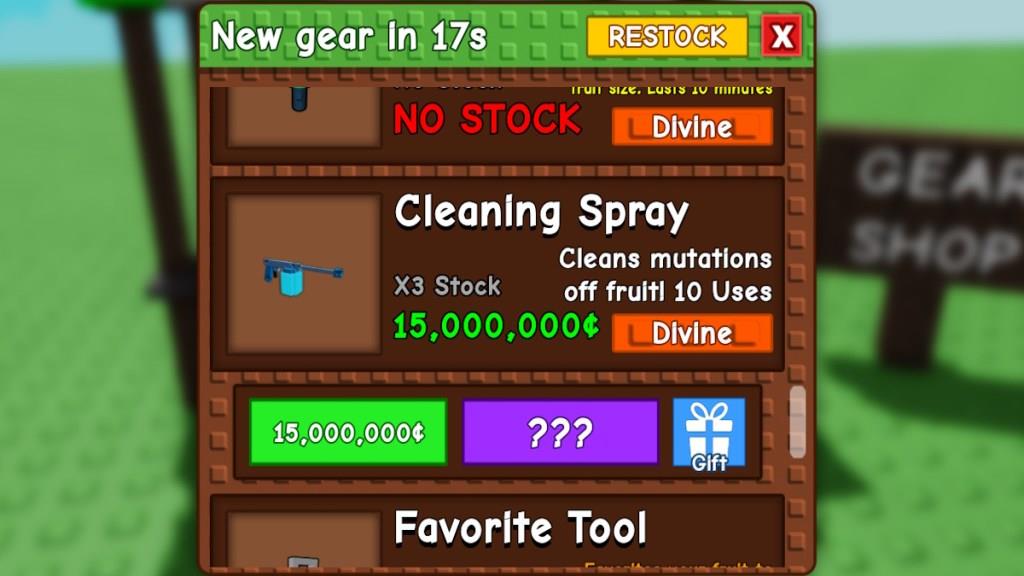
You can purchase the Cleaning Spray at the Gear Shop in Grow a Garden.
To buy it, head to the Gear shop and interact with the Eloise NPC. Then, ask her to show the gear catalogue by selecting the first dialogue option. Once the gear shop opens, scroll down to find the Cleaning Spray, which you can buy for 15 million Sheckles. If it’s not in stock, you can spend a modest 139 Robux to buy this gear with real-life money.
Also Read: How to Get Free Cooked Owl Pet in Grow a Garden
Keep in mind that the Cleaning Spray is a Divine Grow a Garden gear, but in our testing, it’s usually available in stock like the Favorite Tool. This new gear is extremely overpriced, considering it is an optional purchase. Spending 1.5 million Sheckles per use to remove a mutation from a single crop feels a bit ridiculous.
How to Use Cleaning Spray in Grow a Garden
Cleaning Spray is used to remove unwanted mutations from plants in Grow a Garden. Open your inventory, select the spray, and aim it at the mutated plant. Click or tap to apply it, and the mutation will disappear, restoring the plant to its normal state. Use the spray carefully, as it can be limited in quantity and may require collection or purchase before use.
| Cleaning Spray | Value |
|---|---|
| Image |
|
| Purchase Value | 15,000,000 Sheckles or 139 Robux |
| Effects | Removes all mutations from a crop. Used in the Mutation Spray Gun recipe. |
| Uses | 10 times |
Now that you have purchased the Cleaning Spray, using it to remove mutations in Grow a Garden is pretty simple. Here is how the Cleaning Spray works:
- Click the backpack icon on the top left of your screen, or press the ~ (tilde) icon.
- Search for the Cleaning Spray and select the tool to equip it in your hand.
- Go near the crop you want to use it on and hover your cursor over it. If you are using a mobile device, you can just tap the crop.
- Using the Cleaning Spray will instantly remove all mutations from the crop.

At this point, it’s important to mention that the Cleaning Spray only removes mutations in Grow a Garden. It does not remove gold or rainbow fruit variations. This means the price won’t drop significantly when you remove mutations.
Should You Get Cleaning Spray in Grow a Garden?
Cleaning Spray in Grow a Garden is a handy tool that helps remove unwanted mutations from your plants. If your crops start showing strange traits or colors that affect their growth, the spray can restore them to normal. While it’s not required for progress, owning one makes garden maintenance easier and keeps your plants healthy. Players trying to build a clean and high-yield garden will benefit from getting and learning to use it properly.
Absolutely not. Yes, that is the short and sweet answer. In a game where you are supposed to raise your plant’s value, removing mutations seems quite unnecessary. However, this item is required at the new crafting table, as you can make Mutation Spray Guns using this new gear.
So, if you are purchasing the gear for crafting recipe purposes, it is an important item. Using the spray guns, you can get the following mutation sprays in the Grow a Garden:
- Choc mutation spray,
- Shocked mutation spray, and
- Pollinated mutation spray.
That said, if you want to waste your Sheckels in the game, I suggest you collect more Harvest Tools instead. At least that will help you collect crops faster.
Where is the Gear Shop NPC Eloise located in Grow a Garden
Eloise, the Gear Shop NPC in Roblox’s Grow a Garden, stands at the Gear Shop on the main hub island.
Exact Location
The Gear Shop with Eloise is at one end of the central spawn platform, opposite the Seed Shop and Sell Stuff stalls.
Look for the stall with a green-and-white striped canopy between the Pet Eggs Shop and Cosmetics/Crafting stalls; a “Gear Shop” sign appears as you approach.
She has blonde hair, wears a cowboy-style leather hat with a star ribbon, and a dark blue sleeveless shirt with overalls.
How to Interact
Walk up to Eloise and press E (or tap on mobile) to talk to her and open the gear catalog.
The shop stock rotates every 5 minutes with random gears like Cleaning Spray (15M Sheckles).
New players may need to grow/sell a few crops (e.g., carrots), rejoin the server, and repeat until the shop unlocks.
How to buy gears from Eloise in Grow a Garden
To buy gears from Eloise in Grow a Garden, approach her at the Gear Shop on the main hub island and interact to open her catalog.
Step-by-Step Purchase Process
Walk up to Eloise, the blonde NPC with a cowboy hat under the green-and-white striped canopy between Pet Eggs and Cosmetics stalls.
Press E (or tap on mobile) and select “Show me the gear shop” to view rotating stock of 17 gears like Cleaning Spray, sprinklers, or trowels.
Choose an item in stock, confirm purchase with Sheckles (e.g., 15M for Cleaning Spray, 50k for Watering Can), or use Robux if out of stock (e.g., 79-139 Robux).
Stock and Refresh Tips
Stock is identical across servers and refreshes automatically every 5 minutes with random rarity-based items.
Server-hop or wait doesn’t change it; spend 79 Robux for instant refresh if urgent, but it’s rarely worth it early-game.
New players unlock the full shop by growing/selling a few crops (like carrots), rejoining until it appears.
Equipping After Purchase
Gears auto-go to your backpack; click the backpack icon or press ~ to equip and hold them for use on plants.
Each has limited uses (e.g., Cleaning Spray: 10) or timers (e.g., sprinklers: 5 minutes); stack multiples if needed.
